AI for Project Management in 2026: Tools, Use Cases and Best Practices
AI is good at some parts of project management and unreliable at others. It can turn messy input into structured tasks, draft plans and reports, track deadlines, flag slippage, and keep stakeholders updated. But estimates and priorities still need human judgment.
The difference shows up in delivery. PMI found that organizations leading in AI adoption delivered 61% of projects on time, compared with 47% for those lagging behind. That doesn't mean AI is making better decisions than experienced PMs. It means it can remove much of the administrative work that slows projects down.
In this guide, we’ll look at where AI actually helps project managers, which tasks are worth automating, and the best AI project management tools for each job. The focus is on work with clear, verifiable outputs, where AI can save time without replacing the judgment that still belongs to the PM.
What do AI project management tools actually do?
Most AI project management tools do four things: turn conversations into work, keep the plan current, explain what’s happening, and chase what’s stuck. Almost every AI feature inside a project platform fits into one of those buckets.
- Turn conversations into work: Task automation takes a meeting transcript, Slack thread, or rough brief and turns it into tasks with owners and deadlines. It can also update statuses and follow up when updates are missing.
- Keep the plan current: Planning and scheduling turns a brief into a project plan, suggests dependencies, and reshuffles the timeline when something slips. It saves the manual rebuild, but the PM still decides whether the new plan makes sense.
- Explain what’s happening: Reporting takes scattered project data and turns it into weekly updates, executive summaries, and retrospectives. Instead of assembling the same status report every Friday, the first draft is already there.
- Chase what’s stuck: Team coordination catches overdue tasks, nudges owners, surfaces blockers, and moves updates between the tools where work actually happens. It handles the follow-up that otherwise lives in a PM’s tabs, DMs, and memory.
These capabilities generally come in three forms: AI built into project management platforms like Asana or ClickUp, scheduling-first tools like Motion, and AI agents like Mira that work across multiple tools from one chat.
Using AI for project management well starts with choosing the right type, not the longest feature list.
How to use AI for project management: 6 core use cases
Start with work that's structured enough to verify, and stay away from anything needing judgment about people or money. These six cover most of a project manager's week.
- Task creation and assignment from meeting notes: Paste a transcript, get back tasks with owners and dates. An AI notetaker for project managers does it end to end: joins the call, transcribes, hands you action items ready for Jira. Check that every task carries a name and a date.
- Sprint planning and backlog refinement: Point it at the backlog and it groups related items and flags tickets missing estimates or acceptance criteria. Good at catching the incomplete ticket that would have burned ten minutes of planning. Bad at deciding what matters most.
- Status report generation: Where generative AI for project management pays for itself fastest. Feed it the week's closed tasks, open blockers and next week's plan; get back something a stakeholder reads in ninety seconds. Same input shape weekly, so quality stays consistent.
- Risk identification and deadline tracking: AI agents for project managers watch dates instead of waiting to be asked, comparing progress against the plan and flagging what will slip. The value is timing — the warning lands days before the standup surfaces.
- Stakeholder updates and summaries: Long threads compress into a decision log. Effective AI prompts for project managers name the audience, because a client update and an internal update carry different details and the model won't guess which you meant.
- Resource allocation and workload balancing: Give it the board and the team calendar and it names who's carrying 40+ hours next week and who has room. AI for project managers and scrum masters running several teams spots overload while it's still fixable.
🟢 Prompt — Meeting notes to action items
Good output puts a named owner and a date on every line, and flags the items that had neither instead of inventing them. If deadlines appear that nobody said out loud, send it back. For the recording half of this, see our guide to the AI meeting assistant.
Best AI project management tools in 2026: comparison
There's no single best AI project management software, because project management AI tools solve five different problems. Task automation, engineering throughput, documentation, scheduling and cross-tool coordination don't compete with each other.
Pick the row that matches your bottleneck.
AI inside these platforms is usually a per-seat add-on, not something included. Thus, at $6-12 per user per month, a 12-person team adds $900-1,700 a year on top of the license.
Some vendors meter AI by credits, so it quietly stops working in week three. The best AI tools for project management are the ones you can afford to switch on for everyone.
🟢 Prompt — Weekly status update
Good output is specific enough that someone who missed the week knows what changed. If it could describe any week of the project, the input was too thin, put the task names back in.
Generative AI for project management: where it adds the most value
Generative AI for project management is strongest at producing and summarizing, not making the final call. It can draft project briefs, risk assessments, stakeholder reports, and meeting summaries but estimates, priorities, and trade-offs still need human judgment.
The useful pattern is simple: let AI produce the first draft, then validate it. It can surface potential risks; you decide which ones matter.
It can write the brief; you confirm the scope matches what the client agreed to. AI based project management tools can produce polished output quickly, but polished doesn't mean correct.
Scheduling is a separate discipline with its own failure modes, covered in our guide to AI calendar management. For everything here, the rule is straightforward: edit the prose and verify the numbers.
AI project management for agile and scrum teams
AI project management fits naturally into agile and scrum because the workflow produces a constant stream of structured data: tickets, standups, sprint updates, and retrospectives. That gives AI plenty of context to summarize, organize, and act on.
An AI scrum assistant is especially useful in four places:
- Standups become concise summaries with blockers and next steps.
- Retros turn dozens of comments into recurring themes and action items.
- Velocity tracking pulls patterns from completed sprint data without a manual spreadsheet.
- Backlog management can surface stale tickets, missing details, dependencies, and potential priorities for the PM or product owner to review.
For PMs covering multiple teams, retrospectives are a good place to start. AI can do the tedious part of collecting feedback, grouping themes, and drafting actions, while the team still decides what actually needs to change.
🟢 Prompt — Sprint retrospective
Free AI tools for project management: what you actually get
Enough to run the writing half of the job, and nothing that touches your project data automatically. Most AI project management software keeps the AI behind the paid tier, so the free version is manual copy-paste.
- ChatGPT free tier: Drafts briefs, retro summaries and stakeholder updates. No access to your board, so every input goes in by hand.
- Notion AI trial: A capped number of responses per workspace, then it's per-seat. Useful for turning meeting docs into task lists while the credits last.
- ClickUp free plan: Full task management for unlimited members, but Brain is a paid add-on. You get the tool, not the AI.
- Trello free: Butler automation is included; the AI features are not.
- Gemini in Google Workspace: Summarizes Docs and Gmail threads at no extra cost on some business plans, check yours before paying for anything else.
The honest version of the best AI for project management on zero budget is a general chatbot plus disciplined copy-paste. It works. It just doesn't scale past one person.
How Mira works as an AI agent for project managers
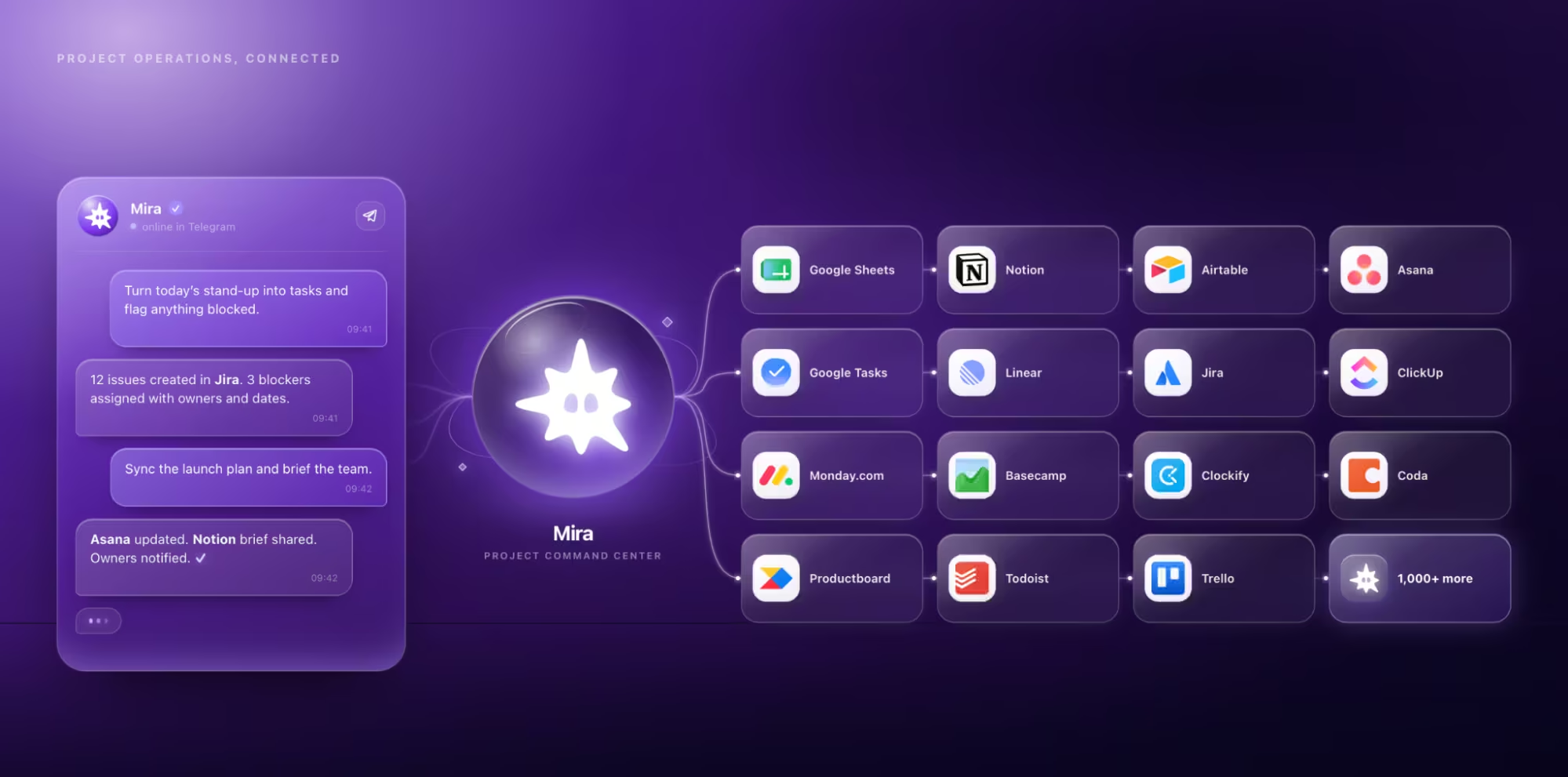
Mira is an AI agent for project managers that works from your messenger and connects to the tools where delivery actually happens. Instead of checking Jira, Linear, GitHub, Notion, Slack, and your calendar separately, you can ask Mira what changed, what’s blocked, and what needs your attention from one chat.
The daily brief is a good example.
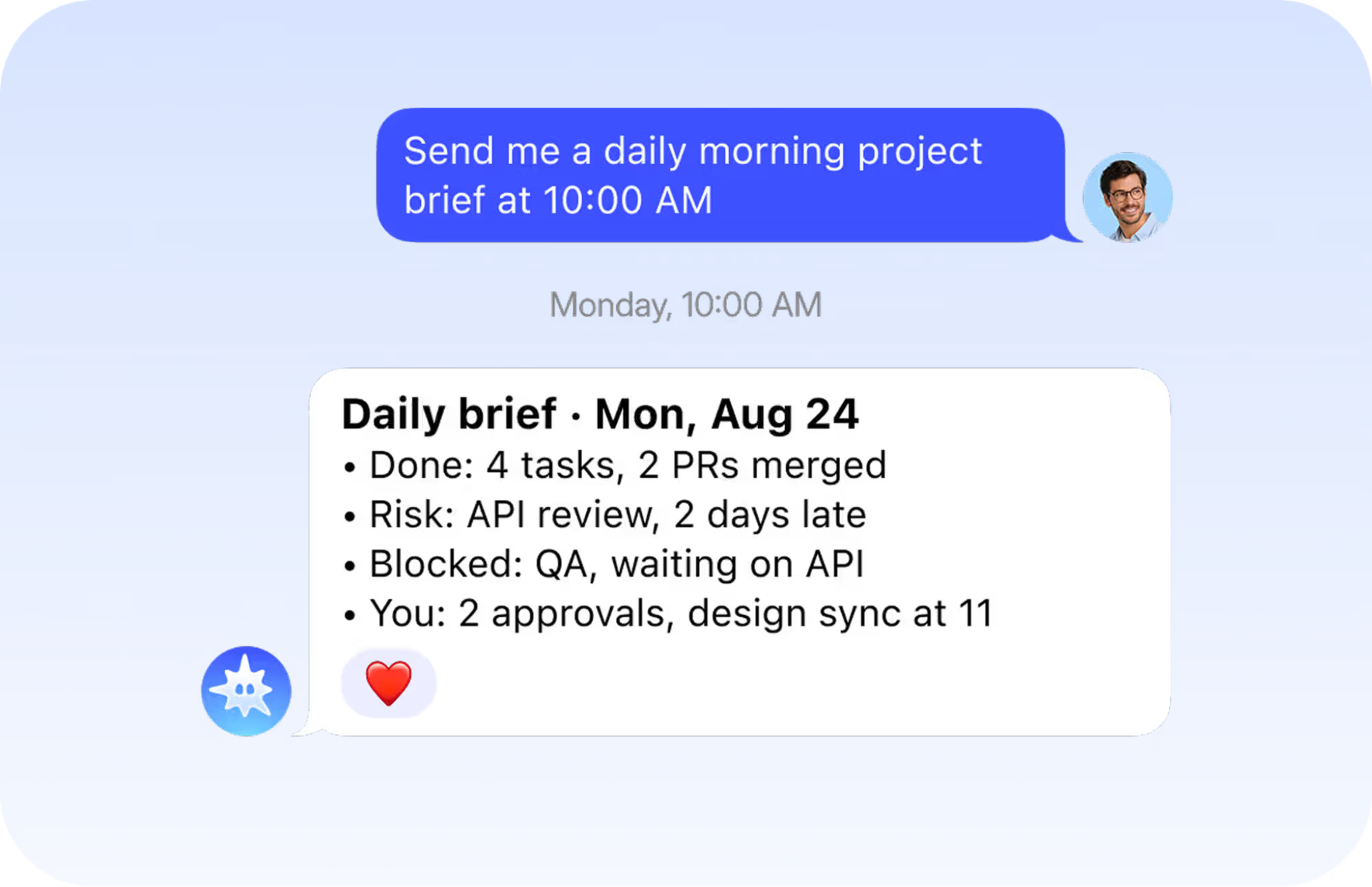
Mira pulls together changes across tasks, tickets, code, docs, and calendar events, then sends you one update with what moved, what’s at risk, what’s blocked, and where a decision is needed. You can set it to run every morning instead of rebuilding project status yourself.
Mira also keeps commitments moving. Assign something in chat and it can capture the task, owner, deadline, and context, follow up when an update is due, and flag overdue work or blockers before they affect delivery. Once you make a decision, Mira can update the ticket, post a status to the team channel, create a follow-up, or schedule a review.
That’s what AI tools for project management automation look like when the agent works across your stack instead of inside a single project platform. Mira connects to 1,000+ tools, including Jira, Linear, GitHub, Notion, and Slack, while your existing project tools remain the system of record.
There’s no new board to migrate to. Mira sits on top of the tools your team already uses, giving you one place to check delivery, coordinate follow-ups, and turn project updates into action.
🟢 Prompt — Project kickoff from call notes
Good output separates what was decided on the call from what the model inferred around it. If it can't tell you which is which, don't send the stakeholder email.
AI project management best practices: what actually works
Start with one workflow, measure the time it takes today, and automate from there. Whichever AI project management tools you choose, the goal is to remove repetitive work without handing over decisions that need context and judgment.
- Start with a measurable workflow: Pick something repetitive, like weekly status reports or meeting follow-ups, and measure how long it takes before introducing AI. That gives you a real baseline for whether the tool is saving time.
- Connect AI to the source of truth: An agent is much more useful when it can read current tickets, docs, calendars, and project data instead of relying on context you paste into a prompt.
- Keep high-impact decisions human: AI can prepare the information behind budget approvals, scope changes, performance reviews, and vendor decisions. The final call should stay with the person accountable for it.
- Know what the tool can change: Check both read and write permissions. Understand what data an integration can access, but also whether it can edit tickets, send messages, create events, or take other actions on your behalf.
- Verify dates and numbers: Double-check deadlines, budgets, estimates, velocity, and headcount before they make it into a plan or stakeholder update.
Where AI still gets it wrong
- Estimation: AI can use historical project data to suggest timelines and effort, but novel work is harder to predict precisely because there may be little relevant precedent. Treat estimates as another input, not the final number.
- Prioritization: A model can rank work using the information it has, but it may miss context that never made it into the project tool: a strategic customer, an upcoming board meeting, or a dependency someone mentioned in a call. Use AI to surface priorities, then make the trade-offs yourself.
- Confident summarization: AI is good at turning long threads and meetings into clean summaries, but that compression can remove disagreement and nuance. If a summary contains an important decision, check it against the original conversation before treating it as settled.
The rule is simple: automate the admin, verify the facts, and own the judgment.
Getting started with AI for project management
Start with one repetitive workflow: meeting follow-ups, status reports, deadline tracking, or project briefs. Automate it, measure the time saved, then expand from there.
If your work is spread across multiple tools, Mira can connect them and handle the follow-ups, updates, and daily project briefs from one chat. You keep the decisions, Mira handles the admin.