

Most people looking for an AI meeting assistant have two problems. The first is that meetings eat attention – you're either listening or you're taking notes, rarely both well. The second is that the calendar around those meetings is its own mess: appointments booked across time zones, recurring syncs nobody remembers to reschedule, and follow-ups that never get sent. AI meeting assistants help solve both.
This guide compares the best AI meeting assistant 2026 has to offer, what each tool is built for, and when you need an AI meeting assistant versus an AI scheduling assistant.
What Is an AI Meeting Assistant?
An AI meeting assistant is software that turns a spoken conversation into usable text: a transcript, a summary, and a list of action items, without you having to type any of it. That's the baseline for any AI powered meeting assistant, notetaker or agent.
The better ones go further. They track who committed to what, sync notes to your CRM or project tool, and let you search across every meeting you've ever had instead of just the one you're in.
The category splits into two tiers, and it's worth knowing which one you're evaluating:
- Notetakers transcribe and summarize. That's the whole job.
- Agentic meeting platforms go past transcription into action, filing tickets, drafting follow-up emails, updating deal stages during or right after the call.
If a tool only gives you a transcript and a bullet-point summary, you're looking at a notetaker, not a full assistant. That's not a knock, plenty of teams only need the notetaker. But it's worth knowing which one you're buying before you compare prices.
Either way, it's an AI meeting assistant worth considering once your team outgrows taking notes manually.
What Is an AI Scheduling Assistant?
An AI scheduling assistant handles the calendar side of your meetings: booking appointments, finding meeting times across time zones, setting recurring reminders, and keeping your calendar from double-booking itself. It's a different job from meeting notes, even though the two get marketed together constantly.
Think of it this way: a meeting assistant works during and after the meeting. A scheduling assistant works before the meeting exists. You need both, but they solve different failure modes — one prevents bad meetings from happening, the other makes the meetings you do have useful afterward.
Inside this category, the terminology gets used almost interchangeably, so here's what each term actually points to.
The leading AI appointment scheduler for businesses tends to combine several of these rather than picking just one.
What to Look For: Core Features Checklist
Before comparing specific tools, know what you're actually scoring them on. These are the criteria that separate a tool you'll use from the one you'll have abandoned:
- Transcription accuracy: Below roughly 90% word accuracy, you'll spend more time correcting the transcript than you saved by not typing it yourself.
- Automatic meeting summary quality: A good summary captures decisions and open questions, not just a chronological list of who said what, the difference between meeting recap AI you can trust and one you have to re-read the transcript to fact-check.
- Action items from meetings: The assistant should assign owners and deadlines, not just extract a flat bullet list you have to triage manually, which is really AI task creation from meeting notes rather than passive extraction.
- Calendar integration: It needs to read and write to your actual calendar, not just log meetings after the fact, which is the real test of AI calendar management — not just displaying events, but changing them.
- Follow-up automation: AI-generated follow-up emails save the ten minutes most people skip entirely after a meeting.
- Pricing transparency: Free tiers with hard caps on transcription minutes or summary counts are common, check the cap before you commit a team to it.
- Privacy model: Where is your data processed, how long is it retained, and can you see that policy in writing before you connect anything.
Every tool discussed below gets measured against this list, not a generic star rating.
Bot-Joiner vs. Bot-less: What This Actually Means
AI transcription for meetings always comes down to two architectures for capturing a video meeting, and the choice matters more than most comparison pages admit.
The bot-joiner model puts a visible AI participant inside your Zoom, Meet, or Teams call, usually with its own name and avatar, and it records from inside the meeting. That's how Otter, Fireflies, Fathom, and tl;dv all work.
The trade-offs run both ways. Bot-joiners are easy to set up and work fine for internal meetings. The downside: external guests see an unfamiliar name join the call, some companies restrict third-party bots from client meetings for compliance reasons, and a bot in the room changes how people talk.
A bot-less AI meeting assistant captures what happened in the call without a visible participant, typically through a browser extension, desktop audio capture, or a platform-native integration, which is what bot-less meeting transcription actually requires under the hood.
AI Meeting Assistants by Platform
Not every tool works equally well across the platforms most teams actually use. Here's what to check before you assume a tool "just works" with your setup.
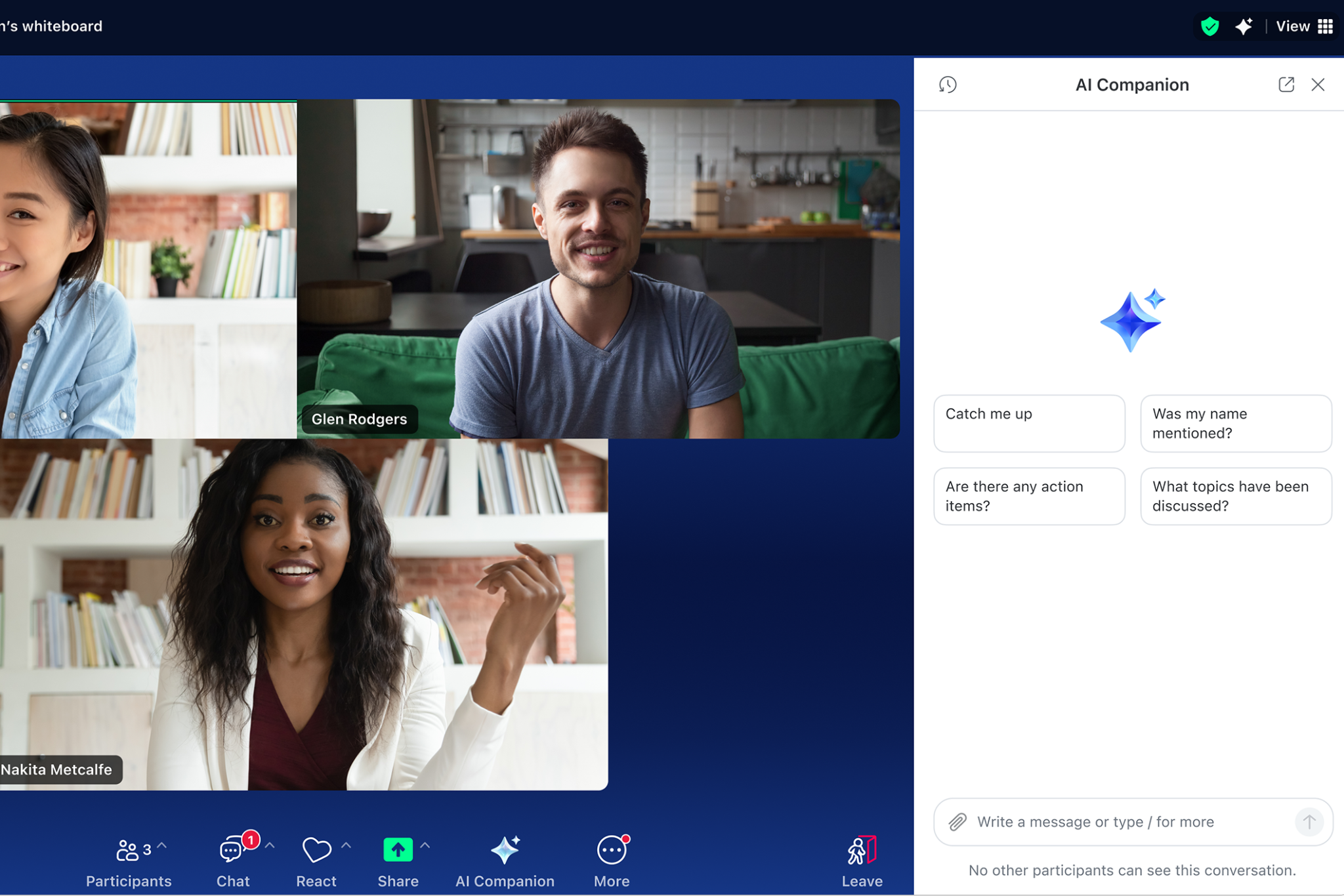
AI meeting assistant for Zoom: As the built-in Zoom AI assistant, Zoom AI Companion includes meeting summaries, transcripts, and action items with eligible paid Zoom Workplace plans, making it the default choice for many teams.
Dedicated AI meeting assistants still tend to offer stronger cross-meeting search, broader integrations, and CRM workflows for organizations that need more than basic meeting summaries.

AI meeting assistant for Google Meet: Gemini for Google Meet can generate Google Meet AI notes and summaries for eligible Google Workspace plans. Dedicated meeting assistants typically provide better cross-meeting search, richer integrations, and more flexible export options than Google's built-in summaries.
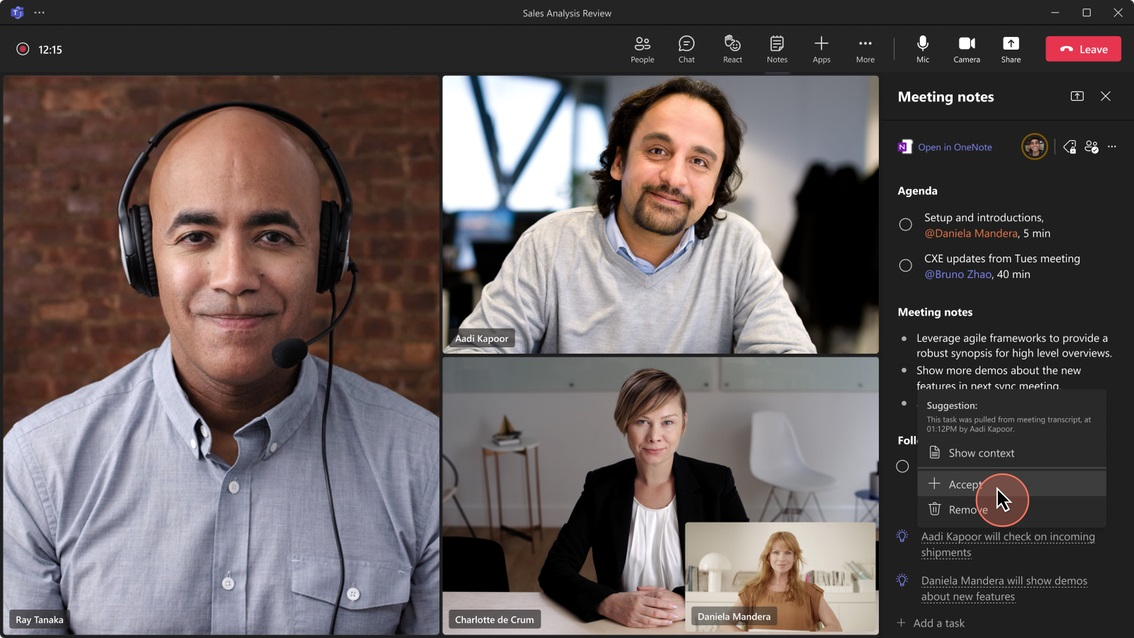
AI meeting assistant for Microsoft Teams: Microsoft Teams AI meeting notes are powered by Microsoft 365 Copilot. While capable, they require a Microsoft 365 Copilot license, which can be difficult to justify if you only need AI meeting notes rather than the broader Copilot feature set.
Best AI Meeting Assistant Tools in 2026
Here's how the most-searched AI meeting assistant tools stack up on the criteria that matter, based on public pricing and feature pages as of 2026.
AI Appointment & Scheduling Tools for Businesses
Scheduling tools get evaluated on a different axis than meeting assistants: not transcription accuracy, but how reliably they fill a calendar without double-booking it or losing a client.
A leading ai appointment scheduler for businesses needs three things working together, not just one:
- Time zone handling: AI for scheduling across time zones should resolve availability automatically. If a client has to do the math themselves, the tool has already failed its one job.
- Booking automation: Appointment booking automation means a client picks a slot and it's confirmed, calendared, and reminded without a human relaying availability back and forth by email.
- Recurring logic: AI for recurring reminders needs to survive edge cases: holidays, someone's PTO, a meeting that needs to shift by a day without breaking the whole recurring series.
The best AI scheduling assistant for appointments is usually the one that's boring in the best sense — it books the slot, sends the confirmation, and you never think about it again.
Meet Mira: The Personal AI Agent That Handles Scheduling and Meeting Follow-Through
Mira takes a different approach to meeting scheduling and recording. It’s a personal AI agent that lives natively inside your messenger, now Telegram.
The whole idea behind Mira AI Telegram: one chat instead of a separate scheduling app, notetaker, and CRM. You message @mira the way you'd message a colleague, and it goes and does the work instead of just answering a question.

Connecting Calendar to Mira takes one message and a link — no API keys or settings menus. The screen that follows lets you see exactly what access you're granting and uncheck anything you don't want to share before confirming.
For meetings and scheduling specifically, here's what that means in practice:
- Books and manages your calendar: Connect Google Calendar, and Mira AI agent can check availability, book meetings, and reschedule a call. It includes AI for scheduling across time zones, since Mira remembers your timezone and the other person's without being told twice.
- Connects to Zoom, Google Meet, and Microsoft Teams: Mira can create and manage meetings on all three platforms, scheduling a Zoom call, spinning up a Google Meet link, or setting a Teams online meeting, directly from the chat, no separate login to any of the three required. For Zoom and Google Meet specifically, it can also pull the recording or transcript the platform already generated once the call ends.
- Runs appointment booking for your business: Connect a Telegram Business account and Mira handles inbound and outbound client messages, qualifies leads, and books the appointment directly – a real answer to AI appointment setting that doesn't require a separate sales-ops tool.
- Tracks decisions and action items from your team's actual conversations: Add Mira to a group chat and it summarizes threads, extracts action items from meetings that happened over Telegram voice notes or text, not a Zoom call, and assigns follow-ups, functioning as meeting notes automation for teams that coordinate asynchronously rather than over video, the same pattern that works for AI for daily standup notes when a team skips the live call entirely.
- Sends scheduled briefings: Using Mira's Skills, recurring routines that run on a schedule with no dashboard or code required, you can set up a daily briefing that covers your calendar and outstanding threads, which is the closest thing to a personalized morning digest without a dedicated app for it.
- Drafts and sends follow-up emails: With Gmail connected, Mira can draft a follow-up email after a meeting directly from the chat.
- Remembers you across conversations: Your role, timezone, and communication style persist between chats, so you're not re-explaining context every time you ask it to schedule something.
A dedicated AI scheduler only ever does one thing: schedule. Mira does the scheduling and the lead qualification and the follow-up email and the recurring reminder, inside the same chat, because it's a general AI agent rather than a single-purpose tool.
That matters most for founders and teams who don't want a fourth subscription for a job that's genuinely 20% of their week, not the whole thing.
Mira vs. Single-Purpose Tools
Mira isn't trying to win the "best in-call transcription" comparison, it's not built for that job. The Mira agent is built to handle everything that happens before and after the call, and everything else you'd otherwise open three more apps for.
Getting Started With Mira
Message @mira and ask it to connect your Google Calendar, that's the whole setup. No credit card, no dashboard, no separate onboarding call.
From there, add it to a team group chat if you want thread summaries and action-item tracking, or connect Telegram Business if you're booking client appointments.