The Best AI Scheduling Assistants in 2026: Automate Your Calendar, Appointments, and Reminders

An AI scheduling assistant takes the back-and-forth out of planning your day. It can check your real-time availability, suggest suitable meeting times, book appointments, update your calendar, and send reminders without forcing you to coordinate every detail manually.
That matters because administrative coordination consumes a substantial part of the workday. In Asana’s Anatomy of Work Global Index, knowledge workers reported spending 58% of their time on communicating about tasks, searching for information, switching between tools, and managing priorities. Scheduling is only one part of that burden, but it is one of the clearest opportunities for automation.
In this guide, we compare the best AI scheduling assistants of 2026 based on their automation capabilities, calendar integrations, ease of use, and suitability for different workflows.
What an AI scheduling assistant actually does
AI scheduling assistants generally handle three jobs: booking meetings, managing your calendar, and keeping you on track with reminders. Most tools excel at one or two, rarely all three, so the right choice depends on which problem you need to solve.
- Booking meetings: An AI appointment scheduler displays your real-time availability, lets invitees choose a suitable slot, and automatically creates the calendar event, often with a video-conferencing link included. No email chain required.
- Calendar management: An AI calendar scheduler organizes what is already on your agenda. It can protect focus time, fit flexible tasks around fixed meetings, reschedule plans when priorities change, and help prevent conflicts.
- Sending reminders: An AI task scheduler tracks deadlines, appointments, and follow-ups, then alerts you when it is time to act so important commitments do not get overlooked.
The best AI scheduling assistants in 2026 compared
To build this comparison, we reviewed each tool’s current product pages, pricing, help documentation, and user feedback. Plan details were checked in August 2026, but pricing and features can change.
AI appointment schedulers: eliminate the booking back-and-forth
An AI appointment scheduler replaces the usual email exchange with a simple workflow: it checks your availability, offers suitable times, lets the invitee choose, and creates the event automatically. Many tools can also add a video link, send confirmations, and remind attendees before the meeting.
The best tool for you largely depends on booking volume and complexity:
- A solo consultant handling a few calls each week may need nothing more than a free booking page.
- A sales or support team managing dozens of daily appointments may also need lead routing, round-robin assignment, shared availability, and automated follow-ups — features offered by platforms such as Calendly and Cal.com.
An AI meeting scheduler that joins calls, produces transcripts, and extracts action items belongs to a related but different category. See our AI meeting assistant guide if you need help during and after the meeting, not just before it.
AI appointment-scheduling best practices
A few simple settings can make any appointment scheduler more effective:
- Limit the choices: Offer a small selection of relevant times instead of an overwhelming calendar of open slots. This makes the decision faster and helps protect the rest of your schedule.
- Add buffers between meetings: Reserve 10-15 minutes before or after calls for preparation, notes, travel, or a short break.
- Send confirmations and reminders: Confirm every booking immediately, then send a reminder before the appointment. For important meetings, consider asking attendees to reconfirm.
- State the purpose upfront: Include the meeting length and a short agenda so attendees know what to expect and can arrive prepared.
- Make rescheduling easy: Add cancellation and rescheduling links to confirmations so changes do not create another email exchange.
🟢 Prompt — Draft an appointment-scheduling message
AI reminder apps and task schedulers: stay ahead of every deadline
An AI reminder app tracks deadlines, follow-ups, appointments, and recurring commitments, then brings them to your attention when they become relevant. Combined with an AI task scheduler, it turns “I’ll remember later” into a responsibility the system manages for you.
What separates an AI reminder from a basic alarm is context. A capable assistant can remind you to follow up only if no one has replied, repeat a weekly review every Friday, and warn you about an approaching deadline early enough to act. Some tools can also adjust task timing when priorities change or your calendar fills up.
The result is a more useful reminder system: one that responds to your workflow instead of simply sounding an alarm at a fixed time.
Here's a setup prompt that captures a full week in one message.
🟢 Prompt — Schedule a full week of reminders
Scheduling for businesses: clients, teams, events, and compliance
Business scheduling is not one problem. Booking clients, coordinating employees, organizing events, and arranging meetings over email require different workflows, and few tools handle all of them equally well.
Depending on its needs, a business may use more than one ai scheduling platform.
- Client appointments: Look for customizable booking pages, confirmations, reminders, rescheduling links, and payment collection. Calendly and Cal.com are strong general-purpose options.
- Team coordination: Prioritize shared availability, calendar overlays, round-robin assignment, workload balancing, and automatic conflict resolution across multiple calendars.
- Event scheduling: Conferences, classes, and multi-session events require more than a standard booking link. Look for attendee registration, capacity limits, session selection, group communications, and event-wide reminders.
- Email-based scheduling: An AI email scheduler such as Gemini in Gmail can suggest available times inside an existing conversation, reducing the need to switch between your inbox and calendar.
Are AI scheduling assistants HIPAA compliant?
Some scheduling platforms can support HIPAA-regulated workflows, but compliance should never be assumed from general security claims alone.
If a vendor creates, receives, maintains, or transmits electronic protected health information (PHI/ePHI) on behalf of a covered entity or business associate, the parties generally need an appropriate business associate agreement, or BAA.
Your compliance or legal team should review the complete workflow, including the scheduler, connected calendar, video platform, forms, reminders, and integrations, before patient information is processed.
Free AI scheduling assistants: what you actually get
A free AI scheduling assistant can provide genuinely useful booking and calendar features, but every plan has limits. The most common restrictions involve calendar connections, booking-page types, scheduling range, team features, and automation capacity.
Here is what the leading free options currently include:
- Calendly Free: One event type, one calendar connection, and unlimited meetings. It is sufficient if you only need a simple “book a call” page.
- Reclaim.ai Lite: Automated focus time, habits, breaks, smart meetings, and one scheduling link for a single user. Its one-week scheduling range and limited integrations make it best suited to personal calendar management.
- Cal.com Individual: Unlimited event types and calendar connections, plus integrations and workflow automation. Its open-source edition can also be self-hosted, although hosting and maintenance may still carry costs.
- Google Calendar: Personal Google accounts include a booking page for appointment scheduling. More advanced booking features and Gemini’s AI-assisted “Help me schedule” function require an eligible Google Workspace or Google AI plan.
- Mira: A free, card-free way to manage tasks and Google Calendar through Telegram. Paid plans add more capacity, integrations, and autonomous workflows.
If you only need one booking page or basic calendar protection, a free plan may be all you need. Paid plans become more relevant when you require multiple calendar connections, team routing, round-robin scheduling, longer planning windows, advanced reminders, or unattended automations.
How Mira schedules meetings from your messenger
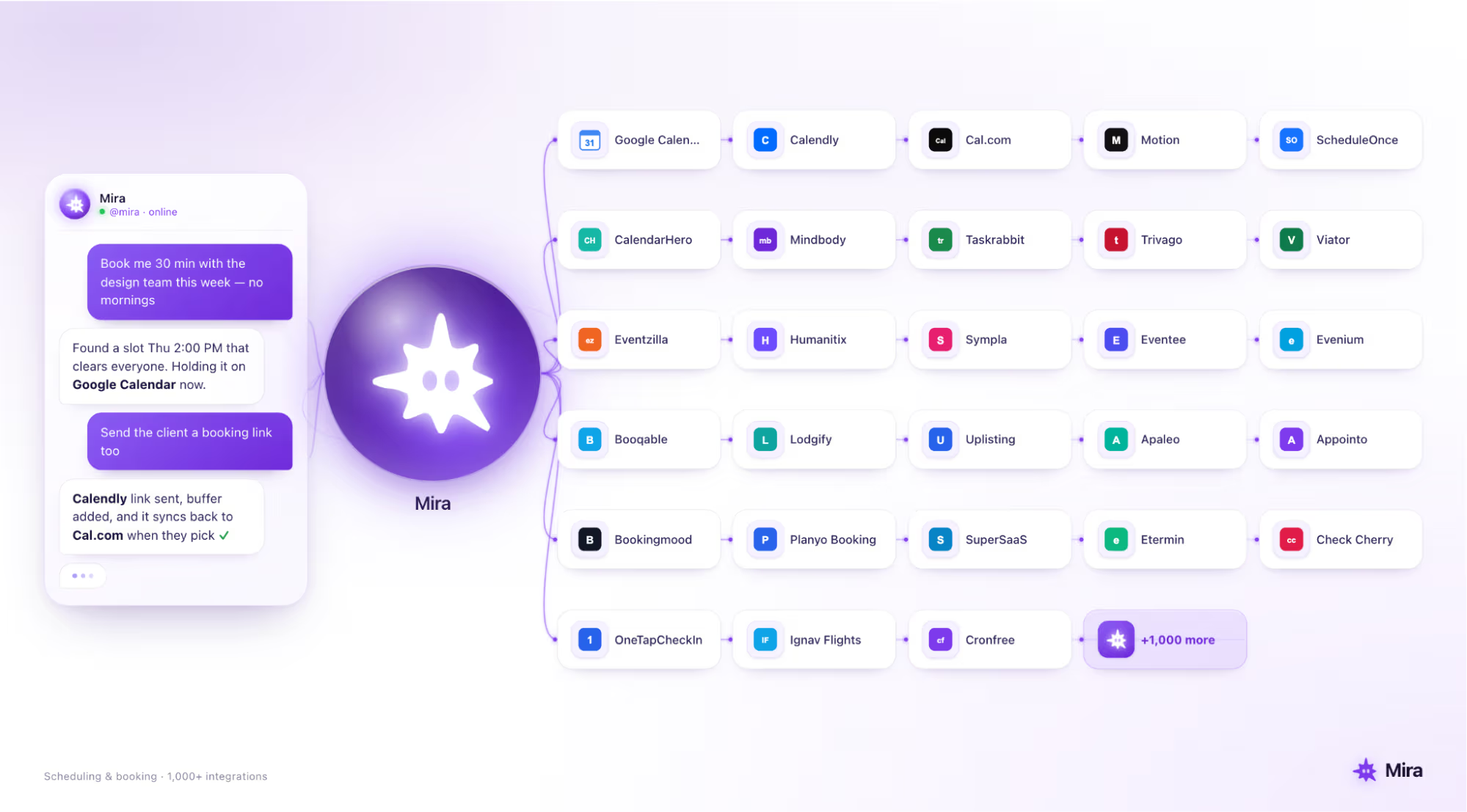
Mira is an AI agent that manages your Google Calendar from your messenger, so you can schedule meetings without opening a separate calendar app. Tell it what you need in plain language or send a voice note, and Mira can check your availability, suggest suitable times, create the event after you approve it, and set a reminder.
For example, send: “Book a call with the team on Thursday afternoon.” Mira checks your Google Calendar and returns a list of available times. Once you choose a slot and confirm the details, it creates the event and reminder. Calendar changes and outgoing messages require your approval, keeping you in control of what gets booked or sent.
What distinguishes the Mira AI agent from a standalone scheduling app is both where it works and what it can connect to. As a Google Calendar AI assistant, Mira can manage events from a conversation. Through its 1,000+ tool integrations, that same workflow can also send a follow-up email, update a project document, or create a task.
The result is one conversation for the entire workflow, not another app you have to remember to check.