Telegram AI Video Generators: How to Create AI Videos Without Leaving the Chat
A Telegram AI video generator is a bot that creates short video clips from text prompts or photos directly inside the messenger. You can describe a scene, animate a still image, select available styles or settings, and receive a finished video in the same conversation.
This chat-based workflow removes the usual steps of opening a separate platform, learning a video editor, exporting an MP4, and uploading it to Telegram. It’s a convenient option for creating social media posts, promotional clips, animated images, memes, and other shareable content on mobile or desktop.
This guide covers how AI video generation works inside Telegram, walks you through the basics of creating your first clip, and reviews the 7 best AI video bots available in 2026.
What Is a Telegram AI Video Generator?
A Telegram AI video generator is a bot that creates videos from text prompts, images, or both without requiring you to leave the messenger. You send your input in a Telegram chat, choose any available model or settings, and receive the generated clip from the bot.
Telegram AI video bots fall into two categories:
- Ready-made bots: Publicly available bots that you can start using in seconds. They handle the video model, interface, rendering, and delivery.
- Custom bots: Bots built by connecting an AI video model to Telegram through its API and automation platforms such as n8n or Make. They offer more flexibility but require setup, API keys, and ongoing maintenance.
How AI video generation works in Telegram
Telegram AI video generation runs in three steps: you send a prompt or an image, the bot passes it to a video model, and the finished clip comes back as a message. Rendering takes anywhere from under a minute to several minutes, depending on the model and the clip length.
Telegram text to video
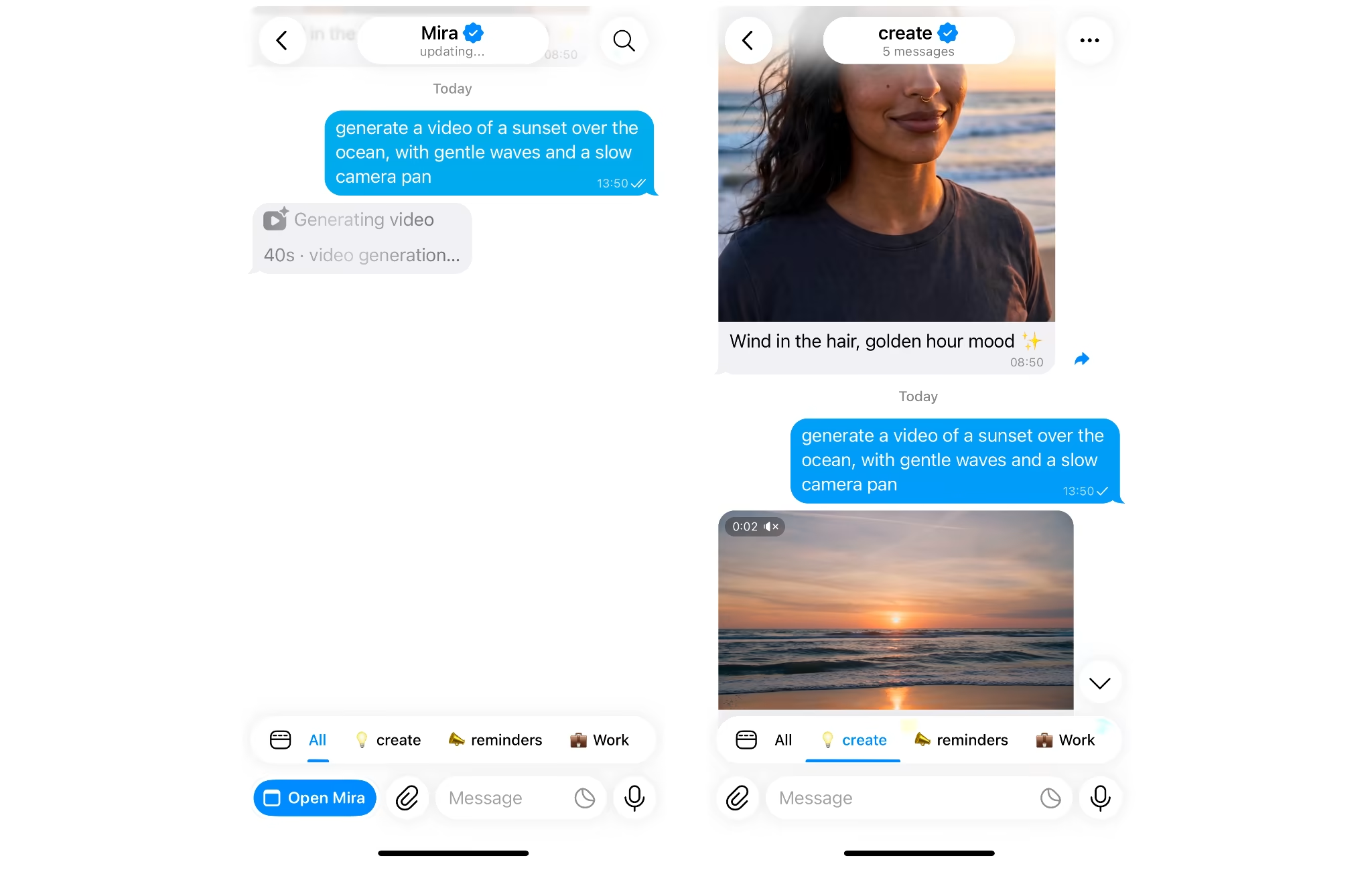
Telegram text to video is the simplest route. You describe a scene in plain words and get a clip back.
A prompt like "a sunset over the ocean with gentle waves, slow camera pan" is enough to start. The more specific you are about the subject, the motion and the light, the closer the result lands to what you pictured.
Image to video: animate a photo
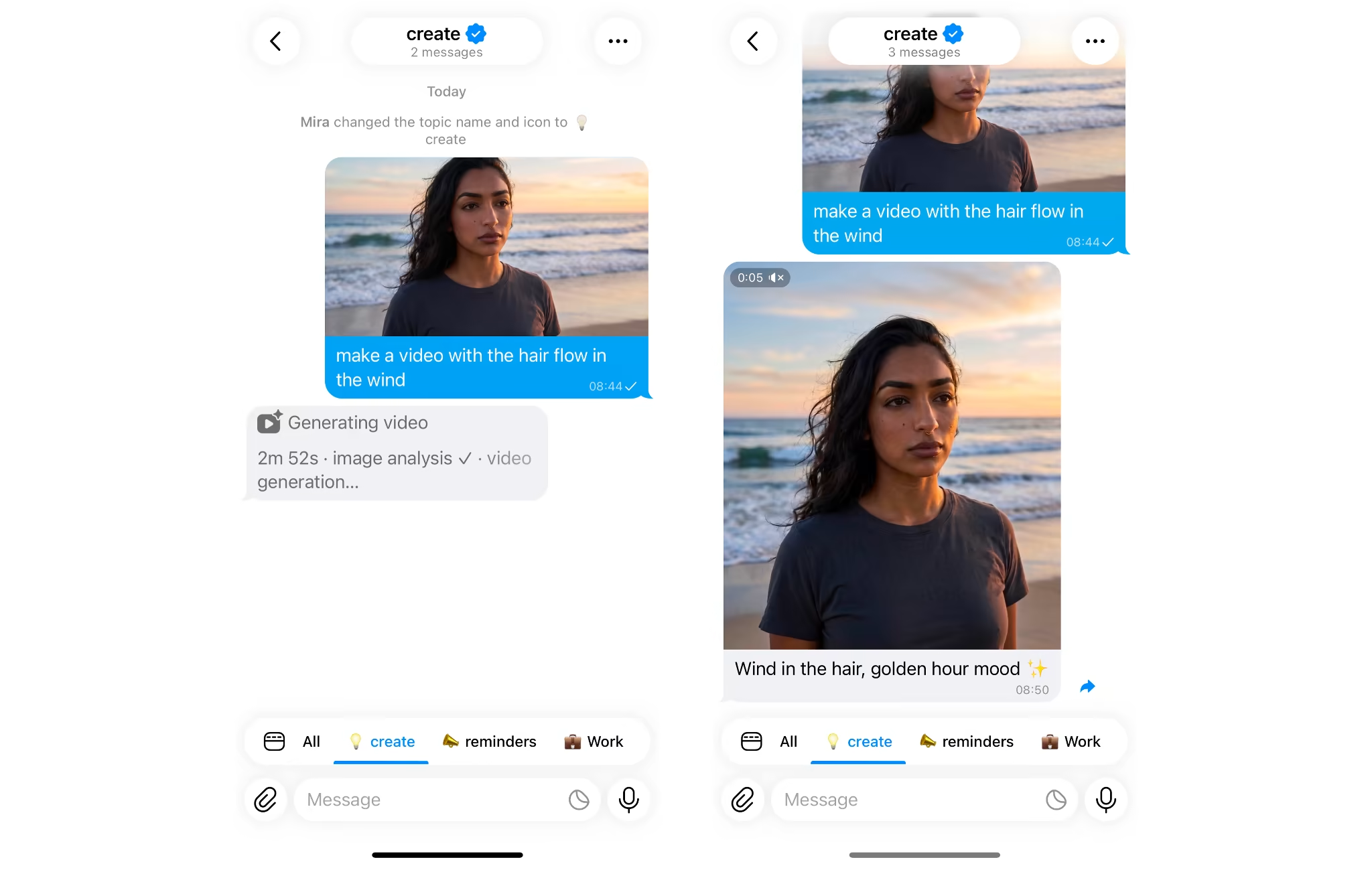
Image to video starts from a picture instead of a blank frame. You send a photo, describe the motion, and the model animates it.
This works well for product shots, portraits and greetings. The photo locks in the look, so you only need to describe what moves: "make the hair flow in the wind".
Template-Based Video Generation
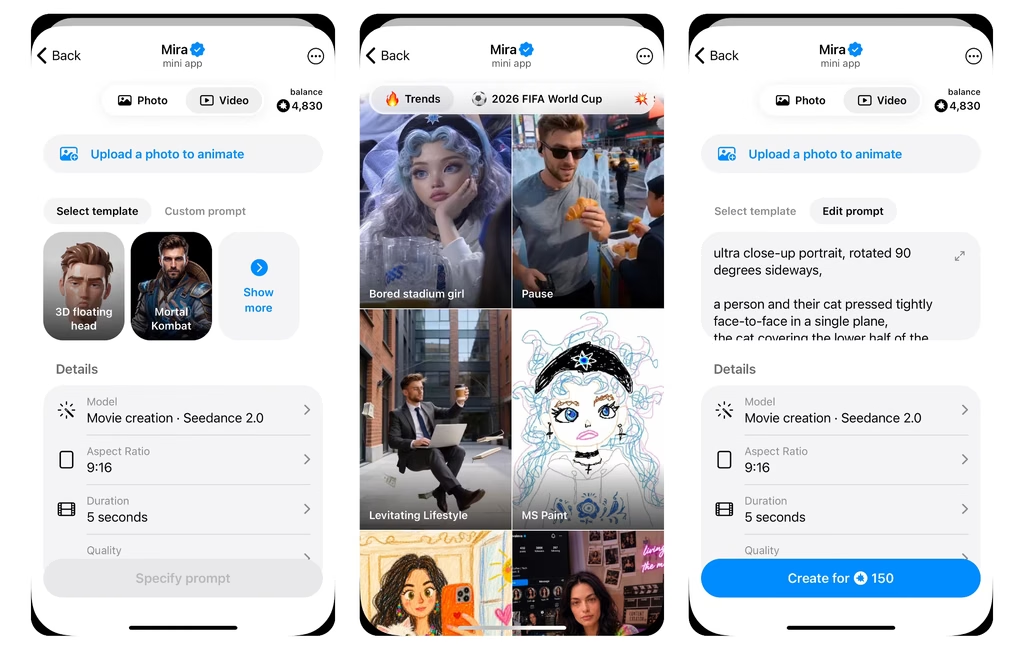
Some Telegram AI video generator bots provide ready-made templates for popular trends, animations, greetings, and social media formats. Select a template, upload your photo, and add any text or other details the bot requests. The bot then applies the predefined style and creates the video for you.
Templates are the easiest option when you do not want to write a detailed prompt or adjust multiple settings. They also make the result more predictable because the effect, movement, and overall structure have already been configured.
Video formats that matter in Telegram
The right aspect ratio depends on where the video will land.
| Format | Best for |
|---|---|
| 9:16 vertical | Stories, Reels, YouTube Shorts, mobile-first channel posts |
| 16:9 horizontal | Channel explainers, YouTube, presentations |
| Video note (circle) | Personal replies in chats and groups |
Pick the format before you generate. Cropping a finished clip almost always cuts off something you wanted to keep.
Best Telegram bots for AI video generation in 2026
The best Telegram bots for AI video generation in 2026 are Mira, SYNTX, ClipForge, ASIX AI BOT, AbhiVideoBot, the Kling bot, and the unofficial Grok bot. Each one works inside the chat. They differ in model choice, extras and how they charge.
| Bot | Text-to-video | Image-to-video | Models | Best for |
|---|---|---|---|---|
| Mira (@mira) | Yes | Yes | 10+ models, including Seedream, Qwen, Seedance, Kling, DreamActor, OmniHuman | One assistant for content ideation, generation and publishing |
| SYNTX (@syntxaibot) | Yes | Yes | Kling, Seedance, Google Veo, Veo Omni Flash 1.1, Grok Imagine, Runway, MiniMax Hailuo, Luma Dream Machine | Picking a specific video model |
| ClipForge (@creokreobot) | Yes | No | Not listed | A dedicated video bot |
| ASIX AI BOT (@ASIXAI_BOT) | Yes | Yes | Kling, Runway | Mixed media in one bot |
| AbhiVideoBot (@AbhiVideoBot) | Yes | Yes | Seedance 2.5 (I2V, R2V), Seedance 2.0 (I2V, R2V), and Adobe Firefly Video | Quick single-purpose clips |
| Kling by G.Media (@kling_gidbot) | Yes | Yes | Kling | Kling output without a Kling account |
| Grok bot (@grok_ai_telegram_bot) | Yes | Yes | Grok 4 | Trying AI video for free |
Mira
Mira (@mira) is a personal AI agent that works inside Telegram. It generates videos from text, animates photos, makes Telegram video notes, and cuts long videos into short clips with subtitles and headlines. You don't need a detailed prompt to get started. Pick a ready-made template, add a photo or the details it asks for, and Mira generates the video.
You don't need to pick a model either. Mira chooses the model and format based on your request. Send an idea as a text or a voice note, and the finished asset comes back in the same chat.
What sets Mira apart is the workflow around video generation:
- More than video: Mira also makes images, music, voiceovers, captions and scripts.
- One idea, many formats: It turns a single piece of content into versions for different platforms.
- Scheduled publishing: Connect your TikTok or Telegram accounts, and Mira schedules and posts to your channels automatically.
- Memory: It remembers your style and preferences between conversations.
- 1,000+ integrations: Mira connects to your social media accounts, calendar, inbox, Notion and CRMs to support the whole content ideation, generation, and publishing pipeline.
Models: Seedance, Kling, DreamActor, OmniHuman, GPT Image, Nano Banana, Seedream, Qwen, and more. You can also connect the Higgsfield MCP server to Mira and generate Higgsfield videos directly from your Telegram chat.
Best for: creating, repurposing, and publishing multimedia content from one Telegram chat.
SYNTX
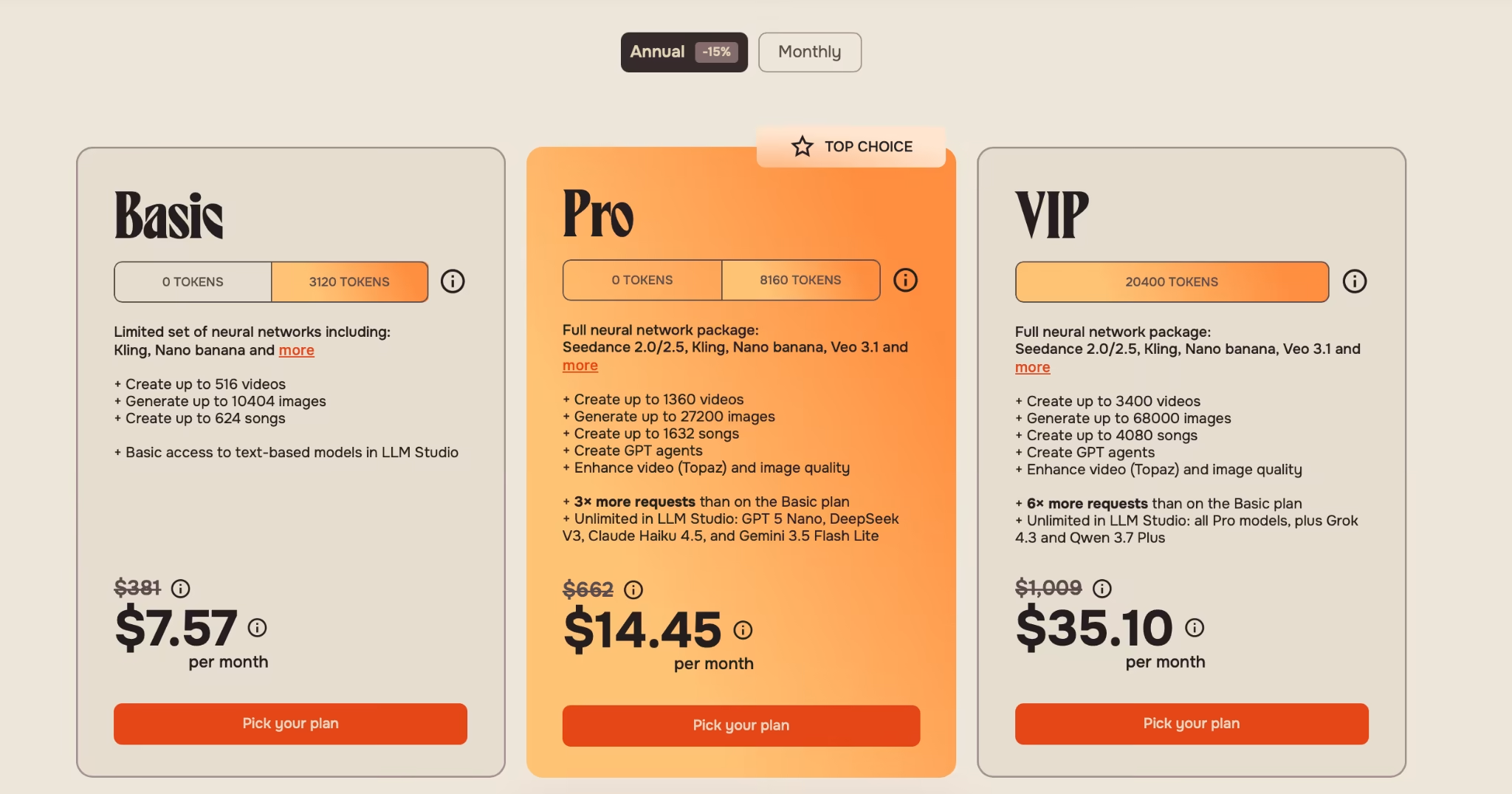
SYNTX is a multi-model AI bot that also runs as a Telegram mini app and a website. It gives you access to several video models, including Veo, Kling and Runway, along with tools for text, images and audio generation.
It’s useful if you want to try one prompt on different models. Expect a busier interface than a single-purpose bot, and a token system that takes a few minutes to learn.
Models: Veo 3, Sora 2 Pro, Kling, Seedance, Runway, Luma, MiniMax.
Best for: comparing video models in one place.
ClipForge
ClipForge (@creokreobot) is a bot built around video generation. You open it in Telegram and start creating right away, with no separate signup.
A focused bot is easier to learn than a multi-tool hub. Check the bot's welcome message for current models, clip length and pricing before you commit.
Best for: a dedicated video bot without extra features in the way.
ASIX AI BOT
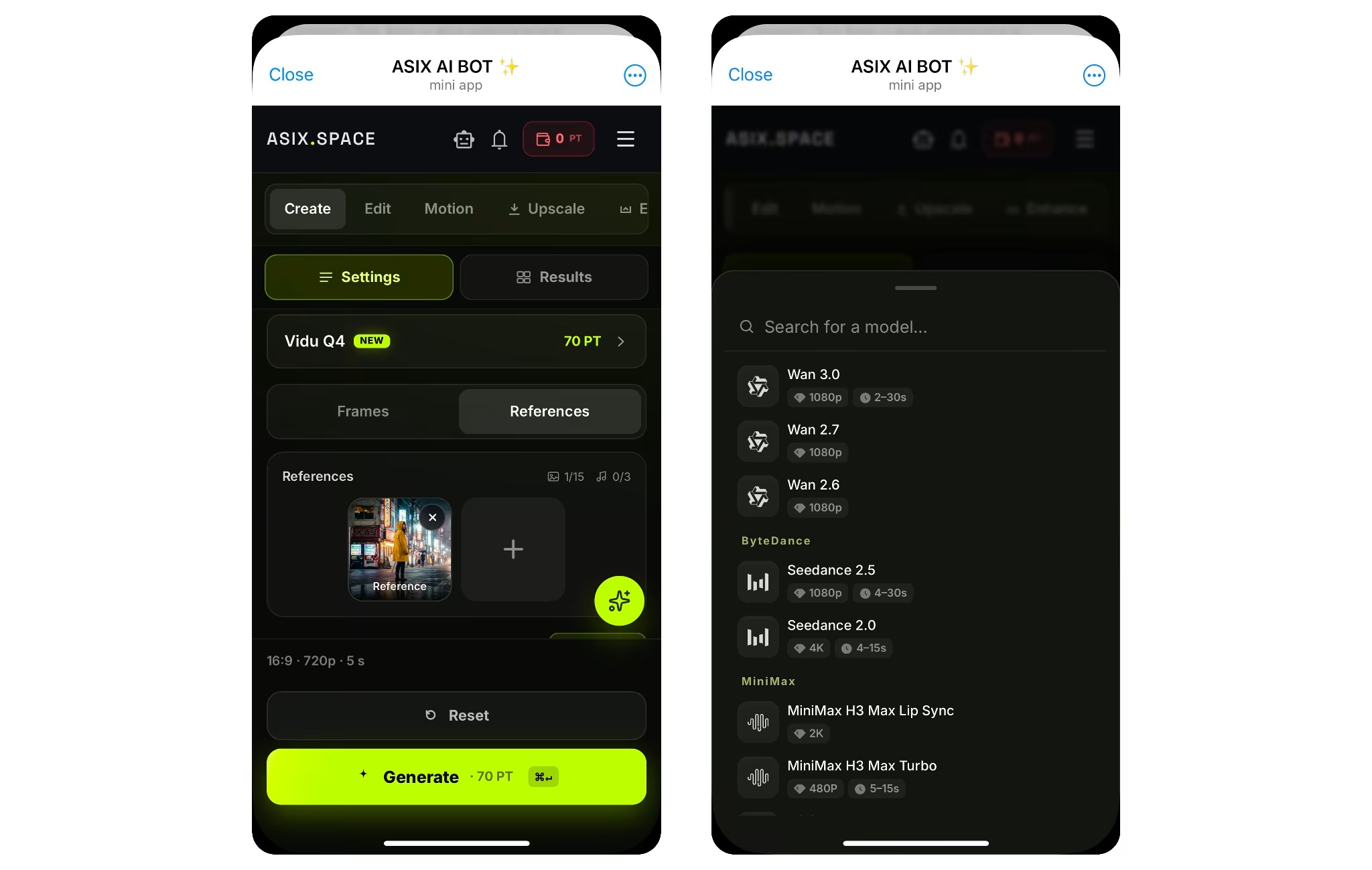
ASIX AI BOT combines AI tools for text, images, video and music in one Telegram bot, plus face swapping.
It suits you if video is one of several things you make. If video is your main job, a model-focused bot gives you more control.
Best for: mixed media in a single bot.
AbhiVideoBot
AbhiVideoBot is a single-purpose bot running ByteDance's Seedance 2.0. It handles text-to-video and image-to-video, with clips up to 15 seconds and adjustable aspect ratios.
It does one thing, which keeps it fast and simple. It shares a credit pool with the other AbhiBots and has a free tier.
Best for: quick, realistic short clips.
Kling by G.Media
@kling_gidbot gives you Kling's text-to-video and image-to-video in Telegram, with control over camera motion. The bot pings you in the chat when the clip is ready.
It's an independent bot built on Kling's public API, not an official Kling product. That's fine for most uses, but worth knowing.
Best for: Kling-quality motion without a separate Kling account.
Grok Telegram bot (unofficial)
This bot wraps xAI's Grok and adds image and video modes, with free daily requests and no signup.
It's a third-party project, not an official xAI bot. Use it for experiments rather than anything you need to rely on.
Best for: trying AI video at zero cost.
How to create AI videos in Telegram with Mira
You can create AI videos with Mira in four messages: start the bot, describe the scene, pick the format, and ask for changes. No app to install and no account beyond Telegram.
- Open Mira: Go to @mira in Telegram and press Start.
- Describe the scene or send a photo: For text to video, write something like "Generate a video of a sunset over the ocean with gentle waves." To animate an image, send the photo with "Animate this photo, make the hair flow in the wind."
- Pick the format: Mira defaults to vertical 9:16 for Stories and Reels. Ask for 16:9 if the clip is going to YouTube or a presentation.
- Get the clip and refine it: The video arrives in the chat. Ask for changes in plain words, such as a slower camera or warmer light.
More you can do with video in the same chat
- Make a video note: Send any video and ask Mira to convert it into a round Telegram circle.
- Cut Shorts from a long video: Send a YouTube link and ask for shorts. Mira returns several clips with subtitles and headlines in 5 to 15 minutes.
- Save a Reel: Send an Instagram Reel link and Mira downloads the video into the chat.
Generate with Higgsfield’s models through Mira
If you use Higgsfield, you can connect its MCP server to Mira and generate with Higgsfield’s video models from your Telegram chat. MCP (Model Context Protocol) is an open standard that lets an AI agent use another service’s tools, so Mira can send your prompts to Higgsfield and bring the finished clips back into the chat.
These generations use your Higgsfield credits, not Mira tokens. Use this setup when you need a specific model or longer, more cinematic clips.
Prompt tips for better AI videos
Good AI video prompts name one subject, one action, one camera move and one light source. Each detail you leave out gets filled in by the model, and that’s usually where clips turn generic or start to warp.
| Weak prompt | Strong prompt |
|---|---|
| A cool video of a coffee shop | A barista pours latte art into a white cup on a wooden counter. Slow push-in, warm morning light from a window, shallow depth of field. 9:16, 6 seconds. |
| My product looking premium | A matte black water bottle on a stone plinth. Slow 90-degree orbit, soft studio light with a thin rim light, dark background. 9:16, 5 seconds. |
| Make this photo move | The woman’s hair and scarf move gently in the wind. She blinks once. Camera stays still. |
The strong versions describe what’s on screen, not how it should feel. “Premium” and “cool” give the model nothing to render.
When a clip goes wrong
| Problem | What usually causes it | Fix |
|---|---|---|
| Faces or hands warp | Too much movement or several actions at once | Cut to one small action and slow the camera |
| Product changes shape mid-clip | Fast camera move around the object | Use a slower orbit, or “camera stays still” |
| Garbled text on screen | The prompt asked for words in the frame | Remove text from the prompt and add captions in the post |
| Jittery or random camera | No camera direction given | Name one move: push-in, pan, orbit or static |
| Clip looks flat | No lighting in the prompt | Add a light source: window light, rim light, neon |
Three habits that save tokens
- Set the format first: State 9:16 or 16:9 in the prompt. Cropping later cuts off the subject.
- Animate photos by motion only: The photo already sets the look, so describe only what moves.
- Change one thing per retry: Keep the rest of the prompt word for word, so you can tell which edit fixed the clip.
If writing prompts isn’t your thing, @mira’s templates skip the step. Pick an effect, add a photo or a few details, and Mira builds the prompt for you.
Telegram AI video generator vs web service: which to use
Use a Telegram bot when speed and in-chat delivery matter most. Use a web tool when you need a specific model, longer clips or fine editing control.
| Telegram bot | Web tool | DIY automation | |
|---|---|---|---|
| Setup time | Seconds | Minutes (account signup) | About 20 minutes plus API keys |
| Where the clip lands | In your chat | Download, then upload | In your own bot |
| Model choice | One to many, depending on the bot | Usually many | Any model with an API |
| Editing control | Prompt-based | Timeline and settings | Whatever you build |
| Best for | Fast, frequent short clips | Polished, longer pieces | Teams with a developer |
For most people, the real cost isn't the generation. It's the download, re-upload and app-switching around it. A bot removes that step.
Conclusion
The right Telegram AI video generator is the one that gets the clip into your chat with the fewest steps. Web tools give you more control, DIY automations give you more flexibility, and bots give you speed.
If you want to create AI videos and keep the rest of your work in the same place, start with Mira. Generate a clip, animate a photo, cut Shorts from a link, or connect Higgsfield when you need a specific model.