How to Use an AI Article Summarizer Without Losing the Original Meaning

An AI article summarizer can turn a 3,000-word piece into five clear points in seconds. It can also quietly change what the article says. A hedge disappears, a number gets rounded, or a conclusion shows up that the author never wrote.
Most of those errors have three causes. The tool never saw the full text, the prompt didn't say how to preserve the original meaning, or nobody checked the result. All three are easy to fix.
This guide covers how to get accurate summaries, which format to pick, and how to check the result, with prompt templates you can copy along the way.
TL;DR
- Give it the full text: A summary of a half-loaded page is a guess.
- Set the format and length: "Short" means something different to every tool.
- Ask the AI to preserve meaning: Key facts, context, and the author’s level of certainty.
- Check it against the source: Two minutes is enough for most articles.
What does an AI article summarizer actually do?
An AI article summarizer reads a text and produces a shorter version of its main argument and supporting points. Any article summarizer AI tool does this in one of two ways.
| Type | How it works | Strength | Risk |
|---|---|---|---|
| Extractive | Pulls existing sentences from the source | Stays close to the author's wording | Can read choppy and miss connections |
| Abstractive | Rewrites the content in new words | Reads naturally | New wording can carry new meaning |
Most modern AI assistants are abstractive. That's why their summaries read so well, and it's also where meaning drift starts.
There's a second limit worth knowing. A summarizer finds the claim, but it doesn't judge whether the claim holds up. It will summarize a weak argument as confidently as a strong one.
The tool handles extraction. Evaluation stays with you.
Where does the original meaning get lost?
Meaning usually gets lost in small edits, not big mistakes. Here's what to watch for:
- Dropped hedges: "Early tests suggest" becomes "tests show," and a tentative finding reads as fact.
- Added claims: The summary includes a cause or conclusion the author never stated, often background knowledge that sounds true.
- Rounded numbers: 38% becomes "about 40%," or two different figures merge into one.
- Shifted attribution: A quoted critic's opinion turns into the author's view.
- Wrong emphasis: A side point gets top billing because it came early or had a vivid example.
- Silent truncation: On long pieces, the tool summarizes only what it could read and doesn't tell you.
Here's what drift looks like in practice. The source says: "Early results suggest the feature may cut response times for some teams." A drifted summary says: "The feature cuts response times." Three qualifiers are gone, and the claim is now much stronger than the evidence.
You can block most of this with one instruction.
🟢 Add it to any summary request:
That single paragraph does more for accuracy than switching tools.
How to summarize an article with AI in 5 steps
To summarize an article with AI without losing its meaning, feed it the full text, define the output, ask the AI to identify what matters, ask follow-ups, and verify.
Each step closes one of the gaps above.
1. Give the AI the full text
The summary can only be as complete as the text the tool received. Public pages usually load fine. Paywalled pages, pages behind a login, and pages heavy with scripts often don't.
When in doubt, paste the text or send the file.
🟢 Prompt to try:
If the tool reports missing content, upload the full article or paste the text before relying on the summary.
2. Pick a format and a length
Give a number instead of an adjective. "Five bullets" or "120 words" gets a consistent result. "Brief" doesn't. The next section covers which format fits which job.
3. Let the AI identify what matters
Ask the AI to identify the main argument, the evidence behind it, and any context that changes how it should be understood. You only need to specify individual details if they matter to your particular task.
4. Ask follow-up questions
The first pass is a draft. Follow-ups catch what it skipped.
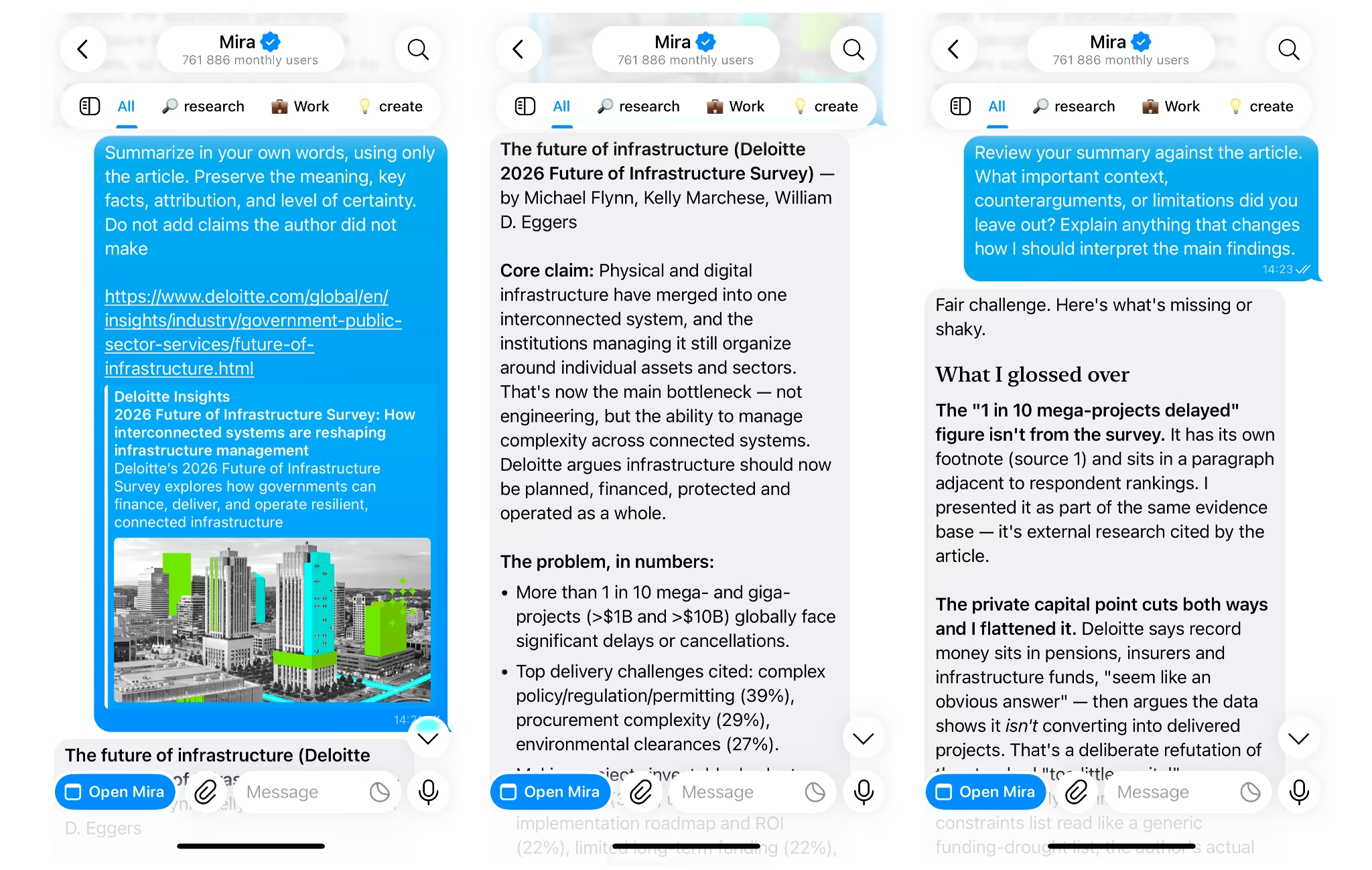
🟢 Prompt to try:
5. Check the summary against the source
Verification is the step most people skip, and it's the one that catches added claims. There's a full method further down.
TL;DR, key points, or detailed outline: which format should you pick?
Pick the format based on what you'll do with the summary. The more you plan to rely on it, cite it, or repeat it to someone else, the longer it should be.
| Format | Length | Best when | Meaning risk |
|---|---|---|---|
| TL;DR | 1 to 3 sentences | Deciding whether to read the full piece | Highest: nuance goes first |
| Key points | 5 to 7 bullets | Quick recall, sharing with a team | Medium: check each bullet |
| Detailed outline | Follows the article's sections | Research, citing, writing a response | Lowest: keeps structure and evidence |
A TL;DR is a filter. Use it to decide where your reading time goes, not as a stand-in for the article.
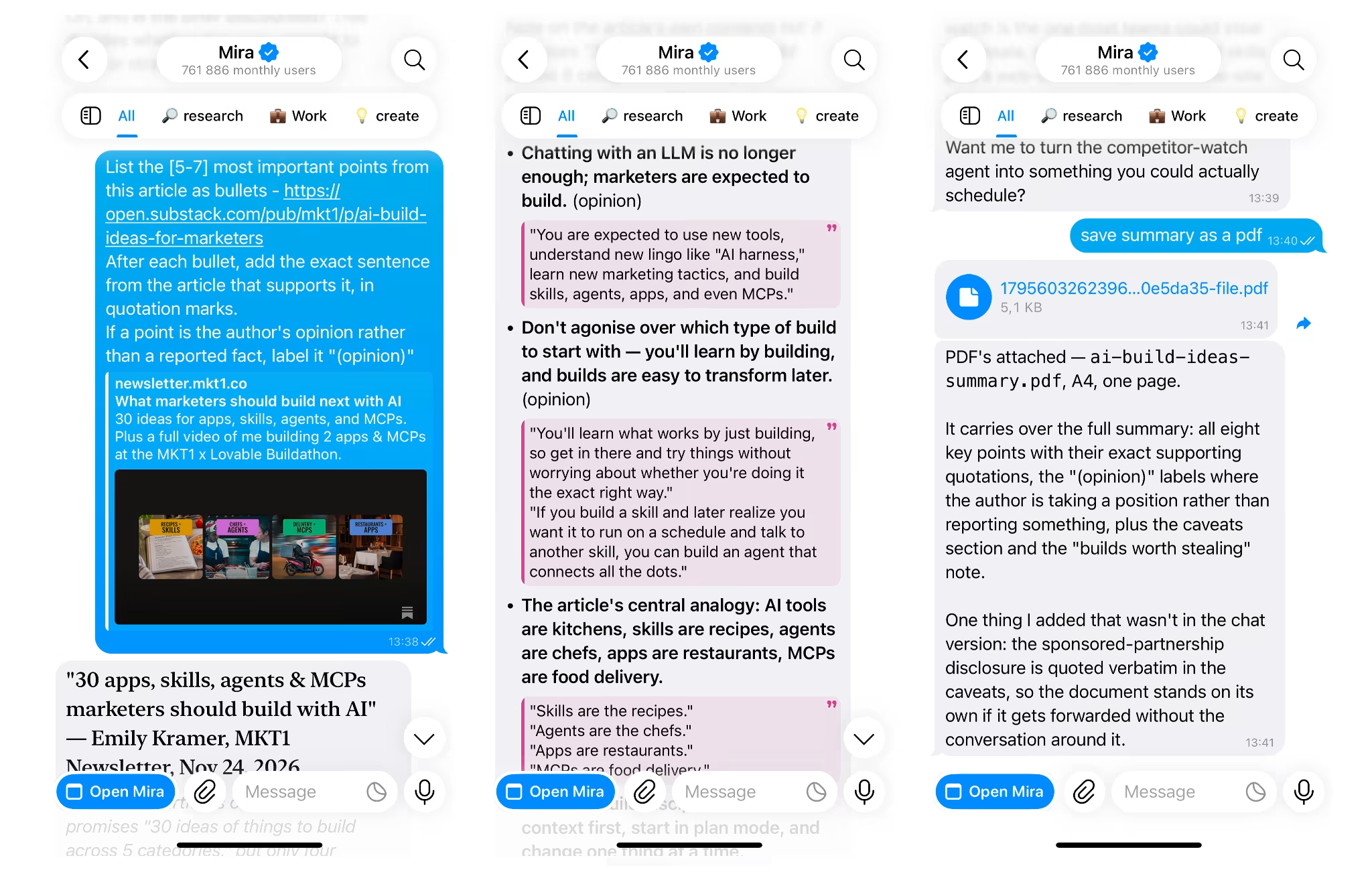
Key points work for sharing. Let the AI prioritize the findings and explain why they matter, without repeating the original text.
🟢 Prompt for key takeaways:
A detailed outline keeps the argument's shape, which matters when you'll build on it.
🟢 Prompt to try:
Not sure yet? Ask for both in one request: a two-sentence TL;DR on top, the outline below. Keep whichever you need.
How do you keep quotes and source links in a summary?
Ask the AI to select the quotes and source links that add value to the summary. There is no need to find them yourself first.
Direct quotes should remain verbatim, and links should come from the article. Leave out quotes that add nothing beyond the paraphrased summary.
🟢 Prompt to try:
Then click every link before you share the summary. It takes less than a minute.
How do you check a summary for added claims?
Ask the AI to compare the summary with the article and flag unsupported or distorted claims. An added claim is anything the summary says that the article doesn't, even if it happens to be true.
For important summaries, ask the AI to check these four things, then review any issues it flags:
- Match the specifics: Find every number, name, and date from the summary in the source.
- Test the cause words: Look for "because," "proves," "shows," and "will." Confirm the author actually made that link.
- Check attribution: Make sure each opinion belongs to the person the summary credits.
- Compare conclusions: Read the summary's last line next to the article's last paragraph.
Start with the AI cross-check below. For anything you’ll publish or act on, verify the flagged issues and critical facts against the original. An independent check in a new chat can also help.
🟢 Prompt to try:
Ask for a corrected summary, not just a list of errors. Omissions change meaning too.
What changes when you summarize long articles?
Long articles break summaries in a way short ones don't: the tool may run out of room and cut the text without saying so. Long reports, whitepapers, and PDFs are where silent truncation happens most.
The best AI to summarize long articles is simply the one that reads all of it. Start with the full file and ask the AI to work through its sections. If the tool cannot process it all, split the text.
🟢 Prompt to try:
For very long pieces, upload smaller sections only if necessary. The detailed outline format works best here, because it keeps track of where each point came from.
What if the article is behind a paywall or won't open?
Don't let the AI guess. When a tool can't reach an article, it may build a summary from the title, snippets, and related coverage. The result often sounds right and can be vague or invented.
Paste the text you have legitimate access to, or the excerpts you can see, and tell the tool to stay inside them.
🟢 Prompt to try:
That last line keeps the summary honest about its own limits.
What should you look for in an AI article summarizer?
Look for control over the input, the instructions, and what happens to the output. Speed is the same everywhere. Accuracy depends on these six things:
- Full-text reading: It accepts pasted text and files, not just links.
- Custom prompts: You set length, format, and what to keep.
- Follow-up questions: You can question the same article without starting over.
- Long-input handling: It processes long pieces or tells you where it stopped.
- Quote and link retention: It keeps both when asked.
- A place for the output: Summaries get saved or shared, not lost in a closed tab.
These requirements split the options into three groups:
| Option | Best for | Trade-off |
|---|---|---|
| Summarizer websites and browser extensions | One-off TL;DRs of public pages | Little control over prompts, few follow-ups |
| General AI chat assistants | Custom prompts and follow-up questions | A separate app, with copy-paste in and out |
| AI agents in your messenger, like Mira | Summaries where articles already get shared, saved straight to your apps | Works through chat, not a side panel on the page |
There's no universal winner. The right pick depends on how often you summarize and where the summary needs to end up.
How do you use Mira as an AI article summarizer?
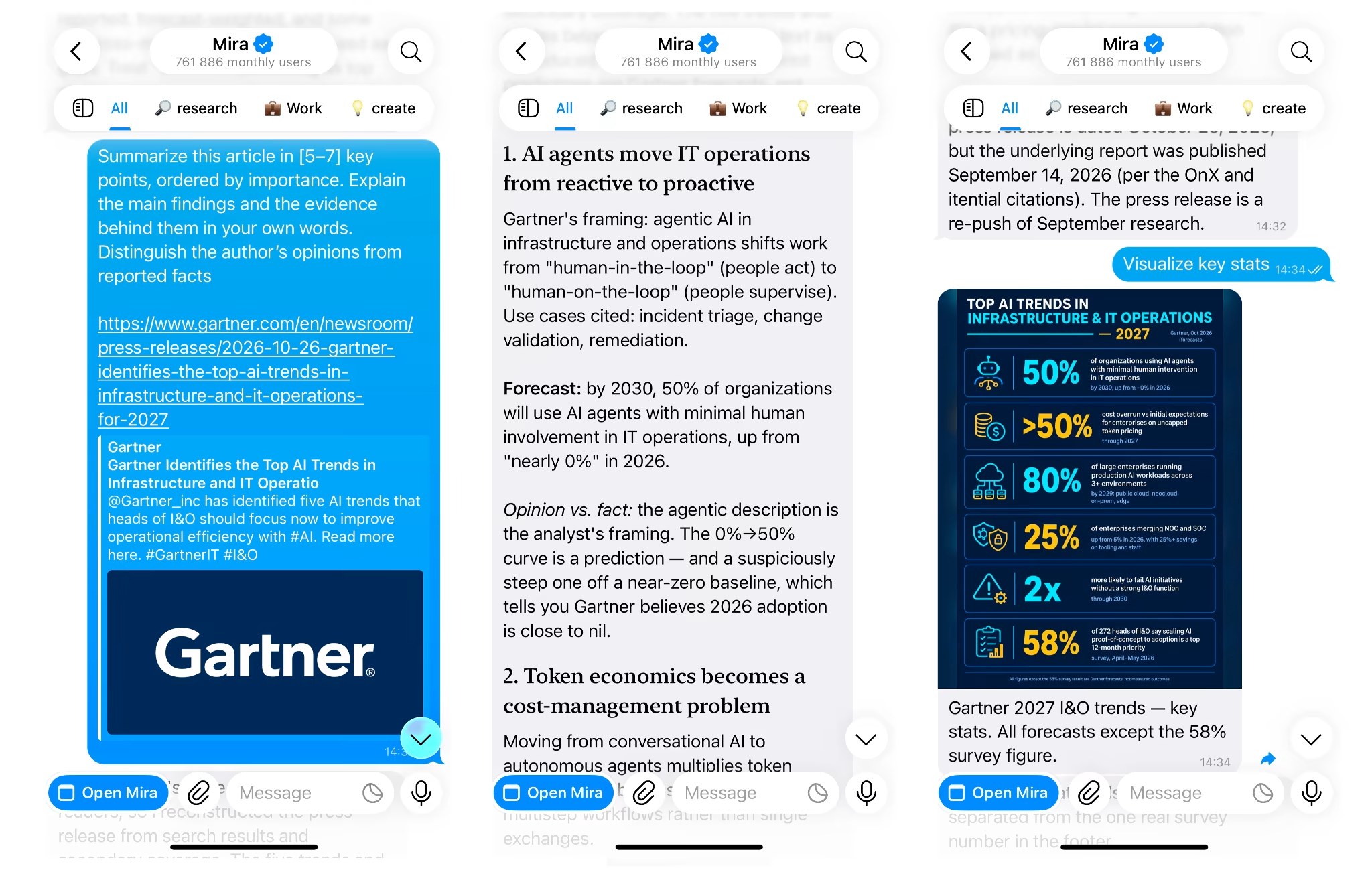
Mira is a personal AI agent that lives inside your messenger. It remembers your preferences across conversations, connects to 1,000+ apps, and performs tasks for you.
For summaries, that means you skip the extra app and the copy-paste. The article, the summary, and the follow-up questions stay in the same thread, and the result can go straight to where you keep your notes and ideas — Notion, Google Docs, Trello.
Here's what that looks like day to day:
- Forward and summarize: Forward a message with an article, or send the document to @mira, then use the key points prompt from above.
- Set your format once: Mira remembers stated preferences across conversations. Tell it "always give me the key takeaways and the evidence behind them," and you don't have to paste that every time.
- Catch up on a group: Add Mira to a group chat and ask what the thread covered while you were away, who said what, and what was decided.
- Save what matters: Ask Mira to save an outline to Notion or Google Docs. It asks for your approval before writing anything.
- Use voice: Send a voice note: "Summarize this in five bullets and highlight the most important findings."
Mira follows the same rules as any summarizer, so the preserve and check steps above still apply. What it removes is the copy-paste between apps.
Is an AI article summarizer free to use?
Most are, at least for basic use. Free tiers usually limit summary length, the number of summaries per day, or file uploads. Free tools that summarize article text with AI handle news pieces and blog posts well.
A free AI article summarizer starts to fall short on long PDFs, bulk summaries, and saved history. Those are usually the features behind a paid plan.
Mira is free to start in your messenger, with no setup and no credit card.
Summaries you can trust start with the prompt
A good AI article summarizer saves time without changing the story. The method is the same everywhere: full text in, clear instructions, a quick check before you rely on it.
Mira brings that method into your messenger. Forward the article, get the summary in the same chat, ask follow-ups, and save it to your apps when it's worth keeping.