Summarize today's emails. What needs my attention?
Read & summarize
Catch up without reading every message. Get summaries of long threads, important updates, and emails that need a response.


Let an AI agent handle your inbox. Find important emails, draft replies, track unanswered messages, and automate repetitive tasks, all from Telegram.
Summarize today's emails. What needs my attention?
Catch up without reading every message. Get summaries of long threads, important updates, and emails that need a response.
Tell everyone waiting for the update it'll be ready Friday.
Compose new emails or reply to threads. Mira matches your tone and fills in the details.
Find Sarah's latest budget approval. What changed?
Find emails by sender, topic, or date. Get the information you need without searching through threads.
Label everything from @client.com as Priority
Sort emails by priority, apply labels, and archive messages in bulk. Keep important conversations easy to find.
Draft follow-ups for unanswered proposals
Prepare follow-ups using previous conversations. Review drafts and schedule emails to send at the right time.
Find all invoices from InfoLabs this month
Retrieve invoices, contracts, and other attachments from your emails. Get the files directly in your Telegram chat.
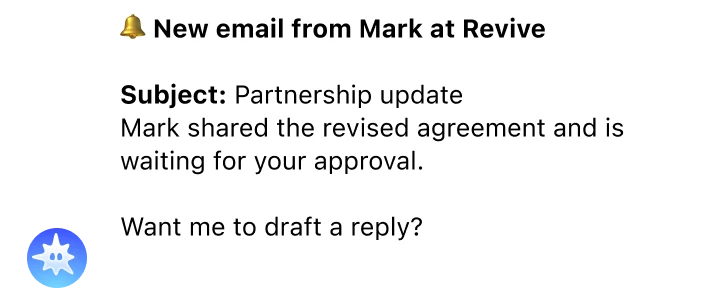

Keep track of what matters without digging through your inbox. Mira notifies you when specific people or companies email you, so you never miss an important update.
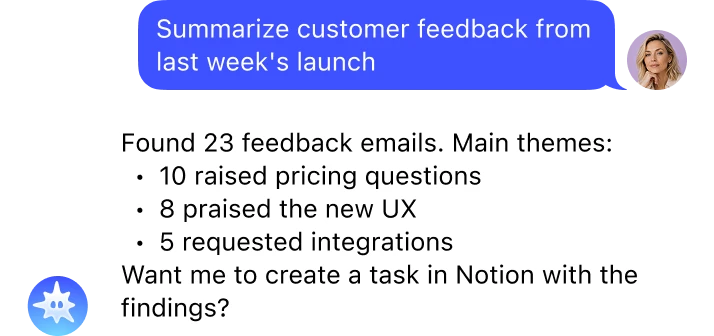

Turn emails into useful insights. Mira groups feedback, identifies recurring issues, and helps move findings into your team's workflow.
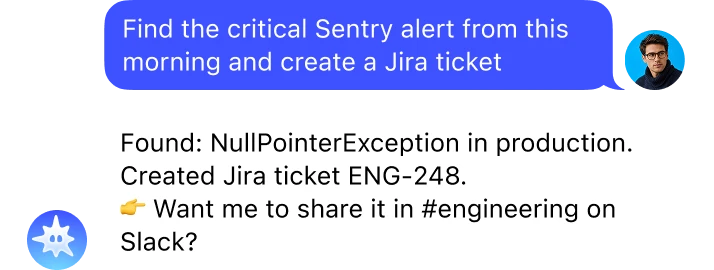

Turn alerts and bug reports into actionable tickets. Mira pulls details from Gmail and passes them to Jira or Slack without manual copy-paste.
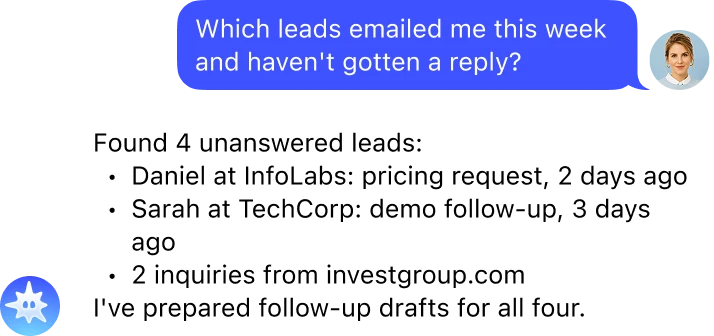

Keep important conversations moving. Find unanswered inquiries, prepare follow-ups, and avoid losing opportunities in a busy inbox.
Trigger a workflow when an email arrives. Filter by sender or keyword to organize messages or start the next step automatically.
Get notified when a key client, partner, or contact emails you.
Trigger a workflow when an invoice, contract, or report arrives. Pass it to another connected tool.
Use Gmail labels to trigger workflows. Route requests, organize incoming messages, or hand off tasks to connected tools.
Get notified when someone responds to a conversation you're waiting on. Stay on top of proposals, approvals, and pending decisions.
Get a scheduled summary of important unread emails every morning. See what needs attention before opening your inbox.
 Open Mira
Launch Mira in Telegram. No separate app to download or account to create.
 Connect Gmail
Ask Mira to connect Gmail. Follow the secure Google sign-in link, choose your account, and approve access.
Mira uses Google's OAuth 2.0 authorization. Your password isn't shared with Mira, and you can revoke access in your Google account settings.
 Start using Gmail with AI
Ask Mira to summarize emails, prepare replies, find attachments, or set up recurring workflows. Just describe what you need in plain English.





Launch @mira AI agent in Telegram and ask it to connect Gmail. Mira will send you a Google authorization link. Sign in, choose your Gmail account, and approve the requested permissions. Once connected, you can search emails, draft replies, organize your inbox, and set up automations directly from Telegram.
Yes. Mira supports Gmail triggers and scheduled workflows. You can receive daily inbox summaries, get notified about important senders, and trigger actions when emails arrive or receive replies. You can also ask Mira to organize emails, prepare follow-ups, or handle specific tasks whenever you need.
Yes. Mira can compose new emails, reply to existing threads, and send messages through your connected Gmail account. You can also ask it to prepare drafts for review or schedule emails to send later.
Mira connects to Gmail using Google's official OAuth 2.0 authorization process, so you don't share your Gmail password with Mira. You choose which account to connect and approve the requested permissions. You can revoke Mira's access at any time through your Google account settings.
Yes. Mira can combine Gmail with connected tools such as Google Calendar, Slack, Notion, and HubSpot. For example, you can ask it to create a task from an email, share a customer request in Slack, or schedule a meeting based on an email conversation.