How to Write an SOP with AI: Turn a Process Walkthrough into a Clear Procedure

The fastest way to write an SOP with AI is to explain the process once, out loud, while you do it. Then give that walkthrough to AI with a structured prompt and have someone who has never done the task test the draft. The expert talks for a few minutes, AI handles the structure, and a fresh reader catches what's missing.
Most procedures never get written because the knowledge sits in one person's head and typing it up takes hours. AI handles the writing. It doesn't remove the need to capture the real process, which is why the method below starts with a walkthrough, not a blank page.
This guide covers how to write standard operating procedures in seven steps, plus a copyable template and eight prompts you can paste as they are.
TL;DR:
- Pick one process.
- Record the walkthrough.
- Turn it into a draft with a prompt.
- Let AI ask the expert follow-up questions.
- Add roles, exceptions, and a clear end point.
- Test it on a new reader.
- Publish it with an owner and a review date.
What is a standard operating procedure?
A standard operating procedure (SOP) is a written, step-by-step guide to one recurring task, detailed enough that someone new can complete it the same way every time. It names who does each step, what they need, what to do when something goes wrong, and what "done" looks like.
A good SOP answers questions before they're asked. "How do we respond to refund requests?" becomes a page anyone on the team can follow, instead of a message to the one person who always does it.
That's the payoff: consistent results, faster onboarding for new hires, and handoffs that don't break when someone is OOO.
SOP vs process documentation vs work instructions
An SOP covers one task from start to finish. Process documentation is the broader set of records describing how a business runs, and SOPs are one part of it. Work instructions zoom into a single step in more detail.
| Document | Process documentation | SOP | Work instructions |
|---|---|---|---|
| Covers | A whole workflow or department | One repeatable task | One step inside a task |
| Detail level | Overview plus links to SOPs | Every step, role, and exception | Action by action |
| Example | Content production, from brief to publish | Publishing a blog post | Setting the canonical URL in the CMS |
Not sure which one you need? Start with the SOP. It's the level most teams are missing.
What should an SOP include?
An SOP should include a title, purpose, scope, roles, prerequisites, numbered steps, exceptions, completion criteria, and an owner with a review date.
Short, low-risk tasks can drop a few of these. Anything with handoffs or approvals needs all of them. For project handoffs, see how Mira uses AI for project managers to track task owners and deadlines.
- Title and ID: A verb-first name, like "Publish a blog post," plus a number if you keep many SOPs.
- Purpose: One sentence on why the task exists.
- Scope and trigger: What starts the process and where it ends or hands off.
- Roles and responsibilities: Who does each part, by role rather than by name.
- Prerequisites: Tools, access, files, and inputs needed before step one.
- Step-by-step instructions: One action per step, each starting with a verb.
- Decision points and exceptions: "If X, then Y" lines and who to contact when something fails.
- Completion criteria: What the finished result looks like, so nobody stops early.
- Owner, version, and review date: One person responsible for accuracy, plus a revision history.
Match the detail to the risk. A checklist is enough for tidying a shared drive. A client-facing or compliance-related task needs the full set.
Why write SOPs with AI (and where it falls short)
AI is good at turning messy explanations into structured steps. It's bad at knowing what your team actually does. Treat it as the writer and formatter, not the source of truth.
| AI handles it well | Needs a human |
|---|---|
| Turning a rambling walkthrough into numbered steps | Knowing the real thresholds, tools, and shortcuts |
| Keeping the format consistent across every SOP | Deciding whether the process itself is right |
| Spotting gaps and missing exceptions | Testing the SOP on a real task |
The failure mode is easy to spot. Ask for "an SOP for onboarding a contractor" with no context, and you get a procedure that fits every company and none in particular. That's what AI process documentation looks like without source material: generic steps, invented details, and nothing your team would recognize.
The quality of the input determines the quality of the output. A five-minute walkthrough from the person who does the task beats any prompt written from memory.
Three ways to write an SOP with AI
There are three common routes, and the right one depends on where the process happens.
| Route | Best for | Trade-off |
|---|---|---|
| Screen-recording AI SOP generator | Click-by-click software tasks | Weak for work that happens in calls, chats, or away from a screen |
| AI built into your wiki or knowledge base | SOPs that live in one shared library | Only as good as the notes you paste in |
| A general AI assistant with a walkthrough and a prompt | Processes explained in voice notes, calls, or group threads, and tasks that span several tools | You set the structure yourself (the templates below handle that) |
If the process is mostly clicking through one app, a dedicated AI SOP generator with screen capture is a reasonable pick. If the process lives in conversations, start where the conversation already is.
Mira is an AI agent that works inside your messenger, so the walkthrough doesn't need a separate tool. Send Mira a voice message, forward the thread where someone explained the process, or tag Mira in the original chat. Mira turns it into a draft SOP and can save the final version to Google Docs or Notion once you've connected them.
How to write an SOP with AI in 7 steps
Writing an SOP with AI follows the same logic as writing one by hand: capture the real process, structure it, test it, and keep it current.
The difference is that AI does the drafting and formatting, so the expert's time goes into explaining and reviewing.
1. Pick one process and define its scope
The first decision in how to create an SOP is scope: choose a single task. "Publishing a blog post" is a scope. "Content marketing" is a category that will turn into ten SOPs.
Write three sentences before anything else:
- Purpose: Why the task exists.
- Trigger: What starts it, such as "a draft is approved in the content tracker."
- Definition of done: Where it stops or hands off, such as "the post is live and shared in the team channel."
Then decide who will read it. A new hire needs more detail than a teammate covering for someone for a week.
2. Capture the walkthrough as the process really happens
Record the person who does the task while they do it. Don't write from memory or meeting notes. People skip the steps they consider obvious, and those are exactly the steps a new user needs.
If you're working out how to document a process for the first time, this is the step that matters most. Pick the capture format that fits the work:
- Voice note while working: Best for tasks done across several tools or away from a desk.
- Recorded call with the expert: Best when you need to ask questions as the expert walks through the process.
- Screen recording: Best for click-by-click software tasks.
- Rough bullet list: A fallback when nothing else is possible.
Ask the expert to say why they do each step and what they do when something goes wrong. The reasons and the exceptions are what generic SOPs leave out.
With Mira, capture happens in the chat you already use. Send Mira a long voice message describing the process, forward the voice notes or messages where a teammate explained it, or tag Mira in the original group chat. Mira transcribes the audio and uses it as source material for the draft.
3. Turn the walkthrough into a first draft
Paste the walkthrough into an AI assistant with a prompt that sets the structure and the rules. The most important rule is "don't invent steps." Ask the AI to mark anything unclear with [VERIFY] instead of guessing.
🟢 Prompt template 1: Walkthrough to SOP draft
The first draft won't be finished. It will have a clear structure, which is often the most time-consuming part to create manually.
4. Let AI interview the expert to fill the gaps
Ask AI to identify gaps and interview the expert one group of questions at a time. As the expert answers, AI updates the SOP and resolves the missing details.
🟢 Prompt template 2: Gap interview
This is faster than a review meeting. The expert answers specific questions in a few minutes instead of rereading a whole document.
In Mira, the draft and the answers stay in one chat. Mira keeps the context, so the expert can reply throughout the day without anyone having to paste the draft again.
5. Add roles, exceptions, and completion criteria
Every step should be one action, done by one role, starting with a verb. "Check the links and fix any broken ones" is two steps. Split it.
Then replace vague words with rules. "Get approval if needed" becomes "If the post mentions pricing, get approval from the product lead before publishing." Add a "done when" line at the end so the reader knows when to stop.
🟢 Prompt template 3: Clarity and exceptions pass
6. Test the SOP on someone who has never done the task
Give the SOP to someone who understands the work but didn't write it. Ask them to complete the task using only the document, and stay quiet. Every question they ask points to a missing detail.
You can run a quick pre-test with AI first. It won't replace a real reader, but it catches obvious gaps before you spend a colleague's time.
🟢 Prompt template 4: Fresh-eyes test
7. Publish it where people work and set a review date
Store the SOP where the team already looks, name one owner, and set a review date. An SOP nobody can find is the same as no SOP.
Ask Mira to save the final version to Google Docs or to your team's wiki through the Notion integration. Mira asks for your permission before it writes to a connected app, so nothing lands in a shared space without your approval.
You can also ask Mira to set a scheduled task that reminds the owner to review the SOP in three months.
Worked example: from a voice note to a finished SOP
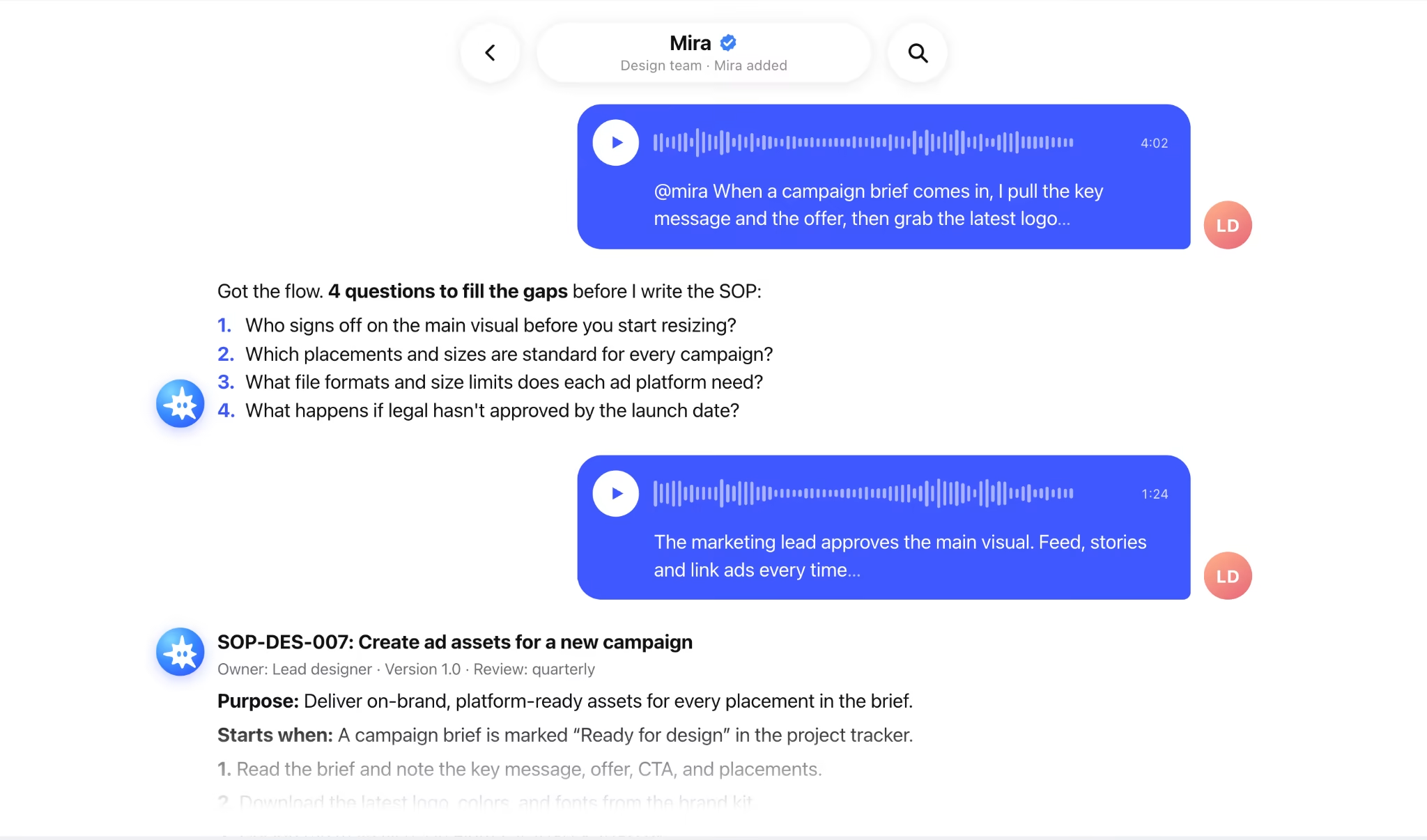
Here's the full method applied to one task, "Create ad assets for a new campaign."
1. The walkthrough. A lead designer tags Mira in the team chat and records a four-minute voice message:
"When a campaign brief comes in, I pull the key message and the offer, then grab the latest logo and colors from the brand kit. I design the main visual in Figma first, then resize it for every placement, usually feed, stories, and a couple of banner sizes. Headline and CTA come straight from the brief. If there's a discount or any legal claim, legal has to see it before anything goes out. Then I export everything, drop it in the campaign folder, and ping the media buyer."
2. The gap questions Mira sends back.
- Who signs off on the main visual before you start resizing?
- Which placements and sizes are standard for every campaign?
- What file formats and size limits does each ad platform need?
- What happens if legal hasn't approved by the launch date?
3. The finished SOP (excerpt).
SOP-DES-007: Create ad assets for a new campaign
Owner: Lead designer · Version: 1.0 · Review: quarterly
Purpose: Deliver on-brand, platform-ready assets for every placement in the brief.
Starts when: A campaign brief is marked "Ready for design" in the project tracker.
Ends when: Final assets are in the campaign folder and the media buyer has confirmed receipt.
- Read the brief and note the key message, offer, CTA, and placements.
- Download the latest logo, colors, and fonts from the brand kit.
- Design the main visual in Figma at 1080 × 1080 px.
- Send the main visual to the marketing lead for approval before resizing.
- Resize the approved visual for each placement: 1080 × 1080 (feed), 1080 × 1920 (stories), 1200 × 628 (link ads).
- Add the headline and CTA from the brief, keeping text inside each platform's safe zone.
- If the copy includes a discount or a legal claim, send it to legal. If there's no approval 2 working days before launch, flag it to the marketing lead.
- Export static assets as PNG and motion assets as MP4, under each platform's file size limit.
- Upload to the campaign folder using the naming format CampaignName_Placement_Size_v1.
- Message the media buyer with the folder link.
Done when: every placement in the brief has an approved, correctly sized file in the folder, and the media buyer has confirmed.
Four minutes of talking and four answers produced a procedure any designer on the team can follow on their first campaign.
Standard operating procedure template (copy and fill in)
Use this standard operating procedure template as the skeleton for every SOP your team writes. Paste it into Prompt template 1 so the AI fills it from your walkthrough, or fill it in by hand.
🟢 SOP template: Ready-to-use structure
Keep the section order the same across every SOP. Readers learn where to look, and AI fills a familiar structure more reliably.
Step-by-step works for most tasks, but not all. Pick the format that matches how the task runs:
| Format | Use it when | Example |
|---|---|---|
| Step-by-step | The task runs in a straight line | Publishing a blog post |
| Hierarchical | Steps have sub-steps or several roles | Onboarding a new contractor |
| Flowchart | The task branches at several decision points | Handling a refund request |
| Checklist | Completeness matters more than order | Pre-launch checks for a campaign |
SOP prompt kit: four more templates to copy
These prompts cover tasks beyond creating the first draft: pulling an SOP out of a conversation, shrinking it to a checklist, updating it, and rewriting it for a different reader.
🟢 Prompt template 5: Turn a meeting or group thread into an SOP
🟢 Prompt template 6: Turn an SOP into a one-page checklist
🟢 Prompt template 7: Update an SOP after a process change
🟢 Prompt template 8: Rewrite an SOP for a different reader
With Mira, you can skip copying and pasting for most of these tasks. Forward the thread or tag Mira in the chat, then send the prompt as your next message.
Common mistakes when writing SOPs with AI
Most weak AI-written SOPs fail for the same five reasons, and all five are fixable before publishing.
- No source material: A one-line prompt produces a generic procedure. Start from a real walkthrough.
- Publishing the first draft: AI drafts read well even when they're wrong. Test before you share.
- Compound steps: "Review and approve if appropriate" hides two actions and an undefined rule. Split it and define the rule.
- The ideal process instead of the real one: If the team skips a step in practice, the SOP should say so, or the process should change.
- No owner: Without one named person, nobody notices when the SOP goes stale.
How to keep SOPs up to date
Review SOPs on two kinds of triggers: a date on the calendar and a change in the process. The calendar catches slow drift. The change trigger catches updates that can't wait.
- Calendar: Check high-use SOPs every quarter and the rest at least once a year. Regulated industries usually set their own cycle, often every one to two years.
- Change: Update right away when a tool changes, a role moves, a mistake repeats, or someone asks a question the SOP didn't answer.
Use Prompt template 7 for the update itself. It keeps the steps that didn't change and writes the revision history for you.
Mira can handle the calendar part. Ask it to set a scheduled task, such as "Every first Monday of the quarter, remind me to review the campaign ad assets SOP," and the reminder arrives in your chat.
Turn your next walkthrough into an SOP
Knowing how to write an SOP comes down to one habit: capture the real process first, then let AI handle the structure. The expert explains the process once, a new reader tests the SOP, and the owner keeps it current.
Mira makes the first step easy. Send a voice message, forward the thread, or tag Mira in the chat where the process was explained, and get a draft SOP back in the same conversation.