One AI agent.
Every tool in reach.

Connect Mira to 1,000+ tools and get work done across your stack from one Telegram chat, no tab switching, dashboards, or complicated setup.

  • 1,000+
    Tools & services
  • 1M+
    Users in Telegram
  • <60 sec
    To connect any tool
HOW IT WORKS

Your entire stack,
controlled from Telegram

Connect any tool with a quick sign-in and describe what you need in plain language. Every step is easy to track.
1

Connect your tools

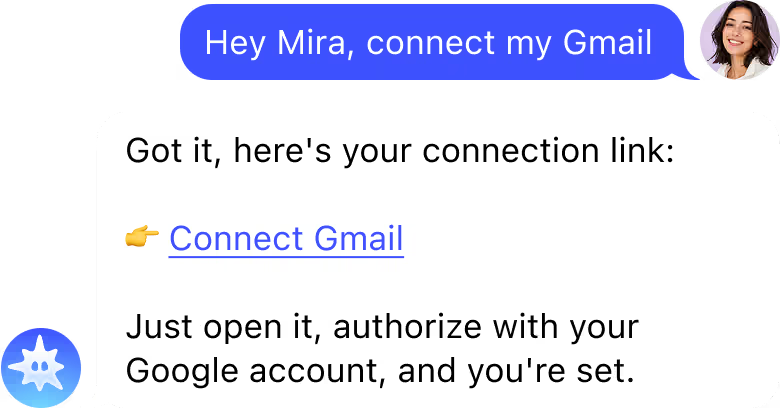
Ask Mira to connect any app. Tap the link it sends, complete a quick sign-in with OAuth, and you’re ready.

OAuth
One click
2

Just ask in Telegram

Send a message or voice note in plain language. Ask Mira to find information, complete a task, or run something on a schedule.

Voice or text
Recurring tasks
3

Mira does the work

Mira completes the tasks across connected tools and brings the result back to chat. Every step is traceable, and sensitive actions wait for your approval.

You stay in control
Real actions

ALL INTEGRATIONS

If your team uses it,
Mira connects to it

Browse 1,000+ tools Mira can work with. Native integrations have full read/write access. Managed connectors cover everything else.
  • Reddit
    Marketing & Social Media
  • Facebook
    Marketing & Social Media
  • Linkedin
    Marketing & Social Media
  • Active campaign
    Marketing & Social Media
  • ActiveTrail
    Marketing & Social Media
  • Ahrefs
    Marketing & Social Media
  • AimTell
    Marketing & Social Media
  • Amcards
    Marketing & Social Media
  • Beamer
    Marketing & Social Media
  • Benchmark email
    Marketing & Social Media
  • Bigmailer
    Marketing & Social Media
  • Bitly
    Marketing & Social Media
  • Brandfetch
    Marketing & Social Media
  • Brevo
    Marketing & Social Media
  • Buffer
    Marketing & Social Media
  • BulkPublish
    Marketing & Social Media
  • Campayn
    Marketing & Social Media
  • Cardly
    Marketing & Social Media
  • ClickSend
    Marketing & Social Media
  • Constant Contact
    Marketing & Social Media
  • ContentStudio
    Marketing & Social Media
  • Crustdata
    Marketing & Social Media
  • Curated
    Marketing & Social Media
  • Customerio
    Marketing & Social Media
  • Cutt ly
    Marketing & Social Media
  • Demio
    Marketing & Social Media
  • Doppler marketing automation
    Marketing & Social Media
  • Dripcel
    Marketing & Social Media
  • Dynosend
    Marketing & Social Media
  • Emailoctopus
    Marketing & Social Media
  • Emaillistverify
    Marketing & Social Media
  • Endorsal
    Marketing & Social Media
Partner integrations

Become a Mira partner

Tell us about your product and we’ll be in touch about building a native integration. We usually reply within 2 business days.

Don’t see your tool?

If it supports MCP, connect it to Mira and use its tools and actions directly from chat.
ALL SOLUTIONS

Find your role.
Connect the right tools.

Explore the integrations, skills, and workflows built for your profession. See which tools Mira connects to, what it can do, and how it works in real conversations.

Founders & CEOs

Know your business pulse — metrics, updates, revenue — without opening a single dashboard.

Marketers

Pull ROAS, CPL, and leads in one message. No tab switching, no morning dashboard ritual.

Sales Professionals

Know your pipeline the moment you wake up. Log calls, update deals, send follow-ups — from Telegram.

Agency Specialists

Run 10 client accounts without 10 open tabs. Reports, approvals, and updates — one bot.

E-commerce

Revenue, orders, returns, ad spend — your store at a glance, wherever you are.

Small Business Owners

Get analyst-level answers without the analyst overhead.

Developers

Check failed builds, blocked PRs, deploys, and new errors without leaving your flow.

Project Managers

AI productivity assistant to see what moved, what stalled, and who needs a nudge across Jira, Linear, and Notion.

IT & DevOps

AI for IT operations to incident response, alert triage, and runbook delivery. It extends AI for business operations to the systems that keep the company running.

Designers

Collect feedback, Figma comments, and asset requests in one place so you can stay focused on the work.

Traders & Web3

Check news, prices and market changes, then set alerts for funding, price, and risk.

Finance & Accounting

AI solution for finance teams to pull revenue and expenses, track unreconciled items, and follow up on overdue invoices.

Real Estate Agents

Virtual AI assistant to reply to new leads, books viewings, updates the CRM, and follows up automatically. It is an AI agent for business automation built around a fast-moving pipeline.

Consultants

Research, draft deliverables, and send client updates in your format - so more time goes to analysis.

Creators

Plan, draft, generate, and schedule content while keeping sponsor conversations and deadlines moving.

Social Media Managers

Get a daily performance briefing, draft the next posts, and surface comments that need a human response.

Podcasters

Coordinate guests and sponsors, then turn every episode into show notes, clips, and follow-up content.

Researchers

Search, summarize, organize, and cite sources while keeping track of what you have already covered.

HR & Recruiters

Works as an AI agents for business automation: coordinates interviews, chases feedback, and keeps onboarding moving without managing every step manually.

Customer Success

Spot usage drops and quiet accounts early, then draft the right check-in before renewal.

Legal Professionals

Track deadlines, search contracts, and surface clauses or renewals before they become a problem.

Healthcare

Coordinate scheduling, reminders, and administrative workflows so staff spend less time switching systems.

Teachers & Educators

Draft lessons, adapt materials, and write parent updates in the gaps between classes.

Coaches

Remember client commitments, send timely check-ins, and keep plans and rescheduling organized.

Freelancers

Send invoices, follow up on late payments, and keep clients updated without adding more admin.

Ready to connect your stack?

Multiple accounts?
Connect them all

Connect as many tools and accounts as you need: your work and personal calendars, multiple inboxes, or separate accounts for the same app. Each connection stays separate, so you can use the right account for every task.

SECURITY & PRIVACY

Your tools. Your data.
Your control.

Here’s how Mira protects your connections and keeps you in control of what it can access and do.

OAuth only, no shared passwords

Connect securely through OAuth. Mira never sees or stores your password, and you can disconnect any tool at any time.

You approve sensitive actions

Mira asks before sending messages or making other sensitive changes. Review the action, then approve it.

Encrypted in transit and at rest

All data is encrypted end-to-end. Your integration credentials and conversation history are stored encrypted, inaccessible to third parties.

Your data never trains AI models

Everything you share, Notion docs, Stripe data, GitHub code, stays yours. Mira doesn’t sell your data, share it for advertising, or use it to train AI models.

BLOG

From the Mira blog

FAQ

  • How do I connect a tool to my AI agent?

    Ask Mira to connect the tool in Telegram. Mira sends you a secure OAuth sign-in link. Complete the authorization, and the tool is ready, no code or webhooks required. You can also connect any tool that supports MCP.
  • Which tools does Mira integrate with?

    Mira connects to 1,000+ tools, including Gmail, Google Calendar, Notion, Jira, Linear, GitHub, Slack, HubSpot, Stripe, and Google Sheets. Native integrations support deeper read and write actions, while managed connectors extend read access across the rest of your stack.
  • How long does it take to connect a tool to Mira?

    Most tools connect in under a minute. The exact time depends on the service and the permissions it requires.
  • Can I connect multiple accounts of the same tool?

    Yes. There’s no cap on the number of tools or accounts you can connect. You can link separate work and personal calendars, multiple inboxes, or several accounts from the same service.
  • Can Mira perform write actions, not just read data?

    Yes. Depending on the integration, Mira can create, send, update, and manage information. Actions such as sending an email wait for your approval.
  • Does Mira store my data from connected tools?

    Mira stores only the information needed to keep your connections and conversation context working. Your data and credentials are encrypted in transit and at rest, and your data is not used to train AI models.
  • What if my tool isn’t in the integration directory?

    If your tool supports MCP, you can connect it to Mira and use its available tools and actions directly from chat.

Still have questions? Just ask Mira

The fastest way to understand what Mira can do is to try it. Open the app — it takes 10 seconds
Message Mira
  • Zero setup
  • No credit card
  • Works in your messenger