AI Sticker Generator for Telegram: Make Custom Stickers Without Leaving the Chat
You can make custom AI stickers for Telegram in a few minutes using either a text prompt or a photo. Describe what you want, and an AI sticker generator can turn it into a sticker-style image with a clear subject, clean background, and the right look for a Telegram sticker pack.
Some tools generate stickers from scratch, while others turn photos, selfies, pets, or existing images into sticker designs. The workflow varies too: some work directly in Telegram, while others require you to generate and download the image elsewhere before adding it to a pack.
This guide covers how AI sticker generators work, which free options are worth trying, and how to create a full Telegram sticker pack from a photo or text description.
What an AI sticker generator does
An AI sticker generator turns a photo or a written description into a sticker: it generates the image, removes the background to a transparent PNG, and sizes it to the 512×512 format Telegram expects. That's the whole job.
There are two inputs, and they work in opposite directions:
- Text to sticker AI takes a line like "a corgi in a business suit looking stressed" and draws it from nothing.
- Photo-based generation takes your face, your pet, or your logo and redraws it in a chosen style, then strips the background behind it.
What separates a good AI-generated sticker from a bad one comes down to three things: style quality, how cleanly the background comes off, and whether the output lands in Telegram directly or makes you upload it by hand. That last one is where most tools quietly cost you time.
Best AI sticker generators for Telegram in 2026
Most AI sticker makers are a separate app or website, which means you generate the sticker in one place and then move it to Telegram yourself. You open the tool, write your prompt, download the PNGs, switch to Telegram, open the @Stickers bot, and upload each file.
The sticker takes ten seconds. The shuffling around it takes longer.
Mira closes the first half of that loop. It's an Telegram AI agent that generates the artwork right inside your chat, no tab to open, no separate site, no ai sticker maker app to install.
You add stickers and start using, the part that usually sends you to a third-party site now happens in the conversation you're already in. That's what "generate a sticker in the messenger" actually means in practice.
Free AI sticker generators
Free AI sticker generators are usually enough to test the format, make a few stickers, or build a small personal pack. Most tools let you generate from a text prompt or photo without paying, but free plans often come with limits.
- Daily generation caps: Free tiers may limit how many stickers you can create each day.
- Watermarks: Some tools add branding to downloaded images unless you upgrade.
- Lower resolution: Free exports may be smaller or less detailed than paid ones.
- Limited styles or models: More advanced generation and editing options are often reserved for paid plans.
- Manual export: Many free AI sticker makers only generate the image, so you still need to download it and add it to Telegram yourself.
For a one-off sticker pack, these limits may not matter much. If you're creating a larger branded pack, need consistent quality, or want to generate stickers regularly, paid plans can be more practical.
How to turn a photo or selfie into stickers
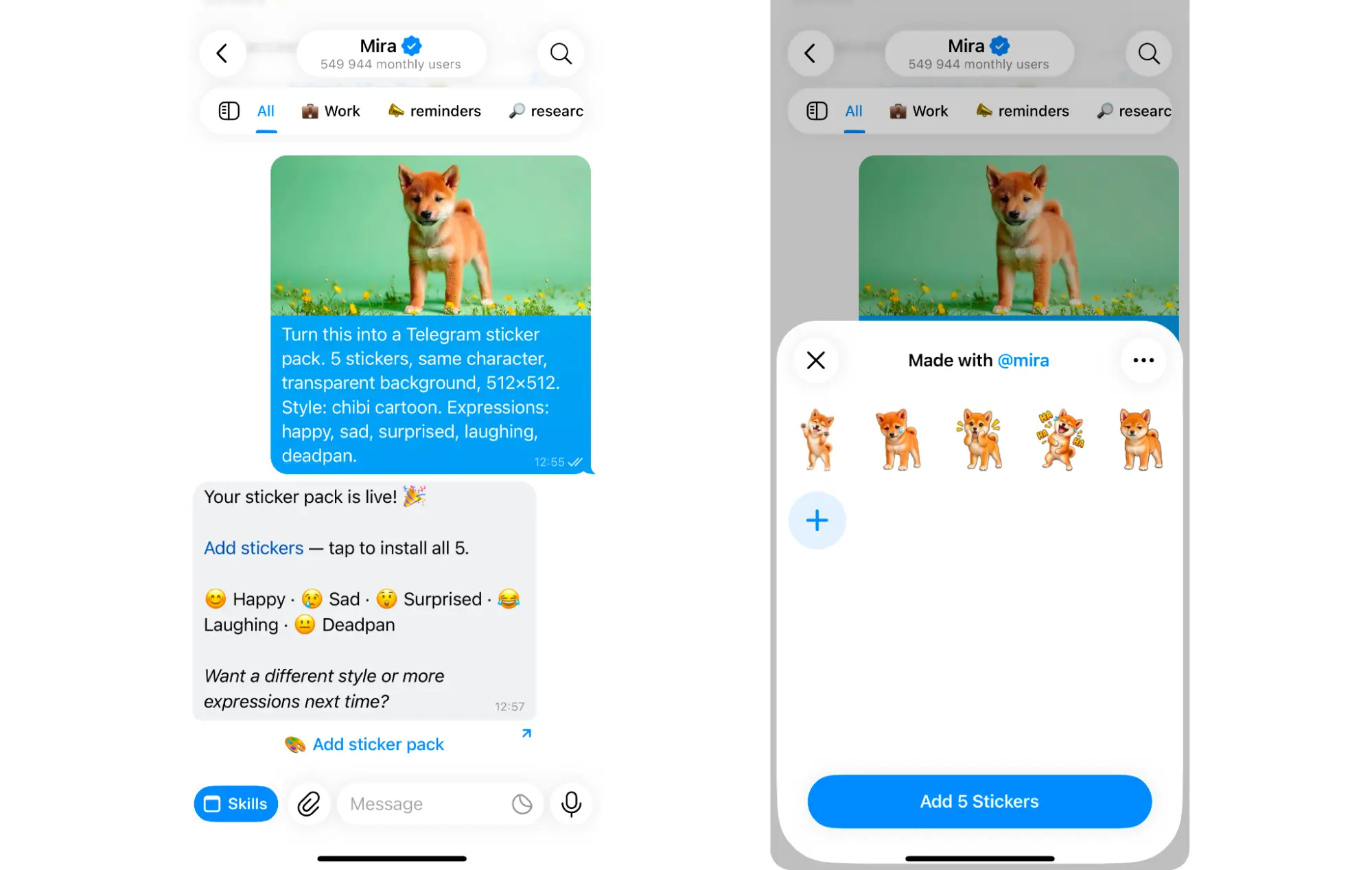
You can turn a selfie, pet photo, logo, or object into a Telegram sticker pack in a few steps:
- Choose a clear photo: Use an image with one main subject, good lighting, and as little background clutter as possible.
- Pick a sticker style: Cartoon and chibi styles work well for faces, while flat illustration is usually better for logos and objects.
- Describe what you want changed: Ask the ai sticker maker from photo to simplify the image, exaggerate expressions, or keep specific details such as glasses, a hat, or a brand colour.
- Request several stickers at once: Ask for five or six expressions or poses so you get a consistent set instead of one isolated image.
- Specify a transparent background: This helps the result look like a proper sticker rather than a cropped photo.
- Review for consistency: Check that the face, colours, clothing, and recurring details stay similar across the whole pack.
🟢 Prompt — Sticker pack from photo
How to create stickers from a text description
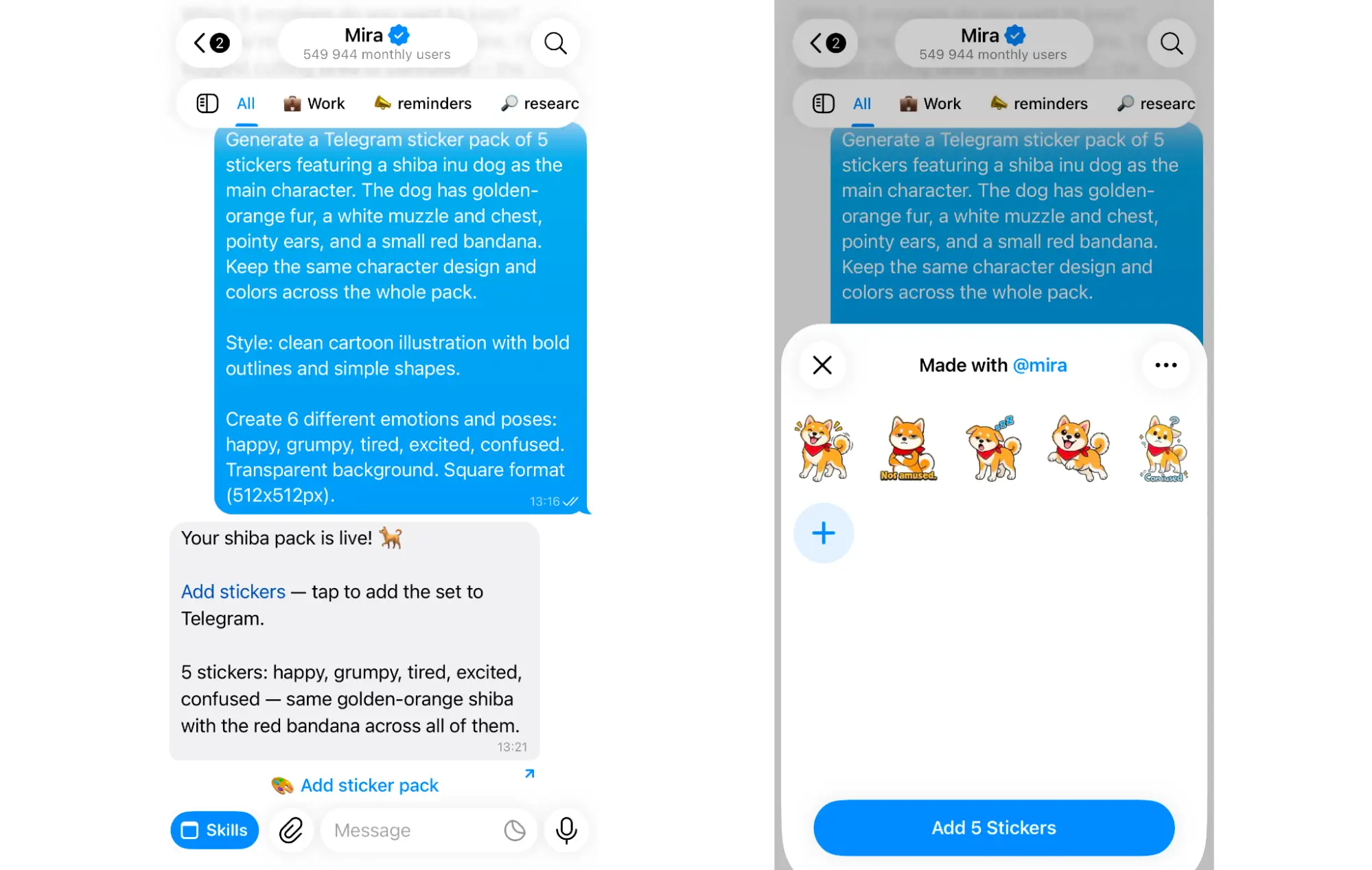
You don't need a photo to make an AI sticker pack. A detailed text prompt is enough.
- Describe the character: Specify who or what should appear, such as a cat, robot, mascot, or fictional person.
- Choose a style: Add terms like cartoon, chibi, 3D, anime, or flat illustration.
- List the expressions or poses: Ask for a set such as happy, angry, surprised, laughing, tired, and celebrating.
- Keep key details consistent: Mention recurring elements like clothing, colors, glasses, or accessories.
- Ask for a transparent background: This makes the images easier to use as Telegram stickers.
🟢 Prompt — Sticker pack from description
Both routes get you the same place: a set of AI-generated stickers in one consistent style, ready to publish.
Animated AI stickers: what’s actually possible in 2026
You can create animated Telegram stickers with AI, but the process is still less straightforward than making static ones. Static sticker generators are widely available and usually produce good results in seconds. Animated stickers often require an extra animation or conversion step before they are ready for Telegram.
Telegram supports animated stickers in formats such as TGS and WEBM, while many AI tools generate GIFs or videos instead. That means you may need a dedicated animation tool or converter to get the final file into a Telegram-compatible format.
For most sticker packs, static AI stickers are still the simpler option. Animated stickers make more sense when movement is an important part of the idea, such as reactions, gestures, or character animations.
How to create and publish a Telegram sticker pack
Once your sticker images are ready, turning them into a shareable Telegram pack takes three steps:
- Generate the stickers: Start with a text prompt or upload a photo, then ask the AI to create five or six stickers in the same style. Keep recurring details, colors, and character features consistent across the set.
- Prepare the files: Save each sticker with a transparent background. For static Telegram stickers, use PNG or WebP and keep the image within Telegram’s size requirements.
- Publish the pack in Telegram: Open Telegram’s official @Stickers bot, create a new pack, upload each sticker, and assign an emoji to it. Once the pack is complete, Telegram gives you a shareable t.me/addstickers link.
Before you start, check the current Telegram requirements for sticker dimensions, file size, and supported formats. Meeting those specs upfront saves you from having to resize or re-export the images later.
Once published, anyone with the link can add the full sticker pack to Telegram in one tap.
AI sticker ideas that work well
The best sticker packs usually have a clear theme and enough variety to use in everyday chats. It also helps to generate the full set at once so the style stays consistent.
- Reaction stickers: Create common reactions like happy, confused, facepalm, laughing, angry, tired, and thumbs-up.
- Selfie packs: Turn one clear selfie into a set of expressions and poses while keeping the same hairstyle, clothes, and facial features.
- Couple or friend packs: Generate two-person stickers for private chats or group conversations.
- Pet stickers: Use a clear pet photo and recreate it across different moods, poses, and reactions.
- Brand or channel mascots: Build a recurring character for a Telegram channel, community, or team from a short visual brief.
- Custom emoji: The same character or visual style can also be adapted into a matching custom emoji set for Telegram.
🟢 Prompt — Character mascot sticker pack
Why make stickers with Mira
Mira is an AI creative tool that works inside your messenger. To make stickers, send a photo or describe what you want, then ask Mira to generate a set in one consistent style. You can keep refining it in the same chat by changing expressions, colors, details, or adding more variations.
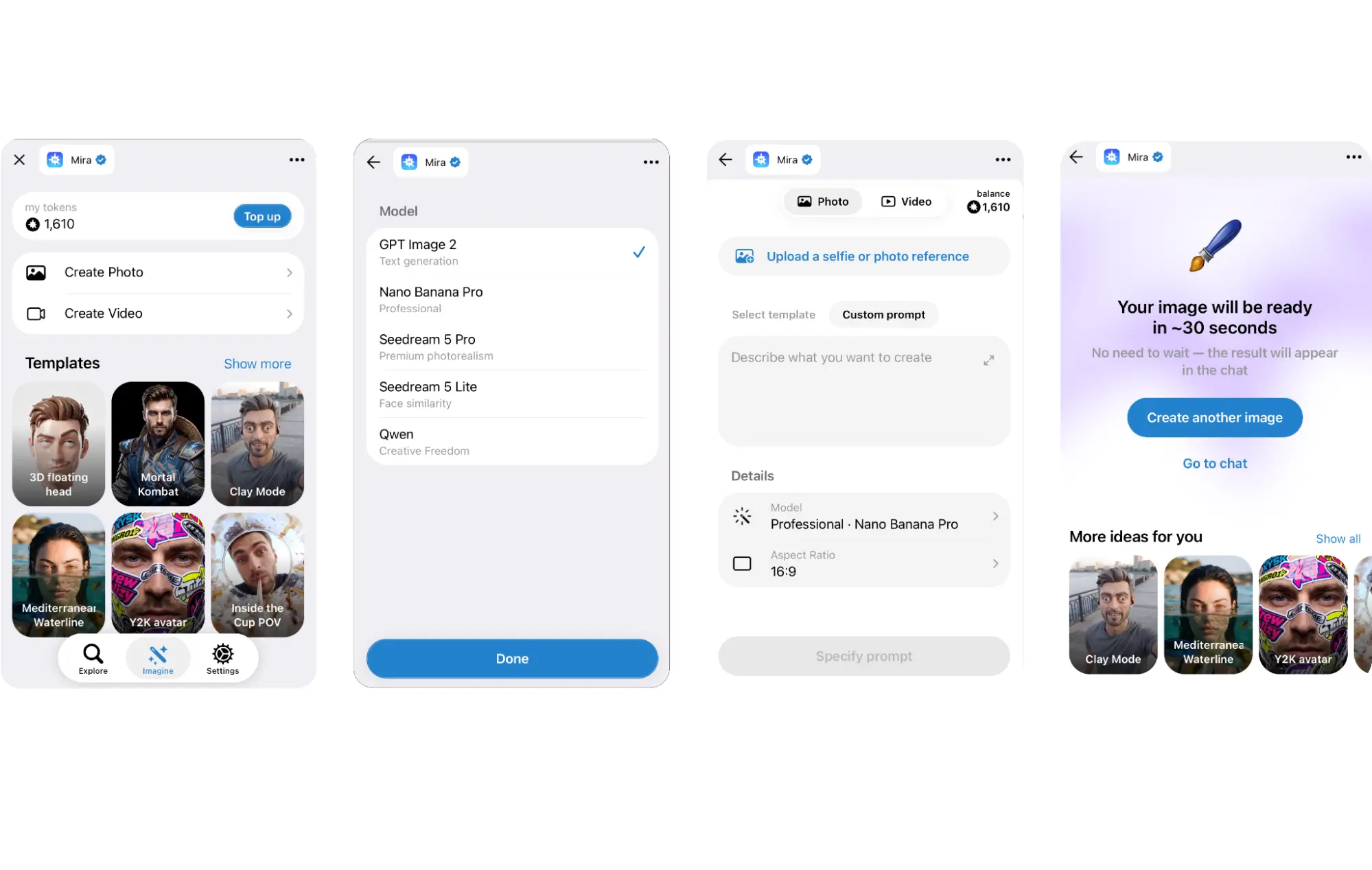
For creators, stickers are just one part of what Mira can do. It can also generate and edit images, create video, write captions and scripts, and make music and voice content. For visual work, Mira can route tasks across 10+ models, including GPT Image 2, Nano Banana, Seedream, Qwen, Seedance, Kling, Dreamactor, and Omnihuman, depending on what you’re creating.
It can also help with the work around content creation. Mira can repurpose one idea into multiple formats, prepare posts for approval, schedule recurring content, and run saved routines. It connects with tools like Notion, Google Drive, Figma, Airtable, and 1,000+ other integrations, so creation and publishing can stay in the same workflow.