


The best AI productivity tools in 2026 are the ones that save time on work you already do: writing, research, meetings, project management, scheduling, and repetitive admin.
The biggest shift is from tools that can handle multi-step tasks and take action across other apps. And the gains are real: Microsoft found that 66% of AI users spend more time on high-value work, while OpenAI reports that enterprise users save 40-60 minutes per active day on average.
In this guide, we’ll compare the AI productivity tools worth using in 2026, what each one is best at, and how to get more from them than basic prompting. We’ll cover writing, research, meetings, project management, automation, and AI agents, with practical examples of where each actually saves time.
What makes an AI productivity tool worth using?
The best AI productivity tools do three things well: they fit into your existing workflow, reduce the number of handoffs between apps, and retain enough context that you don't have to start from scratch every time.
If a tool saves 10 minutes on a task but adds five minutes of setup, prompting, and copying results elsewhere, the productivity gain disappears quickly.
1. Works where you already are
The AI tools for work productivity that tend to stick are available where the work actually happens: your inbox, browser, calendar, project manager, or team chat. Integrations matter here.
A tool that can read the relevant context and work with the apps you already use requires less setup than a standalone AI dashboard that depends on constant copy-pasting.
2. Handles the handoffs
Generating an answer is only part of most workflows. The useful tools can do something with it: turn meeting notes into tasks, add a deadline to a calendar, update a project, send a follow-up, or pull information from another app.
This reduces both manual steps and context switching, instead of simply making one isolated step faster.
3. Memory that carries over
If an AI forgets your role, preferences, projects, and previous decisions, you have to rebuild that context in every prompt. Persistent memory makes repeated workflows faster and more consistent. The best systems also distinguish between long-term preferences and task-specific context, so they remember useful information without treating every past conversation as equally relevant.
Get those three right and AI becomes part of the workflow rather than another tool to manage. That's a better test of productivity than how impressive the model looks in a one-off demo.
Best AI tools for productivity in 2026 by category
There's no single winner. The best AI tools for productivity 2026 are the ones matched to a specific job, and the table below sorts seven of them by category so you can pick on fit rather than hype.
Note the free tiers closely, because that's where the real trade-offs hide, especially for ai tools for business productivity where per-seat pricing adds up fast.
| Tool | Category | Best for | Free tier |
|---|---|---|---|
| Notion AI | Docs & notes | Turning messy notes into structured pages | Limited AI trial, then a paid add-on |
| Mira | All-in-one messenger agent | Running tasks end to end from your messenger | Free plan; Pro and Pro Max paid |
| Motion | Time blocking | Auto-scheduling tasks onto your calendar | No free plan; 7-day trial, card required |
| Otter.ai | Meeting notes | Live transcription and summaries | Free: 300 minutes/month, 30 min per call |
| Grammarly | Writing | Grammar, tone, and full-sentence rewrites | Free: grammar plus 100 AI prompts/month |
| Reclaim.ai | Calendar | Protecting focus time and habits | Free "Lite": 1-week scheduling range, 1 calendar |
| Zapier | Automation | Wiring apps into no-code workflows | Free: 100 tasks/month, 2-step Zaps only |
Most of these do one job well. Mira sits on the last row because it covers several of the jobs above from one chat, which is the point of a messenger-native agent rather than a stack of single-purpose apps.
🟢 Prompt to plan your day
Plan my day for [date]. Here's what I need to get done: [list tasks]. My energy is highest in the [morning / afternoon]. I have meetings at: [list times]. Create a prioritised schedule with time blocks, including breaks. Flag anything that should be delegated or dropped.
If your bottleneck is the calendar specifically, our guide to AI calendar management goes deeper on auto-scheduling and focus protection.

AI tools for business productivity, where teams save the most time
Teams save the most time on the work between the work: documenting meetings, keeping async threads moving, and turning scattered data into a report. Those three sit on nearly every knowledge worker's calendar, and they're where ai productivity tools for business pay back fastest.
| Task | AI approach | Typical time saved |
|---|---|---|
| Meeting documentation | Auto-transcribe, summarize, extract action items | ~30-45 min per meeting |
| Async communication | Summarize threads, surface decisions, draft replies | ~40 min/day |
| Report generation | Read connected tools, draft the first version | ~45-60 min per report |
- Meeting documentation: Transcription plus summarization removes the note-taker role entirely. The AI captures the transcript, extracts decisions and action items, and files them where the team looks, so no one loses an hour reconstructing what was agreed.
- Async communication: Long threads are a tax on attention. Ai based productivity tools for work can summarize a 200-message thread in seconds, surface the decisions, and draft the reply, which keeps a distributed team moving without three follow-up calls.
- Report generation: Pulling numbers from five tools and writing a first draft is the slowest recurring task most teams own. An agent that reads the connected sources and drafts the report turns a half-day into a review pass.
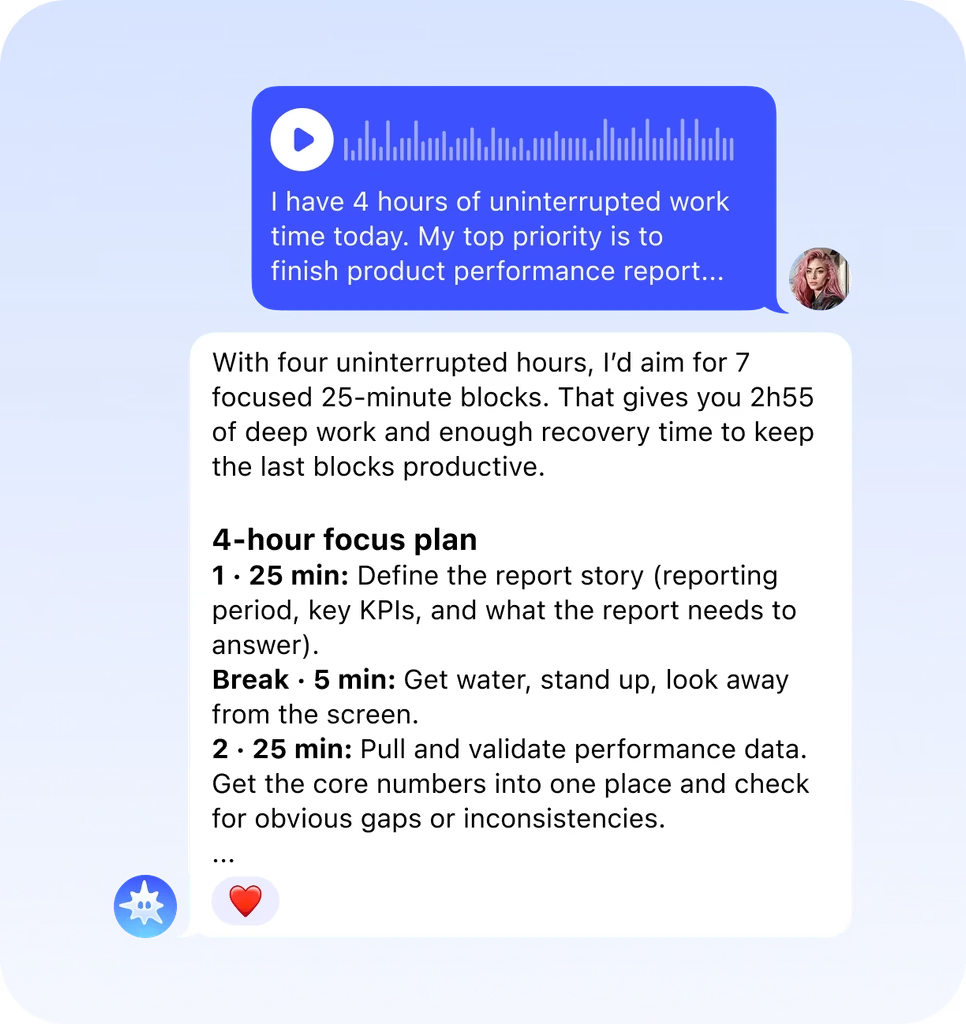
🟢 Prompt for a deep-focus block
I have [X] hours of uninterrupted work time today. My top priority is: [task]. Known distractions: [list]. Draft a focus plan that: - breaks the priority into 25-minute work blocks - suggests what to do in breaks to recharge - lists what to defer until tomorrow
AI productivity tools for personal use, outside of work
The same agents that run your workday handle your personal life without a second app. Ai tools for personal productivity 2026 are useful precisely because they don't clock out at 6pm. Four everyday jobs they handle well:
- Morning digest: A single message each morning with your calendar, top tasks, and anything that needs a reply, so you start the day oriented instead of scrolling five apps.
- Task capture: Speak or type a task the moment it occurs to you, and the agent sorts it, sets a reminder, and surfaces it at the right time.
- Learning on the side: Ask for a plain-language explainer, a summary of a long article, or a study plan, and get it in the same chat you already use.
- Personal reminders: Bills, birthdays, prescription refills, and packing lists, tracked and nudged without a separate to-do app to maintain.
🟢 Prompt for a weekly productivity audit
Give me a personal productivity audit based on this week. What I completed: [list]. What I didn't finish: [list]. Where I lost time: [list]. Identify my biggest productivity leak and suggest one specific change I can make tomorrow.
How Mira works as your AI productivity assistant
Mira gives you one place to manage the work that normally gets scattered across your inbox, calendar, task manager, docs, and chats.
Mira is an AI agent that live in your messenger. You can ask it to find information, organize your day, create work, or take action in connected apps without opening each one yourself.
Some of the everyday tasks you can hand off to Mira include:
- Plan your day: get a morning brief with meetings, priorities, deadlines, and tasks that need attention.
- Manage email: find important messages, summarize long threads, draft replies, and prepare follow-ups.
- Turn voice notes into work: send a voice message and have Mira extract tasks, organize ideas, or set reminders.
- Prepare for meetings: pull together relevant emails, documents, previous notes, and open tasks before a call.
- Capture follow-ups: turn meeting notes or messages into tasks with owners, deadlines, and reminders.
- Research and summarize: gather information from your connected apps and turn it into a brief, comparison, or summary.
- Create content: draft documents, presentations, images, and other creative work using 10+ AI models.
- Run recurring routines: schedule daily briefs, weekly reports, reminders, and other repeatable workflows to run automatically.
Mira connects with 1,000+ apps, so the same conversation can pull from your calendar, email, docs, project tools, and other work apps. It can also take actions in those tools, with approval required for sensitive actions such as sending or publishing.
You don't need to choose a model for every task either. Mira can route work across 10+ models, including GPT and Claude models, depending on what you're asking it to do. The result is less time moving information between tools and more work completed from the chat you already use.
🟢 Prompt to build a daily routine with Mira
I want to build a daily productivity routine using AI. My work hours: [hours]. My main job: [role]. My biggest time wasters: [list]. Design a morning routine (15 min), a midday check-in (5 min) and an end-of-day wrap-up (10 min) that I can run every day.
Free AI productivity tools, what you actually get
Free tiers are real, but each one caps the thing you'll want most, so read the limit before you commit. The best ai tools for work productivity on a free plan trade away volume, seats, or the features that make them worth using daily. What the common ones give you:
- Otter.ai: 300 transcription minutes a month, with a 30-minute cap per call, enough for a light week of meetings.
- Grammarly: unlimited grammar and spelling checks plus 100 AI prompts a month, which heavy writers burn through in days.
- Zapier: 100 automation tasks a month and 2-step workflows only, fine for one simple relay.
- Reclaim.ai: a genuine free "Lite" plan, but scheduling is limited to one week out and one calendar.
- Mira: a free plan that covers everyday agent use inside your chat, with paid tiers when you need more.
For ai tools for office productivity, the pattern holds: free is for evaluating, and the daily-driver features usually sit one tier up.
Start with the work you want to stop doing manually
You don't need to rebuild your entire workflow around AI to become more productive. Start with one task that repeats often: planning your day, sorting through email, preparing for meetings, writing weekly updates, or remembering follow-ups. Once AI reliably handles that step, add the next one.
The biggest productivity gains usually come from repetition. Saving a few minutes once doesn't change much. Saving those minutes every morning, every meeting, or every week does. That's where scheduled workflows and AI agents become more useful than one-off prompts.
Mira is a simple place to start. You can use it for free to set reminders, create recurring routines, and get a daily brief with your meetings, tasks, and priorities, all from your messenger. Connect the apps you already use, set up the workflows you want to automate, and let Mira handle the repeatable parts of your day.