7 Best AI Travel Planners: Build an Itinerary You Can Actually Use

The best AI travel planner doesn't stop at the itinerary. It checks that the plan holds up, keeps everyone on the trip working from the same version, and reminds you about the deadlines that actually break trips: check-in windows, free-cancellation cutoffs, passport renewals.
Most tools get you a good-looking draft in under a minute. The trouble starts on day one. The museum is closed on Mondays. The "20-minute walk" is a ferry ride. Half the group booked a different hotel because the final decision got buried in a chat.
This guide compares seven AI travel planners on one question: does it get you to a plan you can follow? You'll see what each tool does well, what it costs, and where it falls short.
The 7 best AI travel planners at a glance
| Tool | Best for | Free plan | Pricing | Books trips |
|---|---|---|---|---|
| Mindtrip | Planning and booking in one place | Yes | Free | Flights in chat, hotels via links |
| Layla | Live prices and a human check | Yes | $49/year | Through partners |
| Wanderlog | Shared, map-based plans | Yes | $39.99/year | No |
| Wonderplan | A fast first draft | Yes, no signup | Free | No |
| ChatGPT | Brainstorming and custom constraints | Yes | $20/month | No |
| Google Gemini | Trips already in Gmail and Maps | Yes | Free | No |
| Mira | Planning inside Telegram chats and groups | Yes | Free to start | No |
What is an AI travel planner?
An AI travel planner is a tool that turns your dates, budget, interests and constraints into a day-by-day itinerary, then lets you refine it through chat. You describe the trip in plain language. It drafts the route, the stops and the timing.
The category splits four ways:
- Itinerary generators build a personalized itinerary and stop there. Wonderplan is the clearest example.
- Planners with booking connect the plan to real flights, hotels and activities. Mindtrip and Layla sit here.
- Trip organizers collect your bookings and saved places into one shared plan. Wanderlog leads this group.
- General AI assistants plan trips alongside everything else they do. ChatGPT, Gemini and Mira fall here.
How does an AI itinerary planner work?
An AI itinerary planner takes your preferences, drafts a schedule, and revises it as you talk to it. The process runs in three steps.
- You set the brief: Destination, travel dates, budget, pace, must-sees and requirements such as traveling with children, accessibility needs or dietary restrictions.
- The model drafts the plan: Dedicated planners pull from databases of points of interest and live price feeds. General assistants rely on the model's knowledge plus current web results.
- You refine it in chat: Swap two days, cut backtracking, add a rain plan or a cheaper hotel.
The quality of step one decides the quality of everything after it. A vague brief gets a generic trip.
What makes an AI trip planner worth using
An AI trip planner is worth using when its plan survives contact with the real trip. Five things decide that:
- Accuracy: Real places, current opening hours and realistic travel times between stops.
- Live pricing: Actual flight and hotel prices, not estimates you have to check somewhere else.
- Editability: You can change one day without regenerating the whole itinerary.
- Shareability: The people you travel with can see the plan and weigh in.
- Follow-through: Reminders, calendar entries and help with changes once the trip starts.
The 7 best AI travel planners, by job
Each tool below wins at one job and falls short at another. Pick the job first, then the tool. Prices and features are as of November 2026.
1. Mindtrip: best for planning and booking in one place

Mindtrip is the most complete AI travel planner if you want to go from a rough idea to a booked flight without switching apps. You plan in a chat on one side of the screen, and the itinerary builds on an interactive map on the other.
Four features set it apart:
- Start Anywhere: Paste a TikTok or YouTube link, or upload a screenshot or PDF, and Mindtrip builds a trip around the places in it.
- In-chat flight booking: Since May 2026, you can book flights inside the conversation through Sabre, with PayPal handling checkout.
- Partner booking: Hotels, restaurants and activities route through partners like Priceline, Tripadvisor and Viator.
- Group planning: You invite others into the trip, chat inside it, and tag @Mindtrip for suggestions that balance everyone's preferences.
Price: Free. Mindtrip is free because it earns commission on bookings. That’s why every booking path runs through its partner list.
Watch out for: Hotel and activity bookings are still completed on partner sites, and your group has to join Mindtrip to plan together.
2. Mira: best for planning inside the chats where the trip happens
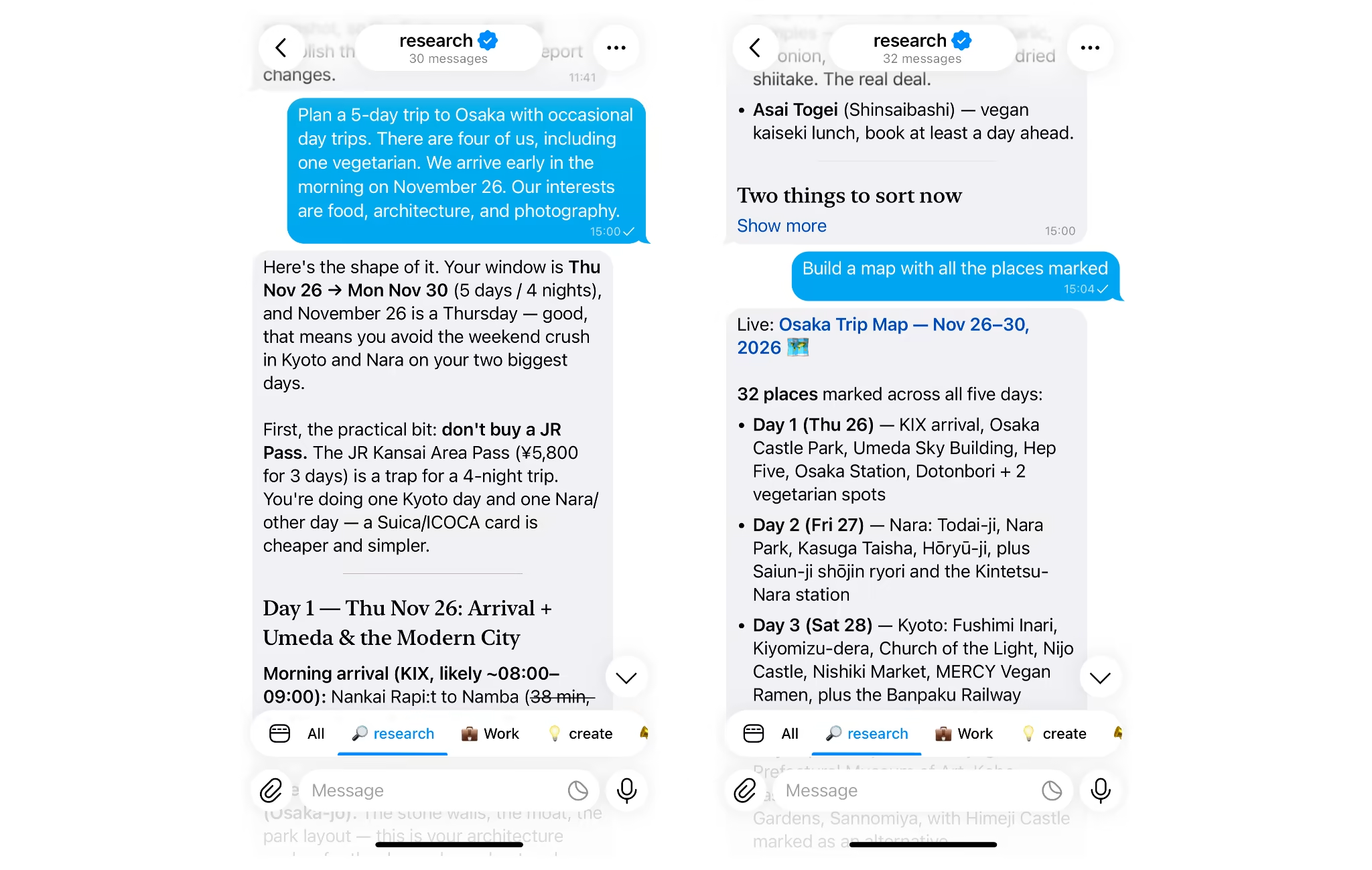
Mira is the pick when the hard part of the trip isn't the itinerary but everything around it. Most group trips get decided in a messenger chat: dates, budgets, who books what. Most tools on this list ask the group to move into a new app. Mira is an AI agent that joins the Telegram chat you already have.
You add @mira to the trip group, and it works there like another member of the group:
- Decision tracking: It summarizes long threads, records what the group agreed on, and lists open questions and tracks who is responsible for each task. Ask "what did we decide about the Lisbon dates?" and you get the answer, not a scroll.
- Shared memory: In a group, Mira keeps context everyone can draw on. In a private chat, it remembers your own preferences, like aisle seats, no red-eye flights or a vegetarian diet, and applies them to the next trip without being told again.
- Day-by-day drafts: It builds an itinerary in the chat and revises it as people react, so the plan and the discussion stay in one place.
- Calendar and inbox: Type "connect my Gmail" and you get a secure sign-in link. Once Gmail and Google Calendar are connected, Mira collects booking confirmations into one digest and turns plans into calendar entries.
- Scheduled reminders: It sets up routines that run on their own: a countdown of open tasks the week before departure, a morning brief with the day's plan once you land, a nudge before a free-cancellation cutoff.
Mira connects to 1,000+ apps, including Tripadvisor, Google Maps and Inglav Flights.
Price: Free to start, with no credit card needed. The Pro plan costs $27/month.
Watch out for: Mira doesn't book flights or hotels or show live fares. Pair it with a booking tool like Mindtrip or Layla.
3. Layla: best for live prices with a human check
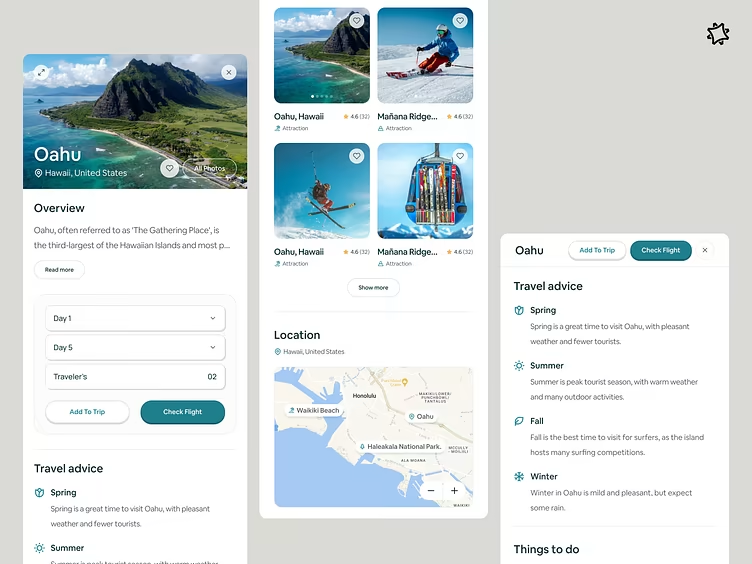
Layla is the pick when you want current prices alongside your itinerary. It builds a day-by-day itinerary with flights, hotels and activities, then prices it with live data from partners like Skyscanner, Booking.com and GetYourGuide.
Three features matter most:
- PriceLock alerts: Layla tracks a route and tells you when the fare drops.
- Human review: An optional "Finalize your trip" step has a real travel agent check the plan before you book.
- Creator video guides: Short clips from travel creators sit next to suggestions, which helps when you're choosing between two neighborhoods.
Price: Free tier with full itineraries.
Watch out for: Chat is the only way to edit the plan, and co-planning with others is limited.
4. Wanderlog: best for shared, map-based plans
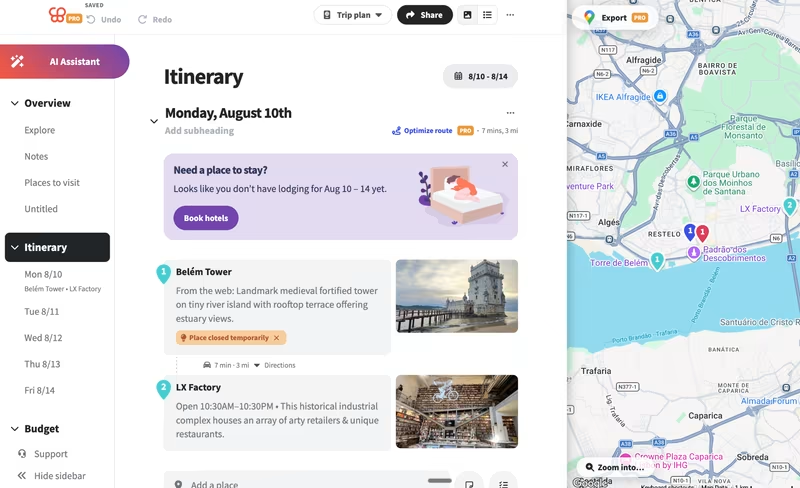
Wanderlog is a trip organizer for groups and road trips. It's less an AI generator than a shared workspace: a drag-and-drop day-by-day timeline, every stop pinned on a map, and real-time editing for everyone on the trip, like a shared doc.
What it handles well:
- Route optimization: It reorders a day's stops to cut driving or walking time, which matters when day three has seven stops in the wrong order.
- Budgeting and expense splitting: You set a budget, log expenses by category and split costs across the group.
- Booking import: It pulls flight and hotel details from confirmation emails into the plan.
- Map export: The route goes to Google Maps or Apple Maps for navigation.
Price: Free tier. Wanderlog Pro costs $39.99/year, with no monthly option, and adds unlimited AI, route optimization, offline access, Gmail auto-import and Google Maps export.
Watch out for: Planning is mostly manual, large itineraries can slow the app, and everyone has to join Wanderlog.
5. Wonderplan: best for a fast, free first draft
Wonderplan is the quickest free AI travel planner to try, with no signup and no paywall on core features. You enter the destination, dates, budget, interests and who's coming, and it returns a structured day-by-day itinerary in seconds.
It's a focused AI itinerary planner rather than a full trip app:
- Editable plan: You can swap destinations, stops and accommodation inside the same view.
- Budget-aware output: Suggestions follow the budget range you set.
- PDF export: You can download the plan for offline use, which helps when roaming data is expensive.
- Multiple languages: Itineraries can be generated in languages other than English.
Price: Free. Wonderplan stays free through affiliate links, so it works well as a first pass before you move the plan into a tool that books or tracks.
Watch out for: There's no booking, no live pricing and no group planning, so costs are estimates.
6. ChatGPT: best for brainstorming and custom constraints
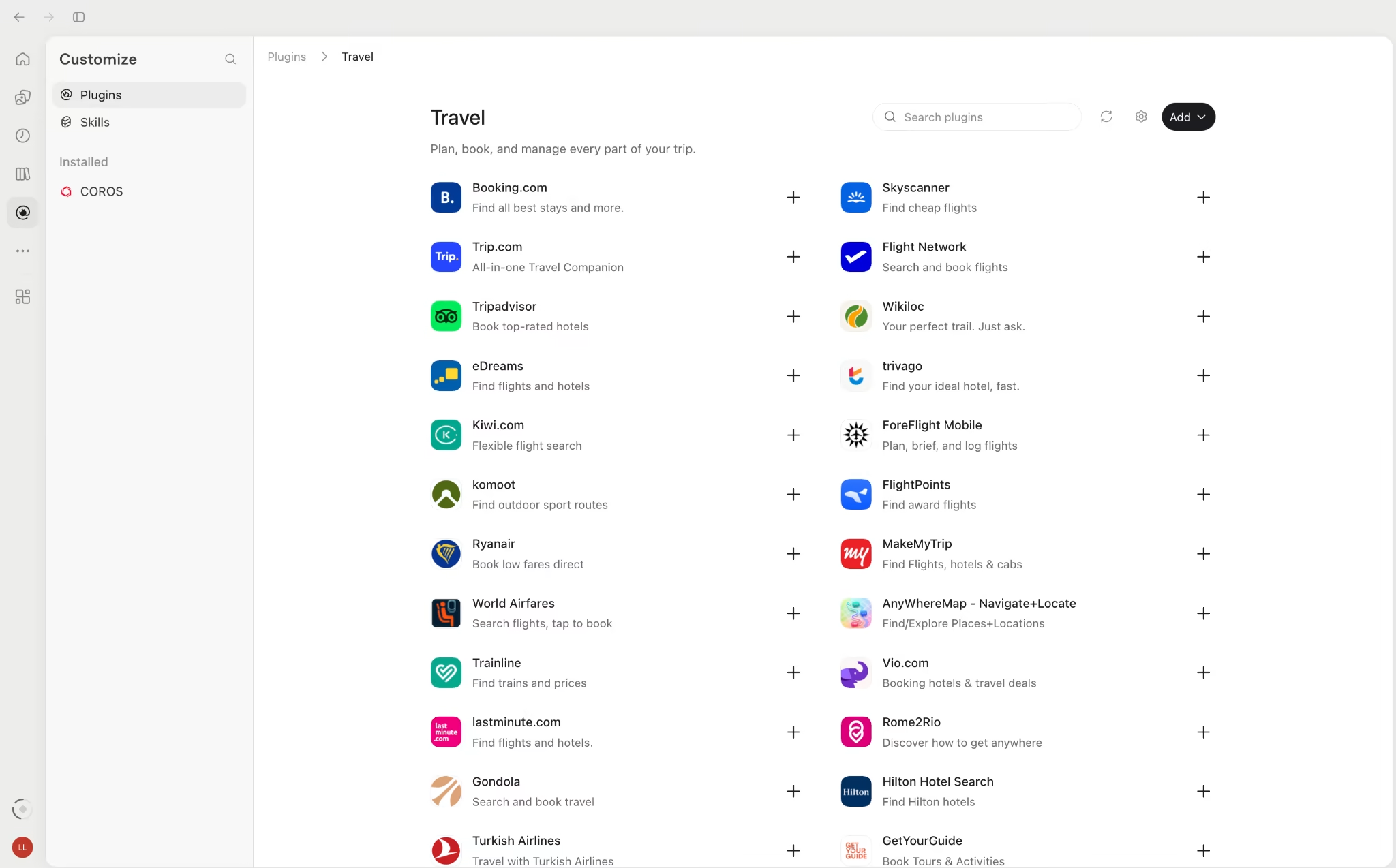
ChatGPT is useful for planning around unusual constraints. Ask for a week in Portugal with no drive over two hours, a vegetarian partner and one rest day, and you'll get a sensible draft you can push back on line by line.
Key features:
- Travel apps in chat: The Expedia and Booking.com apps show live hotel and flight options with prices and maps inside the conversation. You finish the booking on the partner's site, and the apps aren't available in the EU.
- Agent mode: Where it's available, ChatGPT can open booking sites, compare options and fill in forms, then wait for your approval before anything is submitted.
- Side tasks: Packing lists, visa questions, phrase sheets and rainy-day backups take seconds.
The weak spot is structure. The trip lives in a chat thread, not a saved itinerary, so edits pile up as new messages and there's no map to check distances.
Price: Free. ChatGPT Plus costs $20/month.
Watch out for: A chat-based draft can become difficult to manage as revisions accumulate. Keep a clearly labeled final version of the itinerary.
7. Google Gemini: best for trips already in Gmail and Maps
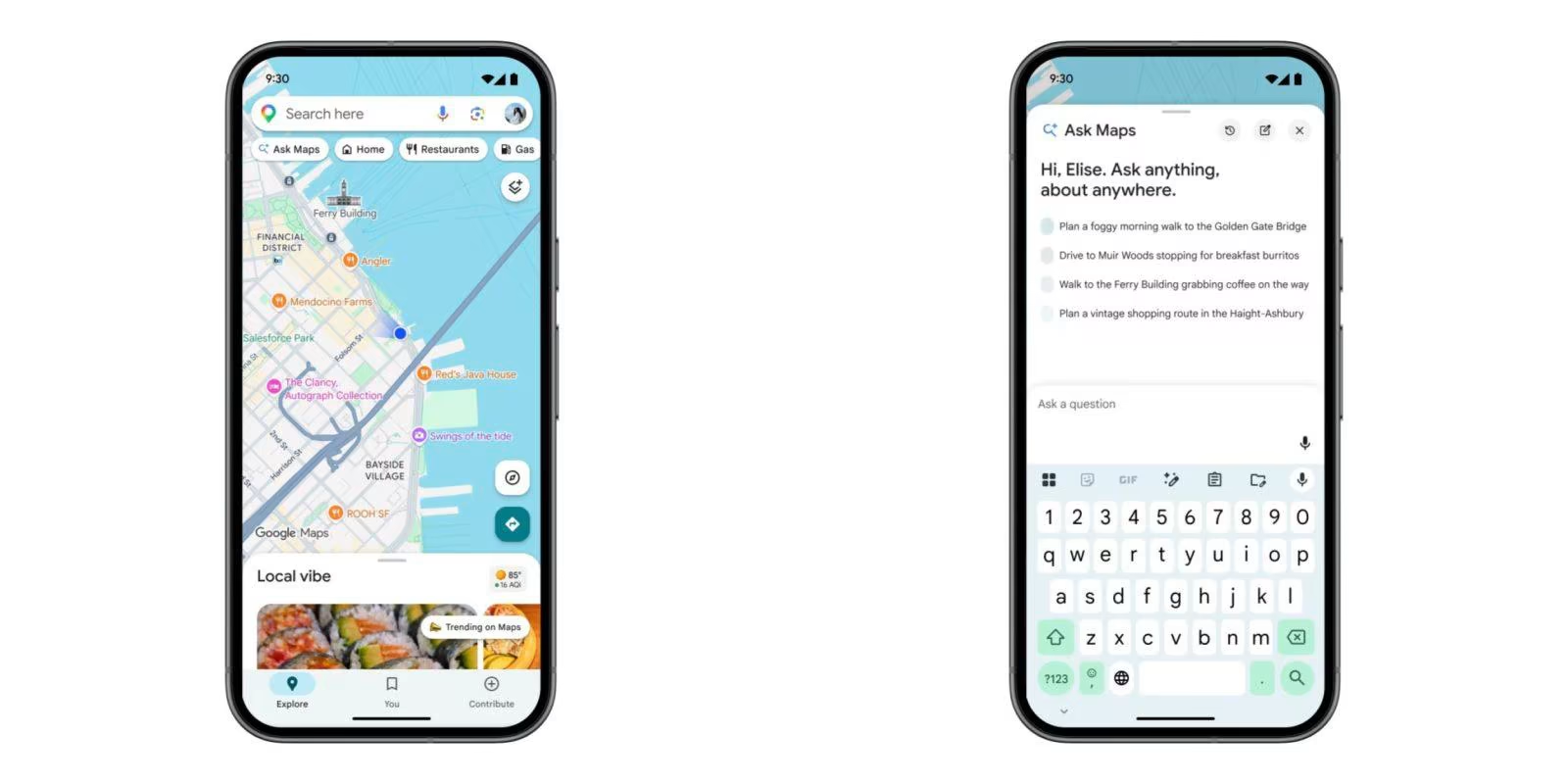
Gemini is the natural pick if your bookings already sit in Google. It reads flight and hotel confirmations from Gmail and plans around them, so the itinerary starts from what you've actually booked rather than a blank page.
Google has spread its travel features across several products in 2026:
- Ask Maps: Since March 2026, you can ask trip questions inside Google Maps, like stops worth making between three national parks. It launched in the US and India.
- Canvas in AI Mode: Since August 2026, a side panel in Google's AI Mode assembles flights, hotels, map data and reviews into one editable itinerary in the US.
- Hotel booking: Hotels can be booked inside AI Mode in the US through partners like Booking.com and Expedia. Flight booking hasn't launched there yet.
- Inbox tracking: Gemini's background agent can watch Gmail and add new bookings to a Google Doc itinerary as they arrive.
The catch is fragmentation. The features live in Gmail, Maps, Search and the Gemini app, and several are US-only.
Price: Core planning is free with a Google account.
Watch out for: There's no single trip view that a group can co-edit, and availability depends on your country.
Which AI trip planner fits which trip
The best AI trip planner changes with the shape of the trip. Match the tool to the hardest part of it.
| Trip | Pick | Why |
|---|---|---|
| Weekend city break | Wonderplan or ChatGPT | A quick draft is all you need |
| Family vacation | Layla or Mindtrip | Balances several interests and connects to booking |
| Multi-city route or road trip | Wanderlog | Map view and route optimization keep stops in order |
| Group trip with friends | Mira, plus Wanderlog for the map | Decisions stay in the group chat everyone already uses |
| Business trip | Gemini or Mira | Bookings come from your inbox, reminders go to your calendar |
Two tools often beat one. A planner that books, paired with an assistant that tracks, covers the whole trip.
Plan your next trip with Mira
The best AI travel planner works where the trip gets decided, and for most groups that’s a chat. Mira joins that chat. You don’t need a new app, a shared login or a link nobody opens.
Once you add @mira to the group, it records what everyone agreed on, lists open questions and who owes what, and drafts the day-by-day plan in the thread. When you connect Gmail and Google Calendar, booking confirmations land in one digest and plans turn into calendar entries. Reminders for check-in windows, cancellation cutoffs and passport tasks run on their own, so nothing slips in the week before you leave.
Mira doesn’t book flights or hotels. It covers the follow-through that can get lost between planning and departure, which is making sure the plan actually happens.