



Freelancers who use AI in their work earn about 34% more per hour than those who don’t. But the advantage is not knowing how to prompt a chatbot. It comes from using AI for freelancers where it has the biggest impact: delivering client work faster, winning more projects, and cutting the unpaid admin behind proposals, contracts, follow-ups, and invoices.
This guide covers where AI actually saves freelancers time, the best AI tools for freelancers 2026 has to offer, and how to combine them into one practical workflow instead of adding five more tabs to your day.
Where AI saves freelancers the most time
AI saves freelancers the most time on the five tasks that surround the work but aren't the work: proposals, contracts, invoicing, client communication, and project tracking.
These are repetitive, template-heavy, and easy to hand off, which is exactly what makes them a good fit for an AI assistant for freelancers.
- Proposals: Turning a client brief into a structured proposal is mostly reformatting the same sections — summary, scope, timeline, price. AI drafts the skeleton in a minute; you edit the specifics.
- Contracts: Reading a client's contract for unfair payment terms or aggressive IP clauses is slow and easy to skip. AI flags the risky lines in plain language so you know what to push back on.
- Invoicing: Generating invoices, chasing late payments, and tracking what's outstanding is pure admin. AI automation for freelancers handles the reminders and the math.
- Client communication: Follow-ups, kickoff emails, and "just checking in" notes are formulaic. AI drafts them in your tone so you approve and send.
- Project tracking: Deadlines, milestones, and check-ins across several clients are hard to hold in your head. AI keeps the list and nudges you before things slip.
None of this replaces the skill clients pay you for. It clears the hours around it, usually 30 to 60 minutes a day, depending on how much admin your work carries.
Best AI tools for freelancers in 2026: comparison
The best AI tools for freelancers fall into two camps: single-purpose specialists that do one admin job well, and all-in-one agents that handle several from one place.
AI for freelancers isn't one product, it's a stack. Here's how six of the most-used options compare on what they're for, their standout strength, and whether there's a genuine free option.
| Tool | Best for | Key strength | Free tier |
|---|---|---|---|
| Mira | All-in-one messenger agent | Runs tasks, reminders, and connected workflows from one Telegram chat | Yes, free to start |
| Bonsai | Proposals, contracts, invoicing | Contracts, proposals, invoices, and client management in one workflow | No, 7-day trial; paid plans from $9/mo annually or $15/mo monthly |
| Notion AI | Project and client management | AI built into your notes, docs, projects, and databases | Limited, Free plan includes trial AI usage; full Notion AI requires Business or Enterprise |
| Grammarly | Writing and editing | Real-time writing and tone support across 1M+ apps and sites | Yes, free plan includes writing corrections, tone detection, and 100 AI prompts |
| Otter.ai | Meeting notes | Live transcription, meeting summaries, and action items | Yes, 300 transcription min/mo, 30-min per-meeting cap |
| QuickBooks | Invoicing and bookkeeping | Tracks income, expenses, invoices, receipts, and tax-ready records | Yes, free Solopreneur plan includes 2 invoices/mo, 2 receipt uploads/mo, and basic reports |
The specialists are stronger inside their lane — Bonsai's contracts, Otter's transcripts, QuickBooks' books are hard to beat one-for-one.
The trade-off is that running four of them means four logins, four subscriptions, and four places to check. An all-in-one agent like Mira trades some depth for living in one place you already are.
Here's a prompt to get a first proposal draft out of any capable AI tool.
Write a project proposal for [client name] at [company]. Project: [describe in 2-3 sentences]. Timeline: [X weeks]. My rate: [rate]. Include: executive summary, scope of work, deliverables, timeline, pricing and next steps. Tone: professional but approachable. Under 500 words.
If the proposal turns into a client relationship, the follow-up emails matter as much as the pitch. A dedicated AI email assistant drafts kickoff notes and check-ins in your voice so replies take seconds, not minutes.
AI proposal generator for freelancers to win more clients
An AI proposal generator for freelancers turns a client brief into a finished, structured proposal in about ten minutes instead of an hour. The workflow is simple: paste the brief, let the AI draft the sections, then edit the parts only you can write.
Say a client sends a two-paragraph brief for a website redesign. You paste it in and ask for a proposal.
The AI returns an executive summary that restates the client's goal, a scope section broken into phases, a deliverables list, a timeline, and a price block using the rate you gave it. What you edit is the judgment — which phases to include, where to pad the timeline, whether the price holds.
The AI handles the structure and the first-draft language; you handle the strategy. That split is why AI tools for freelancers business proposals works: the machine does the reformatting, you do the pricing.
The other place AI earns its keep is before the proposal by making sure you actually understood the brief.
Prompt to catch gaps before you quote
A client just sent me this brief: [paste brief]. Draft 3 follow-up questions I should ask before starting. Then write a one-paragraph summary of what I understood to confirm with the client. Under 100 words. Tone: professional and collaborative.
Send that summary back to the client and you've done two things at once: shown you're thorough, and protected yourself from scope creep later.
AI invoicing and contract tools for freelancers
The strongest AI tools for freelancers on the admin side handle one task type each, including proposal writing, contract review, invoicing, payment follow-up, and expense tracking, and most have a free way to try them.
Here's the map by task.
| Task | AI tool | What it does | Free option |
|---|---|---|---|
| Proposal writing | Mira, Bonsai | Drafts structured proposals from a brief | Mira free to start; Bonsai trial only |
| Contract review | Mira, ChatGPT | Flags unfair terms in plain language | Both have free access |
| Invoice generation | QuickBooks, Bonsai | Creates and sends branded invoices | QuickBooks limited free tier |
| Payment follow-up | QuickBooks, Mira | Sends reminders on a schedule | QuickBooks paid; Mira free to start |
| Expense tracking | QuickBooks, Notion AI | Categorizes spend and estimates tax | QuickBooks limited; Notion AI paid |
Contract review is where an AI contract review tool for freelancers pays for itself fastest, because it catches the clauses you'd skim past. This prompt turns any capable AI into a first-pass reviewer.
Prompt for contract review
Review this freelance contract and flag any issues: [paste contract]. Look for: 1. Payment terms that are unfair or vague 2. IP clauses that assign all rights to the client 3. Termination clauses with no notice period 4. Scope creep risks - work that is undefined or open-ended Summarise in plain language. Under 200 words.
One caveat worth stating plainly: an AI review is a first pass, not legal advice. For a high-value contract, it tells you what to ask a lawyer about, it doesn't replace one.
For the outbound side of client work, including cold pitches, upsells, and lead follow-up, the same automation logic applies. A layer of AI sales automation handles the repeatable outreach so you spend your time on the conversations that convert.
AI project management for freelancers: track clients without a full PM tool
AI project management for freelancers does not need to mean building boards, workflows, and sprint systems in a tool designed for a 20-person team. Most solo freelancers need something simpler: one place to keep track of deadlines, client decisions, follow-ups, and next steps.
For most freelance work, AI is especially useful for three jobs:
- Track deadlines and deliverables: Keep client milestones, revisions, and due dates in one system, then surface what needs attention this week.
- Remember follow-ups: AI automation tools for freelancers can remind you to chase an unanswered proposal, check in after delivery, or follow up on an overdue invoice without adding another item to your mental to-do list.
- Capture client calls: An AI notetaker for freelancers can transcribe meetings, summarize decisions, and pull out action items so you can focus on the conversation instead of taking notes.
The goal is not to manage your freelance business from another dashboard. It is to stop relying on memory for work that can be tracked automatically. A good setup stays in the background, keeps client context organized, and surfaces the next action when you need it.
For a deeper look at tools, workflows, and use cases, see our guide to AI project management.
How Mira works as an AI assistant for freelancers
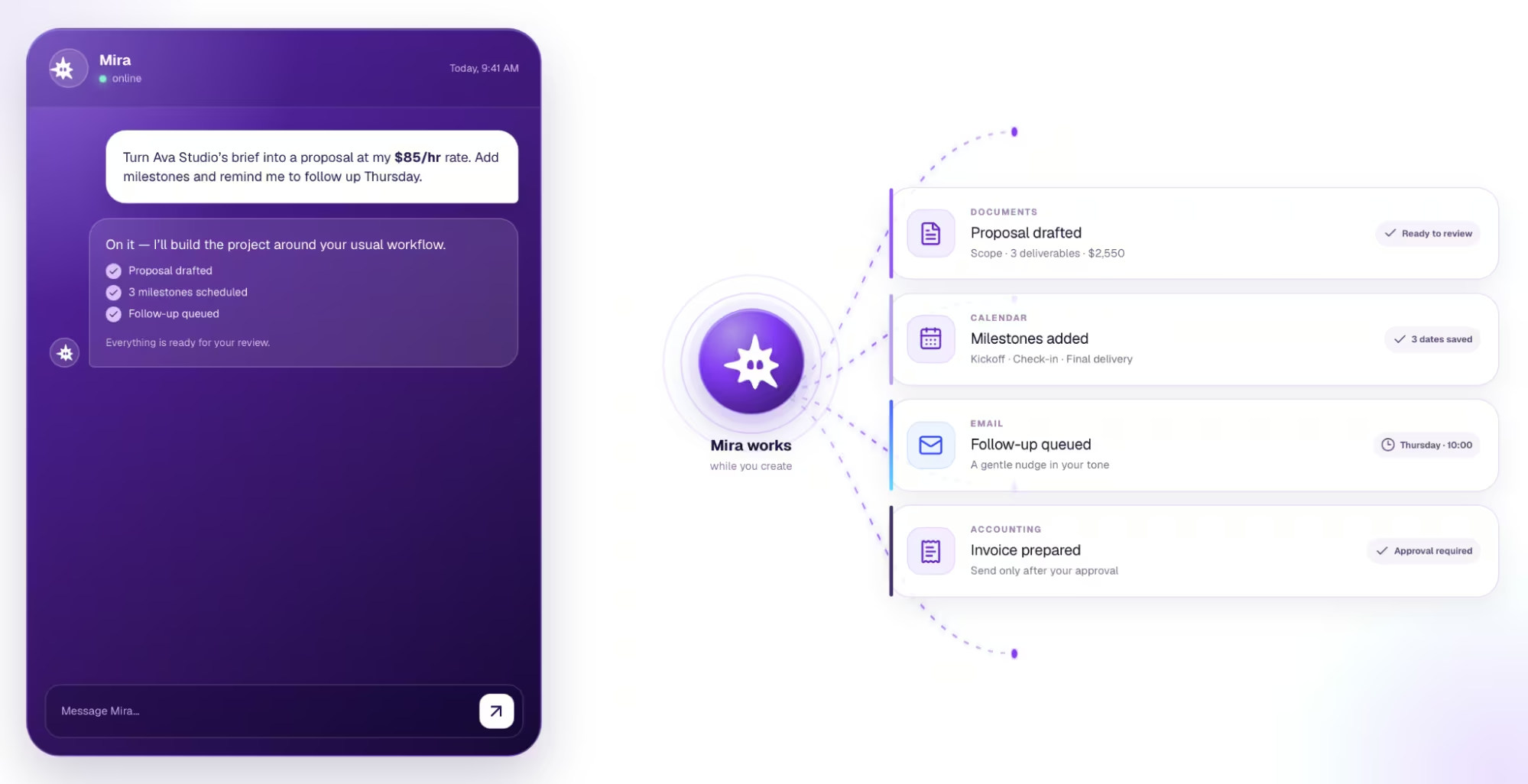
Mira is an AI agent that works from your messenger and handles the admin around freelance projects from one chat. Instead of opening separate tools for reminders, documents, follow-ups, and invoices, you tell Mira what needs to happen and it works across the apps you already use.
A typical client project can look like this:
- Turn a brief into a proposal: Forward Mira the client brief and ask it to draft the scope, deliverables, timeline, and pricing based on your rate. Review it, make any changes, and send it to the client.
- Set up the project: Once the client agrees, give Mira the dates and milestones. It can create reminders for the midpoint check-in, final delivery, payment deadline, or any other step you do not want to keep in your head.
- Keep follow-ups from slipping: If a client needs to approve something or has gone quiet, Mira can remind you to follow up at the right time instead of relying on your inbox as a task list.
- Handle the admin around delivery: At the end of the project, Mira can prepare the next steps and work through connected tools. For example, it can create an invoice through your accounting software, with actions like sending it kept behind your approval.
Why it works well for freelance work
Mira keeps context across conversations, so it can remember things like your clients, rates, preferred tone, and recurring workflows. You do not have to start every request from scratch.
It also connects to 1,000+ tools, which means it can work with the calendar, documents, email, accounting software, and other apps already behind your freelance business. Instead of giving you another dashboard to manage, Mira acts as the layer between you and those tools.
That is the main difference between an AI assistant that answers a question and an AI agent that helps finish the workflow.
Try this prompt
A client just agreed to work with me. Project: [describe the project] Timeline: [dates] Rate: [amount] Help me: Draft a kickoff email confirming the scope, timeline, deliverables, and payment terms. Create a simple project tracker with milestones and deadlines. Set reminders for the midpoint check-in, final delivery, and invoice due date. Draft a follow-up email I can use if the client goes quiet.
Free AI tools for freelancers: where to start
The best free AI tools for freelancers are the ones with a real free tier, not a trial that expires in a week. If you're building a stack on zero budget, start here and know where each tool's limits kick in.
- Grammarly (free): Fixes grammar, spelling, punctuation, and tone across your browser and apps, with 100 AI prompts a month. A useful option for polishing client emails before they go out. Full-sentence rewrites and advanced tone features require Pro.
- Otter.ai (free): Includes 300 transcription minutes a month, with a 30-minute limit per transcription. Enough for occasional client calls, but easy to outgrow if meetings are a regular part of your week.
- QuickBooks (free): Connect one bank account, track basic income and expenses, and send up to two invoices a month. Good for freelancers just starting out, but the limits become restrictive once you have several active clients.
- ChatGPT (free): Useful for drafting proposals, summarizing documents, brainstorming, and handling one-off questions. The free plan also includes web search, file uploads, and data analysis, but with lower usage limits than paid plans.
- Mira (free to start): Works from your messenger to handle reminders, client follow-ups, drafts, and admin across connected tools. You can start without a credit card.
Start with the work you want to stop doing
You do not need an AI tool for every part of freelancing. Start with the work that steals the most time without earning you more money, whether that is proposals, meeting notes, follow-ups, invoicing, or project admin.
The best setup is the one that gives you more time for paid work and keeps fewer tasks in your head. If you want to connect those workflows instead of managing separate AI tools, Mira can handle reminders, drafts, follow-ups, and admin from one chat.