AI Competitor Monitoring: Get Competitor Updates in Telegram

Competitor monitoring rarely suffers from a lack of data. The harder part is spotting which changes need a response before they get buried in dashboards and routine reports.
AI competitor monitoring in Telegram closes that gap. An AI agent checks selected sources on a schedule, filters updates against business priorities, and sends a short digest to chat, early enough to inform pricing, positioning, and go-to-market decisions.
This guide covers which signals to track, six use cases with ready-to-send prompts, how to set up competitor tracking in Telegram, and which competitor monitoring tools add depth where it matters.
| Signal | What it tells you | Where to check | Specialist tool | Sends to Telegram? |
|---|---|---|---|---|
| Pricing and plans | Price cuts, new tiers, features moved between plans | Pricing pages, checkout | Visualping | Via @mira |
| Ecommerce prices and stock | Discounts, stock-outs, new SKUs | Product pages, marketplaces | Prisync | Not natively |
| Product and messaging | Launches, new features, homepage rewrites | Changelogs, release notes, homepage | Visualping | Via @mira |
| SEO and content | Keywords gained, new pages, backlinks | Blog, sitemap | Semrush, Ahrefs | Via @mira |
| Traffic | Rank and traffic trend | Domain level | Similarweb | Via @mira (rank data) |
| Hiring | Teams being built, markets being entered | Careers pages, job boards | TheirStack | Via @mira |
| Reviews and social | Complaints, sentiment, engagement | G2, Capterra, app stores, social | Brand24, Sprout Social | Not natively |
| Ads | Live campaigns and creative tests | Public ad libraries | Meta Ad Library | No |
| Full CI program | Battlecards, win/loss context | All of the above | Klue, Crayon | Not natively |
"Via @mira" means the tool connects to Mira AI agent with your own account or API key, so its data lands in the same Telegram digest as everything else.
What is competitor monitoring?
Competitor monitoring is the ongoing, scheduled tracking of what your rivals do in public: prices, products, content, ads, hiring, and what customers say about them. It runs continuously, so you see changes as they happen instead of discovering them months later.
It's one part of competitive intelligence.
Competitive intelligence is the wider program that turns those signals into decisions: positioning, pricing, sales talking points, roadmap bets. Competitive analysis is different again. It's a one-off study that compares a fixed set of competitors at one point in time.
All of it runs on public information. Pricing pages, job boards, ad libraries and review sites are fair game.
Monitoring collects the signals. Intelligence is what you do with them.
Why monitor competitors?
You monitor competitors to make decisions earlier: before a price war hurts your pipeline, before a launch takes your customers, before a gap in the market closes.
- Catch pricing moves first: A new cheaper tier on a rival's site changes your sales calls the same day.
- See launches coming: Changelogs and job posts often show a new product months before the announcement.
- Find positioning gaps: What competitors promise and what their reviews complain about rarely match. The gap is your angle.
- Spot content opportunities: Topics they rank for and you don't are a ready list of posts to write.
- React while it still matters: An alert in Telegram gets read in minutes. A weekly email report gets read on Friday, if at all.
The value of a signal drops every day it sits unread.
What to monitor (and how often)
Track the four to six signals that would actually change a decision, and ignore the rest. A watchlist that covers everything turns into alert fatigue within a week. These are the signals worth your attention.
Pricing and packaging
To monitor competitor pricing changes, watch their pricing pages, checkout flows and marketplace listings for new tiers, discounts, trial limits and feature moves between plans. Check direct competitors daily.
Read the plan comparison table, not only the headline price. The most common real move is a feature shifting from one tier to another, which changes the price of the plan customers actually need without touching the number on top.
Pricing is also the one signal that deserves a same-day alert.
Product, website and messaging
Watch changelogs, feature pages, release notes and homepage headlines. A rewritten hero line often signals a new target audience before any announcement does.
A few checks a week is enough here.
Hiring
To monitor competitor hiring, track their careers page, LinkedIn jobs and public boards like Greenhouse or Lever. Job postings show strategy 6 to 18 months before a launch, because teams get hired before products ship.
Read the pattern:
- Sales roles in a new country usually mean market entry.
- Machine learning engineers usually mean an AI feature is on the roadmap.
- Removed listings can mean a pivot, a freeze or a funding problem.
A weekly summary is the right cadence. Hiring velocity tells you more than any single posting.
Content, SEO and AI visibility
Track new blog posts, the keywords they gain, new backlinks, and whether AI assistants mention them for your category. A competitor's sitemap.xml often lists new pages days before they're linked from the site, which makes it the earliest content signal available.
Social, reviews and mentions
Watch engagement on their posts, new reviews on G2, Capterra and app stores, and press coverage. Reviews are the most honest source here. Customers say what the marketing won't.
Ads
Public ad libraries show every active campaign a competitor runs on Meta platforms, including how long each ad has been live. An ad that's been running for three months is an ad that works.
Fewer signals, read every time, beat many signals read never.
How to monitor competitors in 5 steps
Pick who to watch, what to watch, set a schedule per signal, let AI read the changes, and turn each change into an action.
- Build a watchlist: Start with 3 to 5 direct competitors plus 2 or 3 indirect ones: the products customers compare you with, and the ones they leave you for. Past 10, nobody reads the updates.
- Choose your signals: Keep only signals tied to a decision someone owns. If nobody on the team sets prices, pricing alerts are noise.
- Set a cadence per signal: Pricing daily, product and content twice a week, hiring weekly, a deeper review monthly. Match the cadence to how fast the team can act.
- Let AI read the changes: An agent turns a raw page diff into one sentence, such as "InfoLab added a $49 tier". It drops navigation tweaks and typo fixes, and it links related signals, so a new tier plus three sales hires in Germany reads as one expansion story.
- Turn each change into an action: Every update ends in one of four outcomes: ignore, brief sales, update your own page, or publish a response. Logging the decision next to the alert stops the same change from being discussed twice.
Step 4 is where AI competitor analysis earns its place, and also where it stops. It summarizes and flags, but it doesn't predict a rival's next move. A person still makes the call.
Competitor tracking only pays off when step 5 happens.
Competitor monitoring use cases in Telegram
The use cases below cover the jobs competitor monitoring most often needs to do. Each one lists what to watch, a prompt that works as is, what the digest looks like, and what to do with it.
1. Track pricing changes every morning
Pricing is the fastest-moving signal and the one sales feels first. Watch the pricing page, the plan comparison table and the checkout flow of 3 to 5 direct competitors.
🟢 Prompt example
The action is usually a one-line brief to sales: the objection they'll hear this week and the answer to it.
2. Catch product launches before the announcement
Launches leak through changelogs, release notes, help center articles and app store "What's new" text before any press release. A new docs page for an unreleased feature is the classic early tell.
🟢 Prompt example
That lead time is enough to prepare a comparison page or a response post before the launch lands.
3. Read hiring as a roadmap
Job postings are the most reliable early signal of strategy, because companies hire for a product 6 to 18 months before shipping it. Single posts mean little. A spike in one department or one city means a lot.
🟢 Prompt example
For wider coverage, TheirStack connects to Mira and adds postings from job boards beyond the careers page.
4. Watch competitor content and SEO
Content shows where a competitor is investing in demand. Watch their blog, sitemap and keyword gains, and connect Semrush or Ahrefs to Mira for ranking data.
🟢 Prompt example
That gap becomes next week's content brief.
For broader marketing workflows, explore Mira’s AI for marketers.
5. Turn reviews into positioning
Reviews show what competitors fail to deliver, in their customers' own words. Watch G2, Capterra and app store reviews, and summarize monthly by theme rather than review by review.
🟢 Prompt example
Recurring complaints are ready-made headlines for comparison pages and sales decks.
6. Share one competitor feed with the team
A shared feed stops five people tracking the same rivals separately. Add Mira to a team group chat and set one weekly summary across all signals.
🟢 Prompt example
The discussion happens in the thread under each update, and the Google Sheets log keeps a history that’s easy to review at quarter end.
When the thread lands on a decision or an idea, tag Mira in the same chat to turn it into work. It can draft a Notion doc from the discussion or create tasks in Linear, with the context from the thread already included.
🟢 Prompt example
The alert, the decision and the follow-up all stay in one place, so nothing gets lost between the chat and the tracker.
How to get competitor updates in Telegram with Mira
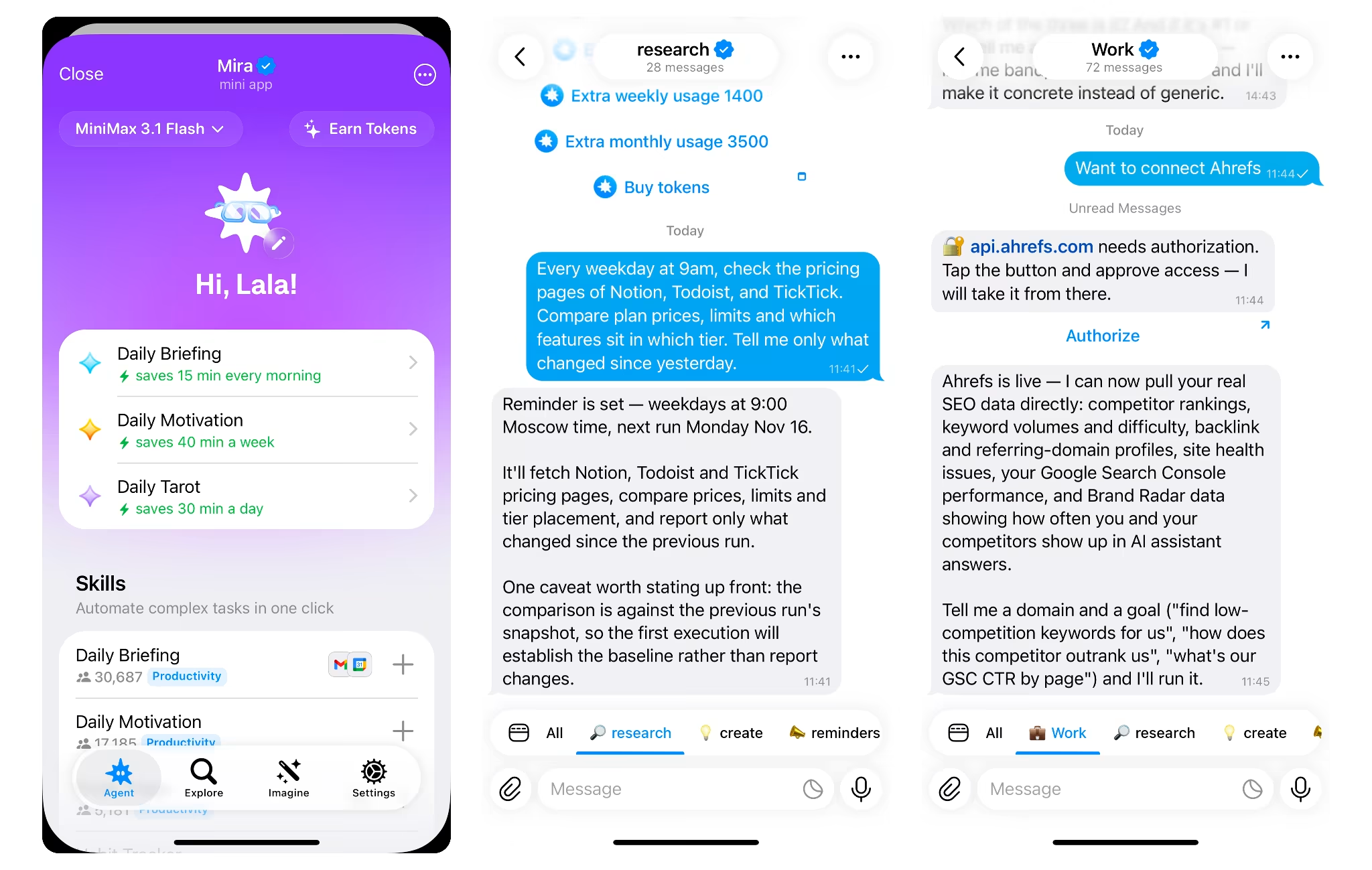
Message @mira, a Telegram-native AI agent, describe what to watch and when, and competitor alerts arrive in that chat on schedule.
The DIY alternative is a BotFather bot, a token, a workflow tool and an AI API key, plus fixes every time a page layout changes.
- Start a chat with @mira: No setup, no credit card.
- Describe the job: Name the competitors, the pages, the schedule, and what counts as noise. Any prompt from the use cases above works as written.
- Pick the destination: A DM for a personal digest, a team group for a shared one.
- Connect specialist tools if needed: Semrush, Ahrefs, Similarweb, Visualping and TheirStack connect with your own account or API key, so their data joins the same digest. Explore Mira integrations to see which tools you can connect.
Mira remembers which competitors matter and what to ignore, so the digest gets tighter over time. With 1,000+ connected apps, every change can also be logged to Google Sheets or Notion.
Competitor monitoring tools by job
No single competitor monitoring software covers every signal well. The setup that holds up is one agent for collection and delivery, plus one specialist tool for the signal that matters most. Several specialist tools connect to Mira, so their data can feed the same Telegram digest.
| Tool | Best for | Delivers to | Sends to Telegram? | Pricing |
|---|---|---|---|---|
| Mira | One digest of public changes plus connected tools | Telegram chat or group | Native | Free to start |
| Klue, Crayon | Formal competitive intelligence programs | Platform, CRM | Not natively | Quote-based |
| Semrush | SEO and keyword data | Dashboard, email | Via @mira | Paid plans |
| Ahrefs | Backlinks and keyword data | Dashboard, email | Via @mira | Paid plans |
| Similarweb | Traffic and rank trends | Dashboard | Via @mira (rank data) | Free tier, paid plans |
| Visualping | Page change alerts | Email, integrations | Via @mira | Free tier, paid plans |
| Prisync | Ecommerce price monitoring | Dashboard, email | Not natively | Paid plans |
| Brand24, Sprout Social | Mentions and social benchmarking | Dashboard, email | Not natively | Paid plans |
| Meta Ad Library | Competitor ads | Web only | No | Free |
| TheirStack | Hiring signals | Email, webhooks | Via @mira | Free tier, paid plans |
Pick the specialist tool for the highest-stakes signal, connect it, and let one digest carry the rest.
Start with one digest
You don't need a full competitive intelligence stack to stay ahead. Pick three competitors, two or three signals, and a daily time. Let AI competitor analysis do the reading, and read the result in Telegram over coffee.
That's competitor tracking you'll actually keep up with.