

AI in Telegram - Everything You Can Do with an AI Assistant
AI in Telegram means using AI bots and agents directly inside chats to answer questions, summarize content, create media, manage tasks, and automate workflows without switching to another app.
In 2026, these tools go far beyond simple command-based bots. The more advanced ones can remember context, connect to external services, and take actions on your behalf, from working with documents to managing calendars and team workflows.
This article looks at what AI in Telegram can actually do today, the main use cases, and the tools available. One example is Mira, a Telegram-native AI agent that works in DMs and group chats, connects to other tools, and can carry out multi-step tasks directly from the conversation.
How to use AI in Telegram, in three steps
You add an agent to a chat, ask in plain language, and connect your tools. That's the whole integration process, no download, no separate account.
- Add an AI agent to a chat: Search @mira in Telegram or open it via a link. It's live in seconds.
- Ask in plain language: Summarize this thread, plan my day, remind me about a meeting on Friday, and so on. It reads the context and acts.
- Connect your tools: Link Gmail, Google Calendar, Notion, other tools from the integrations library, and it executes across them from inside the chat.
Everything below is what that unlocks.
What Is AI in Telegram? (Bots, Agents, and Assistants)
AI in Telegram means intelligent bots and agents embedded in your chats that understand natural language and act on it. These aren't the command-based bots of 2015, they read your messages, hold context, and complete multi-step tasks on your behalf.
Does Telegram have built-in AI?
Not natively. Telegram itself doesn't ship an AI assistant. Instead, its open Bot API lets AI agents run directly inside your chats. That's why the best AI experience in Telegram comes from agents like Mira: you add one to a chat and it works there, with no separate app.
What is the difference between Telegram AI bots and AI agents?
A Telegram AI bot answers. An AI agent acts. The difference is memory, tools, and autonomy — an agent remembers your context, connects to your apps, and finishes multi-step tasks without being re-prompted.
Consider three concrete examples:
- A simple FAQ bot answers predefined questions with templated replies.
- A GPT-based Q&A bot generates answers but forgets everything when the session ends.
- Mira AI agent remembers your context across weeks, integrates with Notion or GitHub, and suggests actions based on chat activity. Same chat window, three very different levels of help.
Put AI to work in Telegram
Message Mira to research a topic, summarize a document, manage your calendar, create content, or run workflows across your tools without leaving the chat.
How Telegram AI Bots Work Under the Hood
Every Telegram AI bot is built on two things: Telegram's Bot API and an external AI model. When you send a message, Telegram forwards it via webhook to the bot's backend, where the model processes your input before sending a response back to your chat.
Modern AI bots run on models like GPT-4o, Claude, Gemini, Grok, or open-source models such as Qwen. For example, Mira is model-agnostic: it defaults to GPT-4o and lets you switch across 10+ models per task, so you can pick the best model for reasoning, speed, or privacy instead of being locked to one.
What gives an agent "memory" in Telegram?
Agents like Mira store chat snippets as embeddings, then run semantic search across your history. They remember preferences per user and per chat — your tone, languages, recurring tasks, writing style, which creates continuity across days and weeks that stateless bots can't match.
Speed depends on the task. Typical queries return in a few seconds; operations that call external APIs take longer. Telegram's own rate limits (roughly 30 messages per second per bot) mean bulk jobs are queued rather than fired all at once.
Key Features of Advanced Telegram AI Agents
Modern Telegram AI agents go well beyond answering questions. Here's what separates a basic bot from a full agent:
- Long-term memory: Remembers tone, languages, and topics across days and weeks, so every reply is grounded in what came before.
- Workflow automation: Turns a standing instruction ("every Monday, summarize this group") into a routine that runs without prompts.
- Tool integrations: Uses connectors for Notion, GitHub, Google Calendar, Sheets, and email to act on your behalf.
- Content pipelines: Idea → draft → revision → scheduled post, coordinated from the chat.
- Group chat intelligence: Monitors a group for decisions, questions, and deadlines, then summarizes and assigns action items.
- Private mode and access control: Clear separation between 1:1 and group usage, with control over who sees what and which tools the agent can touch.
Everything You Can Do with AI in Telegram (Practical Use Cases)
Here's a concrete tour of what people do with AI in Telegram today daily, for both life and work. None of this is theoretical.
- Personal assistant tasks: Ask Mira to plan your day, break down a project, or brainstorm a presentation. It holds the thread across the whole conversation.
- Group chat automation: Digest long conversations, extract action items, and draft replies inside groups without scrolling back through 200 messages.
- Content creation: Draft channel posts, social captions, blog outlines, and journal entries in your own voice.
- Document and link summaries: Forward PDFs, URLs, and voice messages and get a tight digest back.
- Scheduling and reminders: Say "remind me in 2 days" and have it sync to your calendar.
- Research and notes: Let it collect and organize notes into Notion or Google Docs while you chat.
All of it happens without leaving Telegram, the opposite of browser-based AI tools that make you switch context every time.
Mira: A Telegram-Native AI Agent, Not Just Another Bot
Mira is an AI agent purpose-built for Telegram, personal intelligence embedded in your chats, not a generic bot wrapping a web service. It runs both as a conversational agent you talk to and as a background workflow automation tool.
What sets it apart:
- Long-term memory: Remembers preferences, writing style, and recurring tasks per user and per group, across weeks.
- Deep Telegram integration: Slash commands, inline replies, replying to specific messages, and working naturally in both DMs and groups.
- Model choice: Mira defaults to GPT-4o but can switch across 10+ models (Claude, Gemini, Grok, DeepSeek, Qwen, Kimi, etc.) per task.
- Private Mode: Runs your request inside a Trusted Execution Environment (TEE) on Cocoon, a third-party confidential-compute network, using Qwen3-32B. Even the node operator can't read your data, and nothing is stored.
- Integration library: Mira connects to 1,000+ external services, including Gmail, Google Calendar, Notion, Slack, GitHub, Linear, Jira, Stripe, HubSpot, and more, turning Telegram chats into a control center for your workflows.
Compared to ChatGPT, Claude, or Copilot, Mira's edge isn't a better dashboard. It's being present where decisions actually get made.
Mira Scenario: How finance teams use the agent
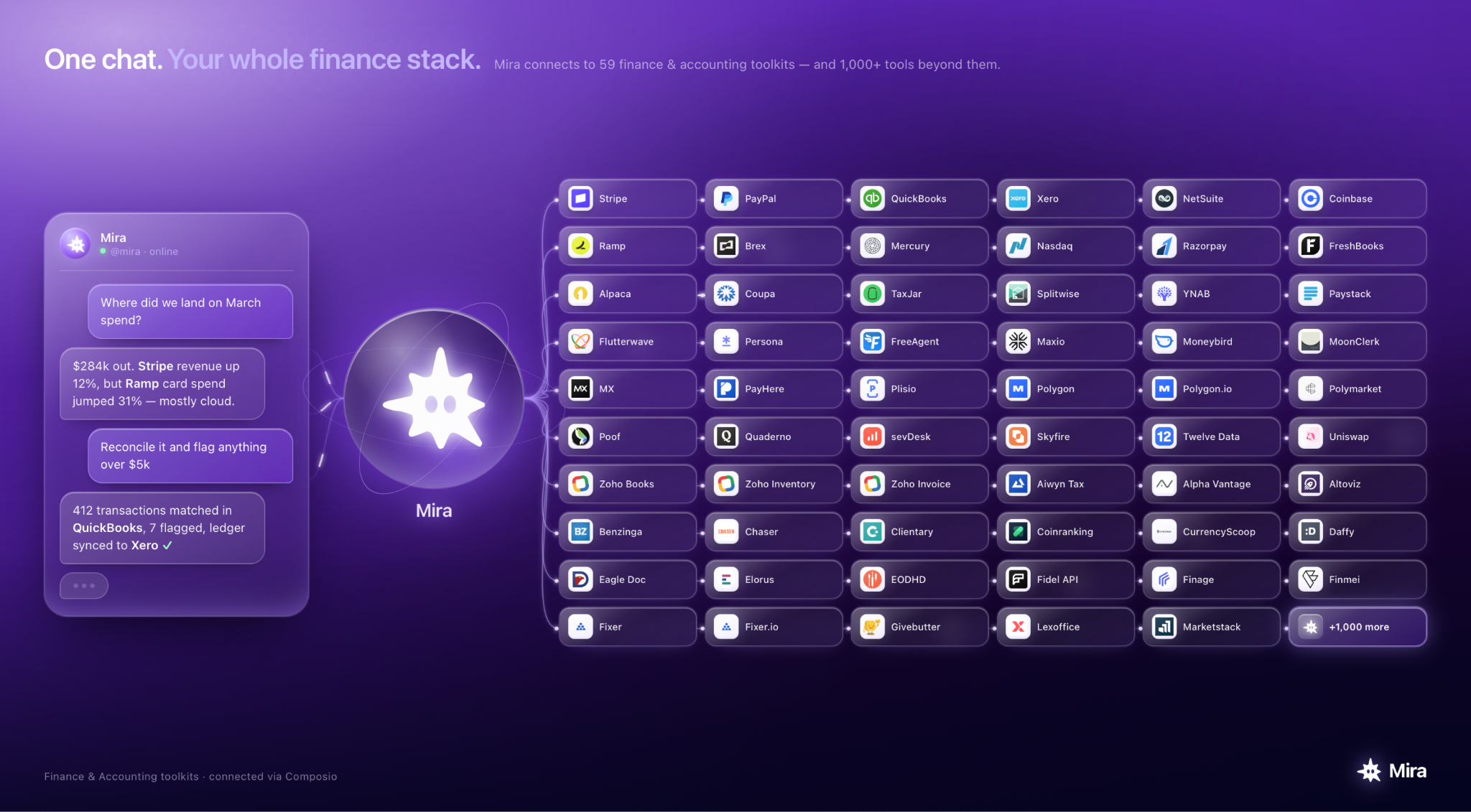
"Where did we land in March spend?"
You don't open QuickBooks. You don't pull up Xero. You just ask Mira in the same Telegram chat you use for everything else.
Mira checks Stripe for revenue, cross-references Ramp for card spend, and answers in seconds.
Ask it to go further, and Mira matches transactions across your ledger, flags outliers, and syncs the clean version back to Xero. No dashboards, no exports, no app-switching.
That's the shift: other AI tells you what your numbers might mean. Mira goes and gets the numbers, reconciles them, and hands you the result from inside a chat window.
More on how finance teams can use Mira.
Personal Use: Your AI Assistant in Telegram
For most people, Telegram is already a home screen — the app they check most. An AI assistant living in those chats removes the friction of opening a separate app or site.
- Daily planning: Ask Mira to plan your day, break down goals, and nudge you at set times.
- Learning and research: Chat through a topic — programming, languages, exam prep — and save the key notes to Notion or a "Study" chat.
- Life admin: Draft emails, messages, and documents in Telegram, then send them via integrations. Automate routine nudges like invoice or appointment reminders.
- Content for your personal brand: Turn one conversation into a channel post, an Instagram caption, and a LinkedIn update.
- Knowledge inbox: Forward links, voice messages, and documents, then pull summaries or references later with a plain-language search.
One example: forward a 30-page PDF to Mira, ask for a 5-bullet summary, then say "turn this into a channel post draft." Three messages, done on mobile, no dashboard.
Group Chat Intelligence: AI for Your Telegram Team
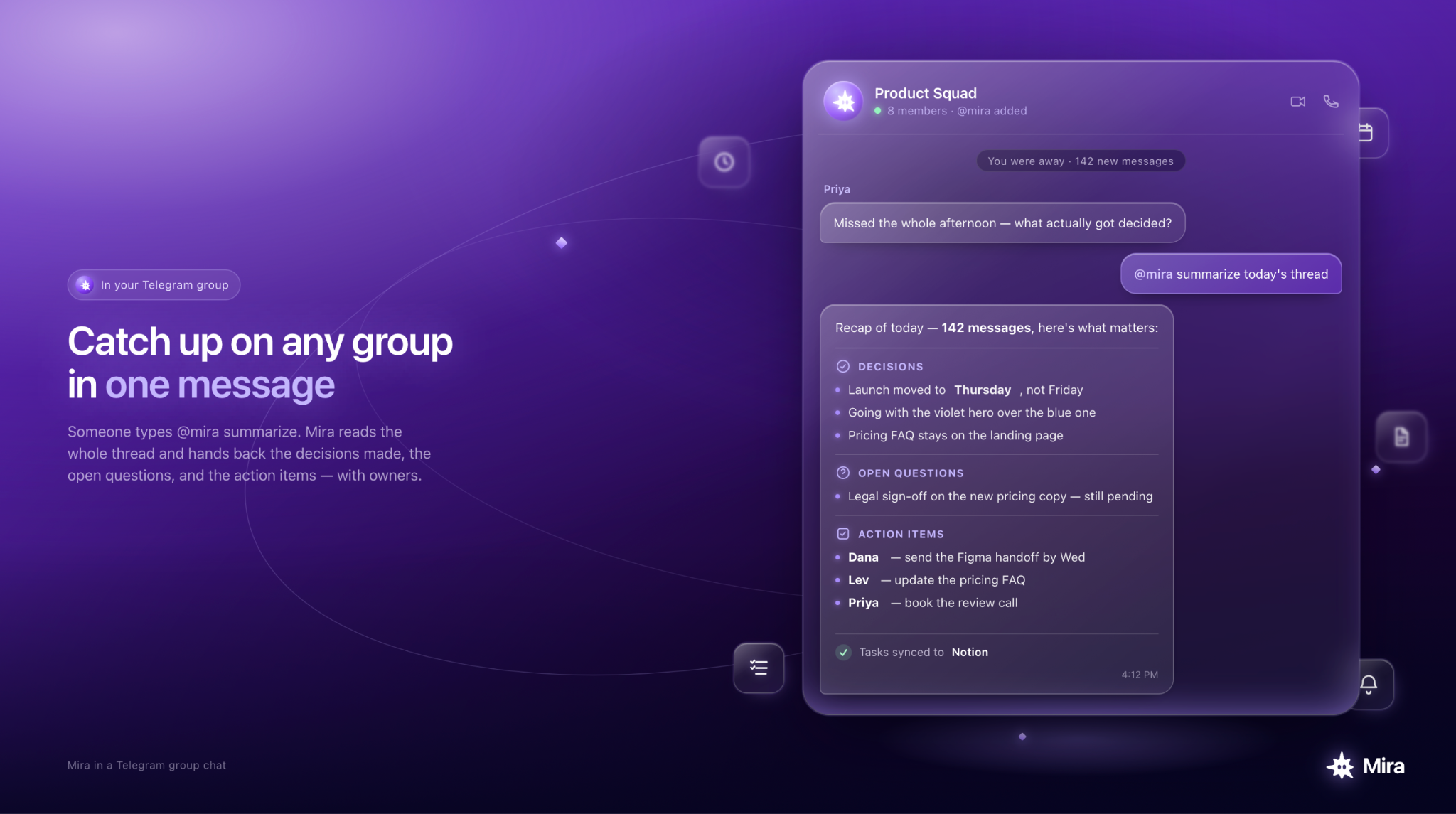
Example of how Mira can work in group chats
Many people run work, communities, DAOs, and study circles inside Telegram groups. An AI agent becomes the shared brain that keeps everyone aligned, no new app for anyone.
- Discussion summaries: Mira digests daily or weekly group activity into a catch-up message for anyone who missed it.
- Task extraction: Pulls action items with owners and deadlines out of messy threads, then syncs them to Notion or Trello. "Sarah should draft the proposal by Friday" becomes a tracked task.
- Decision tracking: Logs decisions as they're made, so later you can ask "what did we decide about X last week?" and get a real answer.
- Community Q&A: Answers recurring questions for members and escalates the uncertain ones to a human.
- Multilingual support: Translates messages and summaries so international teams collaborate without friction.
Control matters here: admins decide what the agent can see, which chats it joins, and which external tools it can reach. The result is an augmented workspace without anyone installing anything new.
Workflow Automation with AI in Telegram
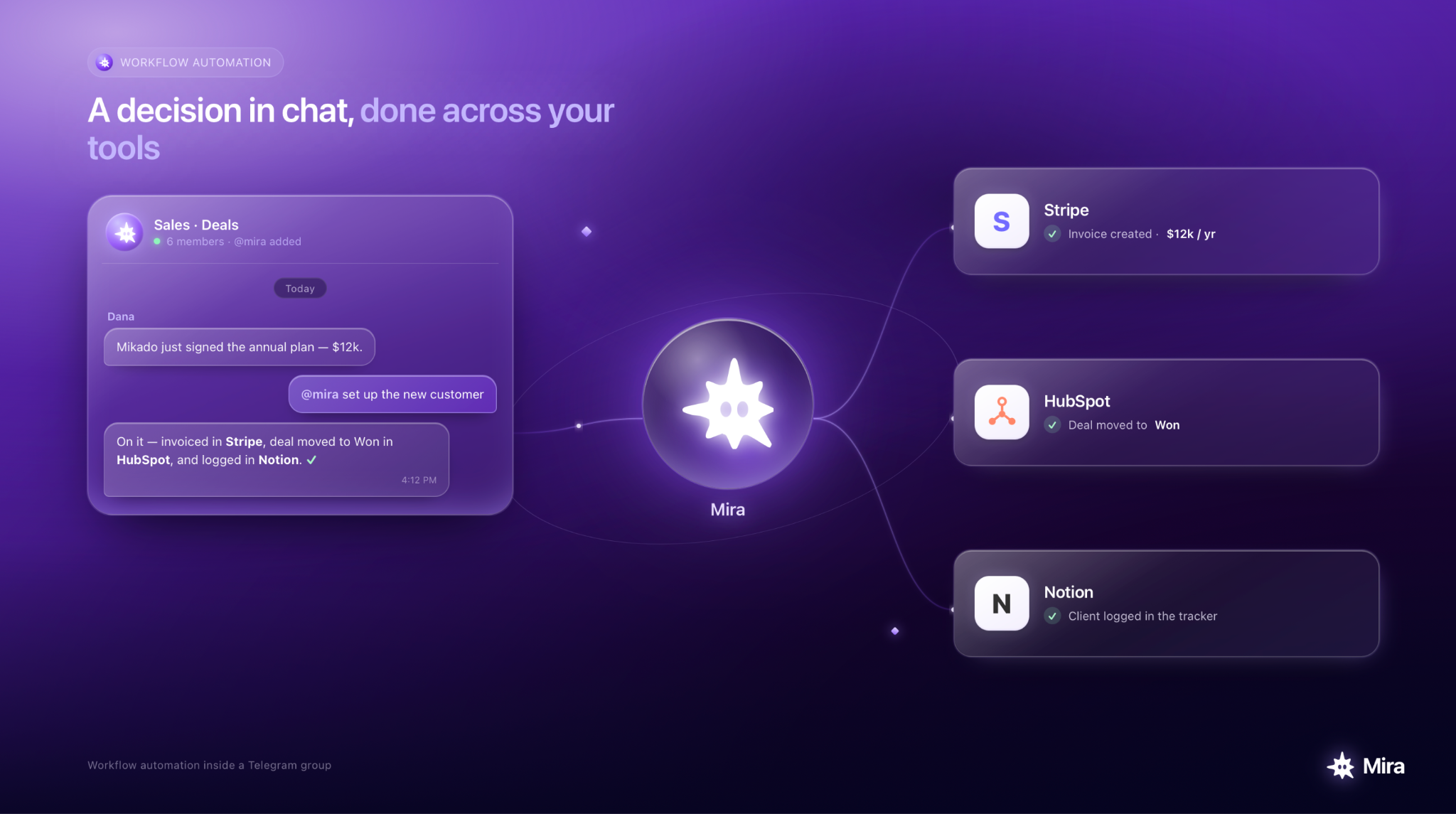
Example of workflow automation run by Mira
The real value of AI in Telegram is automating end-to-end workflows, not just answering one-off questions. A few that people actually run:
- Content pipeline: Brainstorm in a group → Mira drafts → feedback in thread → Mira revises → final copy stored or scheduled.
- Client and customer support: The agent answers common questions in a support chat and logs tickets to your helpdesk, routing the hard cases to a person.
- Engineering and product: Mira watches GitHub notifications and feedback pasted into Telegram, then summarizes, tags, and pushes tasks to your issue tracker.
- Personal productivity: Recurring reminders, weekly review summaries, and goal check-ins, all inside Telegram.
Privacy, Security, and Control with Telegram AI Agents
Using AI in Telegram raises fair questions about where data goes and who can see it. Here's the straight answer.
- Data flow: Messages go from Telegram to the AI backend, get processed, and are stored with minimal retention, embeddings and preferences, not full message logs.
- Private Mode: Routes requests to Cocoon's TEE network, so data is processed in isolation and never stored, useful for confidential work. Cocoon is third-party infrastructure Mira runs on, not Mira's own.
- Access control in groups: Only participants and authorized bots can reach group content. Admins set what the agent sees and which tools it can use.
- Memory management: You can ask Mira to forget specific information or reset context at any time.
Choosing the Right AI Telegram Bot (And Why Mira)
There are thousands of Telegram AI bots now, so pick against clear criteria — not the first one you find.
- Native Telegram experience: Does it feel like a first-class Telegram citizen, or a thin wrapper around a web app?
- Memory and personalization: Can it remember your context and style over time, or does every prompt start from scratch?
- Integrations: Does it connect to the tools you actually use — Notion, GitHub, calendars — and act through them?
- Group capabilities: Useful only in DMs, or does it handle real multi-user group scenarios?
- Pricing and models: Free tier vs. paid, which models are available, and how limits are handled.
- Privacy and control: Clarity on retention, controls for forgetting or limiting scope, and a real security posture.
Mira meets or exceeds each of these. Start with something small — summarize a document, set a reminder — then delegate more as trust builds.
Getting Started with Mira: Your AI Assistant on Telegram
Setup takes a few minutes, entirely inside Telegram.
- Add Mira via @mira or a deep link, no download, no separate account.
- Run the guided setup, where Mira asks about your languages, tone, and typical tasks.
- Connect your services through secure OAuth, from inside Telegram. Just say Mira "I want to connect my inbox", it will do the rest.
- Try three starter commands: "Remind me tomorrow to set up a meeting" or "Check my inbox for any urgent requests."
- Invite Mira into one small group and set what it should do there — daily summaries at a set local time, for example.
Upgrade to Mira Pro or Pro Max from inside Telegram for premium models, higher limits, and faster responses if you lean on it heavily.