AI for Teams in Telegram: How an AI Agent Works Inside Your Group Chat
Team AI is an AI assistant that works with everyone in a shared workspace, rather than in separate one-on-one chats. In Telegram, that means adding an AI agent directly to your group chat, where it can follow conversations, remember decisions, summarize discussions, assign tasks, and take action across connected tools.
This turns a regular Telegram group into a shared AI workspace without changing how your team already communicates. Add the agent to the chat, give it the right permissions, and the whole team can start using it in minutes.
What an AI agent does in a team chat
A team AI agent handles the coordination work that normally gets scattered across messages, people, and tools. It remembers what the team decided, turns conversations into action, finds information when someone needs it, and follows up on work that might otherwise get missed.
Here’s what that looks like inside a Telegram group, using the AI agent @mira as an example:
- Catch up without reading the whole thread. You wake up to 60 new messages about the launch. Type “@mira catch me up” and get the decisions, open questions, blockers, and owners in under 10 lines.
- Remember decisions and shared context. After a long back-and-forth, the team moves the launch to Oct 12 and puts Maya on QA. Mira keeps the decision, reasoning, and owner in the group’s memory, so anyone can ask about it later.
- Turn conversation into work. Someone agrees to fix the checkout bug. Mira can turn that discussion into a Linear or Jira issue, add the relevant context, assign the owner, and link it back to the conversation.
- Keep work moving after the conversation ends. QA is still unassigned and the launch review is Friday. Mira can surface the gap, tag the right person, set a follow-up, and bring it up again if it is still blocked. The team doesn’t have to remember every next step.
- Work across the team’s tools. Ask “@mira what’s still open in Linear for checkout?” and Mira can check the project and answer in the group. It can also create and update work across connected tools, so the chat becomes a place to act, not just ask questions.
- Handle routine questions for the group. A new designer asks where the brand files live. Mira can answer from the group’s existing context or connected docs, while questions it can’t resolve can stay with the team.
The important difference is that a team AI agent doesn’t just answer prompts. It remembers the group’s context, turns discussions into work, and keeps track of what needs to happen next.
🟢 Prompt example
Shared memory: why a group agent is different from a personal one
A personal AI agent learns about you. A group agent learns how the team works together: what you’re working on, what was decided, why decisions were made, who owns what, and what changed along the way.
That shared memory means the team doesn’t have to keep reconstructing context.
Ask “@mira what did we decide about pricing?” and Mira can bring back the decision, the reasoning, and when it happened. A new teammate can ask the same question months later instead of searching through old threads.
The important part is that group and personal context stay separate.
| Personal chat with the agent | Team group chat | |
|---|---|---|
| What it remembers | Your conversations and personal context | The group’s conversations, decisions, plans, and shared context |
| Who can access the context | You | Members of that group |
| Does context carry into other chats? | No | No. Each group has its own context |
Mira can’t see conversations it hasn’t been added to. Your personal context doesn’t become group memory, and one group’s context doesn’t carry into another group.
That separation is what makes shared memory useful: everyone gets the context they need without mixing conversations that should stay separate.
Five team workflows that live in the chat
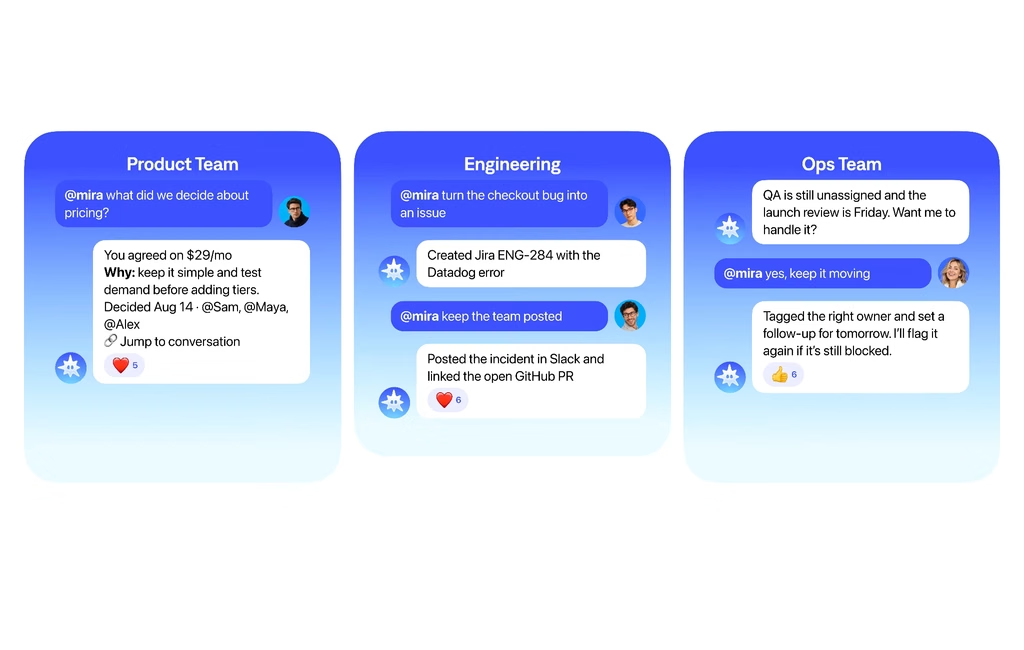
Five workflows cover most of what a team needs from an AI Telegram group. Each one starts with a single message, typed the way people actually type in chat.
| Situation | What someone types | What the agent does |
|---|---|---|
| Morning brief | @mira brief us at 9 every weekday | Posts what's due, what moved overnight, and what's blocked, every weekday at 9am |
| Long thread recap | @mira tldr, what did we land on | Lists the decisions, open questions, and owners from the thread |
| Tasks from a discussion | @mira make tasks out of this | Drafts one task per line with owner and due date, then creates them in your tracker once someone approves |
| Project status | @mira where's checkout at in jira | Pulls the current status from Jira and posts it for the whole group |
| Deadline reminder | @mira ping maya thurs about the deck | Tags the owner in the chat at the time you set |
Every row runs in the chat your AI team Telegram members already use. Nobody opens another app to get the answer.
🟢 Prompt example
Connecting your team's tools
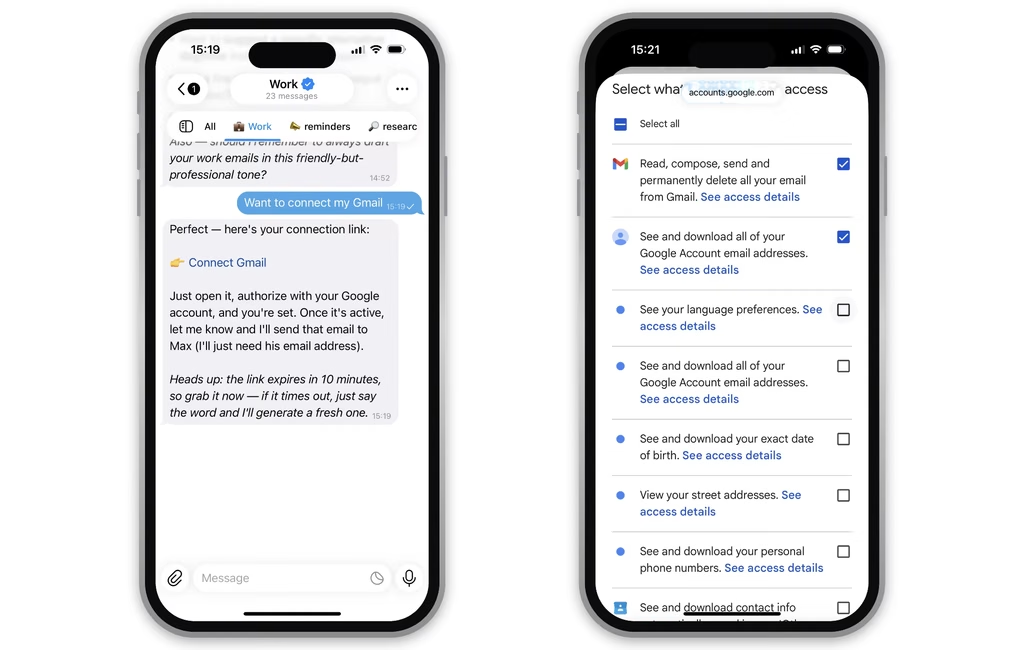
Mira connects to 1,000+ apps, including Notion, Jira, Linear, GitHub, Google Calendar, and Google Sheets. Once connected, you can ask Mira to find information or take action in those tools directly from the group chat.
Tool connections are personal to each teammate.
If you connect your Google Calendar and ask Mira to organize a call, Mira can create the event from your account. If another teammate asks Mira to organize a call, it won't use your Calendar connection. Mira will ask them to connect their own Google Calendar first.
The same applies to other connected tools. If several people want to create Jira issues, update Notion pages, or manage calendar events through Mira, each person should connect the account they want Mira to use.
One teammate connecting a tool doesn't give the whole group access to that account.
This keeps shared group context separate from individual permissions. Everyone can work with Mira in the same Telegram chat, while actions in external tools happen through the account of the person handing off the task.
For recurring work, Mira can also run scheduled workflows, such as pulling metrics from Google Sheets or preparing a weekly project update.
🟢 Prompt example
What to agree on before adding an AI agent to a work group
Before adding an AI agent to a team chat, agree on a few basics: who will use it, which tools each person should connect, what the agent can do automatically, and what information stays outside the group.
- Who will hand off tasks: Decide who will use the agent to create tickets, schedule meetings, update docs, or take other actions. Each person connects their own accounts, so Mira acts through the account of the teammate making the request, not someone else’s connection.
- Which tools people should connect: Teammates who plan to hand off work should connect the tools they use. If three people need Mira to manage their calendars, for example, each connects their own Google Calendar.
- What Mira can do automatically: Decide which actions can happen without another check and which should wait for approval. This might differ by tool or type of action.
- What stays outside the group: Keep sensitive conversations, such as compensation, HR cases, or legal matters, in chats where they won’t become part of the group’s shared context.
- How the team uses it: Keep requests clear — tag @mira, say what you want done, and name the tool when it matters.
The important distinction is that the context is shared, but tool access is personal.
Everyone works with the same team agent and group memory, while each teammate controls which of their own accounts Mira can use.
How Mira works as a team agent in Telegram
Mira joins your Telegram group as a shared AI agent. It learns who’s who, what the team is working on, and how you work from the conversation itself. It can then remember context, turn discussions into action, and work across 1,000+ connected tools. Teammates don’t need separate installs, accounts, or seats.
🟢 Prompt example
Here’s what that can look like for a six-person product team over one day.
- 9:00. Mira posts a morning update with what changed: the launch moved to Oct 12, pricing was decided, and QA still has no owner.
- 10:15. Maya missed a long thread. She asks, “@mira what did we decide about pricing?” Mira brings back the decision, why the team made it, and who was involved.
- 13:30. The team identifies a checkout bug. Someone asks, “@mira turn this into an issue.” Mira creates the ticket with the relevant context from the conversation and connected tools.
- 16:00. QA is still unassigned and the launch review is approaching. Mira surfaces it, tags the right owner, and sets a follow-up instead of waiting for someone to notice.
- 18:00. The team asks what’s still open. Mira pulls together the unfinished work, owners, and next steps without everyone checking separate threads and tools.
The team decides how much autonomy Mira gets. It can capture, create, update, and follow up automatically where you allow it. Actions outside those permissions wait for approval.
That’s what makes Mira a team agent rather than another chatbot in the group. It doesn’t just answer questions when tagged. It remembers shared context, notices what needs attention, and helps move the work forward.