How to Use AI in Telegram Group Chats
AI in Telegram group chats works as a shared assistant that can follow conversations, answer questions, summarize discussions, track decisions, and help complete tasks without leaving the chat.
Most people first use AI in Telegram through a one-on-one bot. That works for simple questions and drafting, but group chats unlock more useful workflows. Teams can use AI to summarize long threads, find information from earlier messages, turn discussions into action items, coordinate work, and reduce repetitive communication.
This guide explains how to use AI in Telegram group chats, how to set it up, and which use cases are most useful for teams and communities.
Why Telegram group chats are the right environment for AI
Telegram gives AI assistants the infrastructure to work directly inside group conversations. Its Bot API, large group support, granular permissions, and newer AI bot features let bots access group context, interact with other bots, and automate actions beyond answering individual prompts.
That matters because useful group AI needs more than a chat interface. An assistant can follow discussions, summarize long threads, track decisions and action items, answer questions based on group context, and help coordinate work without members repeatedly explaining what happened.
The exact role of the AI depends on the group. For a team, it might manage tasks and decisions. For a community, it might answer questions and summarize discussions. For a customer or sales group, it can help handle requests and keep conversations moving.
What AI can actually do in a Telegram group chat
Before getting into setup, it's worth being specific about capabilities. AI in a group chat covers a wide range of functionality, and the gap between a basic bot and a genuine group AI assistant is significant.
Summarization
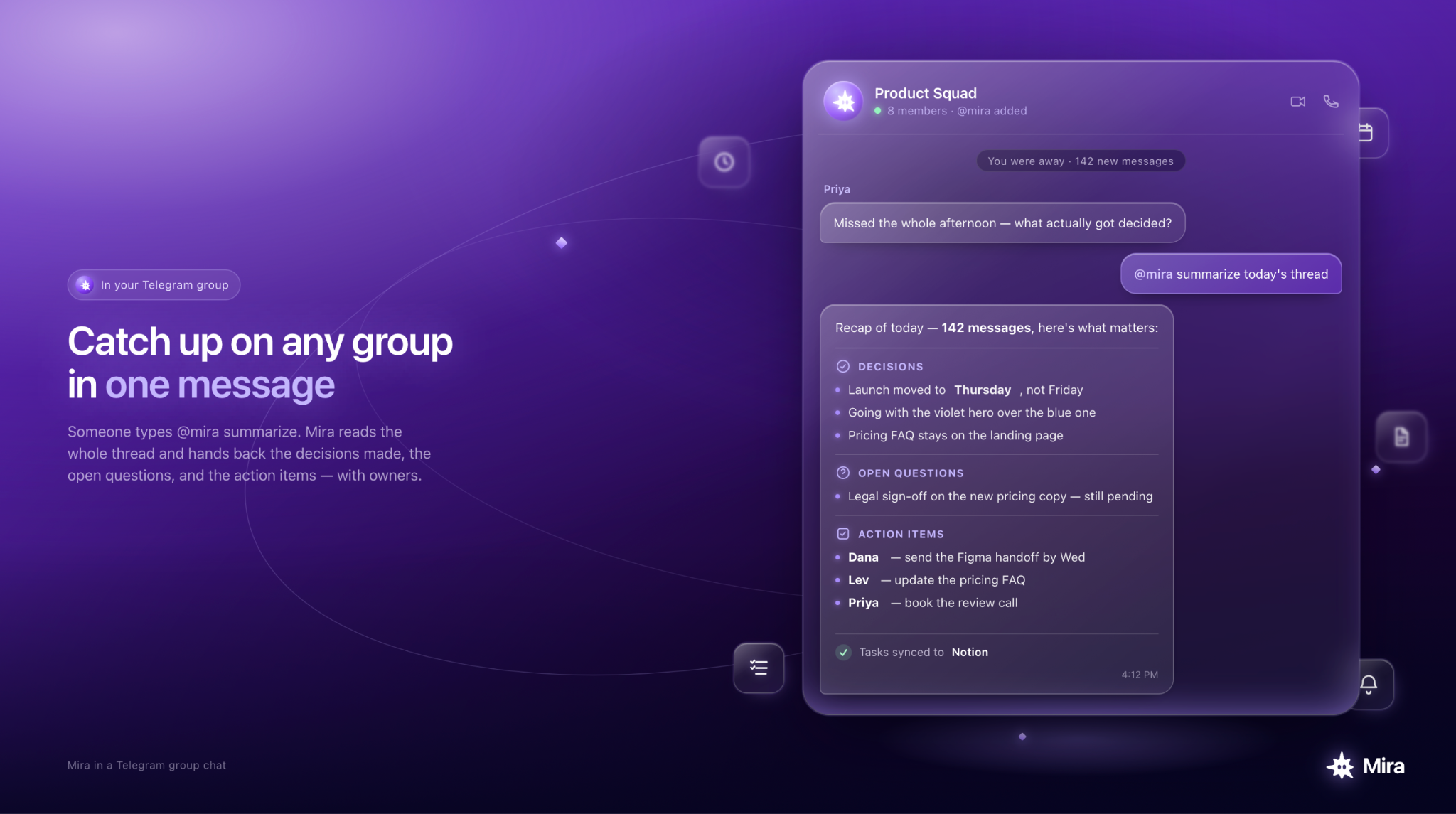
Example of how Mira can summarize a group chant and highlight what everyone agreed to
Summarization is the most immediately useful capability for most groups. An AI group assistant can summarize everything that happened while you were away — not just the last few messages, but the substance of a long discussion, the decisions reached, and the open questions that remain.
For active groups, this alone saves hours per week.
Question answering in context
A Telegram group AI bot can answer questions from group members using the context of the group conversation itself. In a sales team group, it can answer "where did we land on the Acme proposal?" In a community group, it can answer "has this question been asked before?" It uses what the group already knows, not just what it was trained on.
Task and action tracking
AI for Telegram groups can identify action items mentioned in conversation — "someone needs to follow up on this," "let's get that done by Friday" — and surface them as structured tasks without anyone having to manually copy them into a task manager.
Automated summaries and digests
Rather than waiting for someone to ask, a group AI assistant can send a daily or weekly digest of the group's activity: key decisions, open items, important links shared, and anything flagged as needing attention.
Onboarding new members
When someone new joins a group, an AI onboarding bot for Telegram can greet them, answer common questions about the group's purpose and rules, and give them the context they need to participate without burdening existing members.
Moderation support
For large communities, AI moderation in Telegram groups can flag content that violates group rules, handle repetitive questions automatically, and reduce the administrative load on human moderators.
Workflow automation
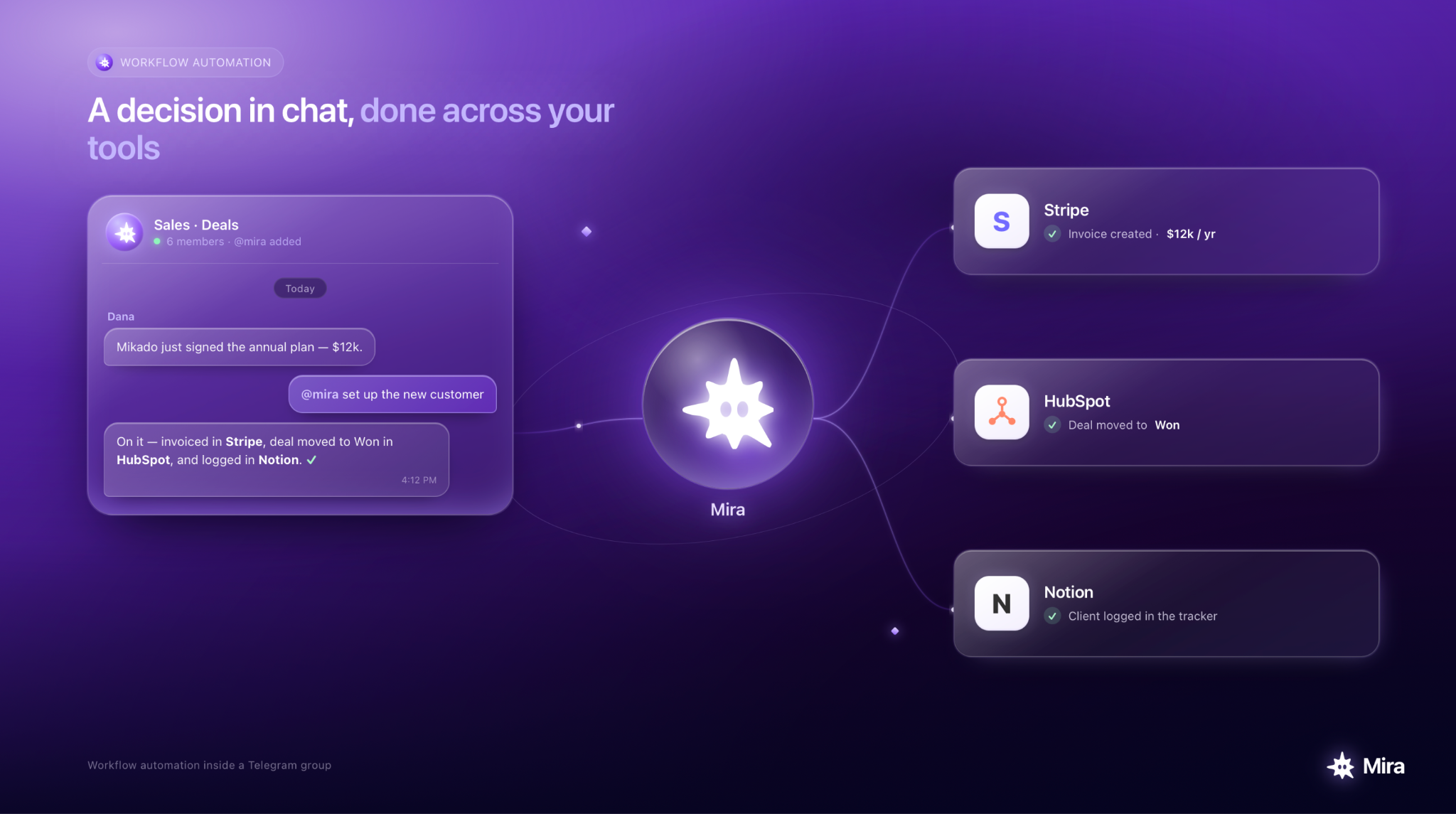
For example, Mira connects to 1,000+ tools and can automate task management, reporting, and other workflows directly from a Telegram group chat.
This is where the leverage compounds. An AI that understands group context can trigger workflows based on what happens in conversation — routing a message to the right person, creating a task when a decision is made, sending a notification when a specific topic is mentioned.
How to add an AI bot to a Telegram group (step by step)
Adding an AI bot to a Telegram group takes about a minute. Any group admin can do it — no code, no separate app.
- Pick the right bot: A general-purpose bot handles one-off questions. A group AI agent with persistent context handles ongoing coordination, including summaries, task tracking, digests. For teams and communities, the second kind is worth the setup.
- Add the bot to your group: Open the group → Add Members → search the bot's username (for Mira, @mira). Or use a one-tap add link, below.
- Set admin permissions: Proactive messages (summaries, reminders) need posting rights. Moderation needs delete or restrict rights. Grant only what the use case requires.
- Give it context: Tell the bot what the group is for, what it covers, and what to track. The more it knows on day one, the more useful it is.
- Introduce it to members: A short pinned message on what the bot does and how to mention it cuts confusion fast.
Use cases by group type
AI works differently depending on the type of Telegram group. The most useful workflows vary across teams, communities, sales chats, and customer groups.
AI for your whole team in one Telegram group
You add one AI agent to the group and everyone delegates to it, no per-seat licensing, no separate logins. Anyone mentions @mira from the group chat, and it works with the shared context of the whole conversation.
In a group, memory is shared: the AI tracks the team's decisions, priorities, and open items across the thread, so a teammate in another timezone can ask "where did we land on this?" and get a real answer.
In direct messages, memory stays private to each person. That split — shared in the group, private in DMs — is what lets one agent serve a whole team without leaking anyone's individual context.
AI for remote team Telegram groups
Remote teams rely on Telegram groups for coordination that would happen in person in an office. The challenge is that asynchronous communication produces a lot of noise — messages sent at different times, decisions buried in long threads, action items that never get formally captured.
A Telegram AI for teams addresses this directly. It tracks decisions made in conversation, surfaces action items with owners and deadlines, and sends a daily digest that keeps everyone aligned without requiring anyone to maintain a separate status doc. Members in different time zones arrive at the start of their day with a clear picture of what happened while they were offline.
For teams that also handle documents and invoices through Telegram, AI can go further — automating invoice processing and other document workflows that previously required manual handling.
AI for small business and sales team groups
Sales teams use Telegram groups to share updates on deals, coordinate on prospects, and move quickly on opportunities. The problem is that critical information like a prospect's response, a deal update, a follow-up that needs to happen often gets buried in conversation and never reaches the right person at the right time.
An AI sales team Telegram group assistant tracks deal mentions, flags time-sensitive items, and can automatically route messages to the right team member based on context. It turns a coordination channel into an active workflow tool.
AI for community and crypto Telegram groups
Large communities, for example, crypto Telegram groups, which often have thousands of members and extremely high message volume, face a specific challenge: new members can't absorb the group's history, repeated questions consume moderator time, and important announcements get lost in noise.
A Telegram community AI bot handles all three. It answers FAQs automatically using the group's own history and pinned content, greets new members with relevant context, and ensures that important announcements reach everyone regardless of when they joined.
For crypto groups specifically, AI can also track mentions of specific tokens, projects, or events and surface relevant discussions automatically, reducing the time members spend searching through message history.
AI for customer support Telegram groups
Businesses that run customer support through Telegram groups can use AI to handle the first layer of inquiry — answering common questions, routing complex issues to the right team member, and ensuring that no message goes unanswered when the team is offline.
AI customer support in Telegram group contexts works best when the AI has access to the group's knowledge base and conversation history, so it can answer questions accurately based on what the business actually does rather than generic responses.
What to look for in the best AI bot for Telegram groups
Not all Telegram group bots are equivalent. The gap that matters is between a bot that reacts to commands and an agent that holds context.
The short version: a reactive bot answers when mentioned; a group AI agent holds the group's context over time and acts on it. For a full comparison of AI assistants available inside Telegram, including how they handle group contexts: Best AI Assistant for Telegram in 2026 →
How Mira works in Telegram group chats
Mira is a personal AI agent built to operate inside Telegram — across both personal chats and group conversations at once.
In a group, Mira understands the conversation history, tracks action items and decisions, answers questions using the group's own context, and sends proactive summaries when activity warrants them.
What distinguishes Mira from a standard Telegram group AI bot is persistent memory. Mira doesn't reset between sessions. It builds a continuous model of the group's activity, the team's priorities, and the ongoing context of whatever work the group is coordinating, and it applies all of that every time it responds.
For teams that want to move beyond question-answering into genuine workflow automation, Mira connects to 1,000+ external tools and acts within them: creating tasks in Notion or Linear, updating records, opening GitHub issues, sending notifications, and handling the steps between a decision made in chat and the outcome that decision requires.
Getting started
The fastest way to understand what AI in a Telegram group chat actually produces is to run it in a group you already use. Add Mira, give it the context of what the group is for, and watch a week of normal group activity.