How to Talk to an AI Assistant: Prompting Basics With Examples

A good prompt tells the assistant three things: what you want, why you want it, and what the finished result should look like. That's most of what you need to know about how to ask an AI assistant questions.
Compare two requests. “Write an email” gets you a generic template. “Write a short email to a client moving our call from Tuesday to Thursday, friendly but brief” gets you something you can send.
The rest is structure, follow-ups and a few mistakes to avoid, with prompts you can copy at every step.
What is a prompt?
A prompt is the request or instruction you give an AI assistant. Your message is one layer. The others are the earlier conversation, what the assistant remembers about you, and any files or app data it can pull in.
| Layer | What it adds | How you shape it |
|---|---|---|
| Your message | The task right now | Every time you write |
| Conversation history | Earlier asks, answers and corrections | By what you keep in the chat |
| Memory and preferences | Role, time zone, preferred format | Once |
| Attached or connected data | Files, emails, calendar events, sheets | By sharing a file or connecting an app |
The model behind the assistant predicts the most useful reply to that whole bundle. Where the bundle is thin, it fills the gaps with the most generic guess. Where it's rich, the answer gets specific without you writing more.
That changes how to use an AI assistant well. A short message works when the other layers already carry the context. A long one still misses if it leaves out the one fact that matters.
With an AI agent, a prompt can also trigger an action. “Move my 3pm to Thursday” isn't a request for text. It's an instruction the agent carries out on your calendar once you approve it, so precision matters more.
How to start a conversation with an AI assistant
Start a conversation with an AI assistant by stating the job. The first message does most of the work.
A strong first message has three parts:
- The situation: One sentence on what's going on and who the result is for.
- The ask: The specific thing you need, led by a verb: draft, sort, summarize, plan.
- The definition of done: Length, format, tone or deadline.
Not sure what the assistant can do? Describe the problem and let it suggest the work.
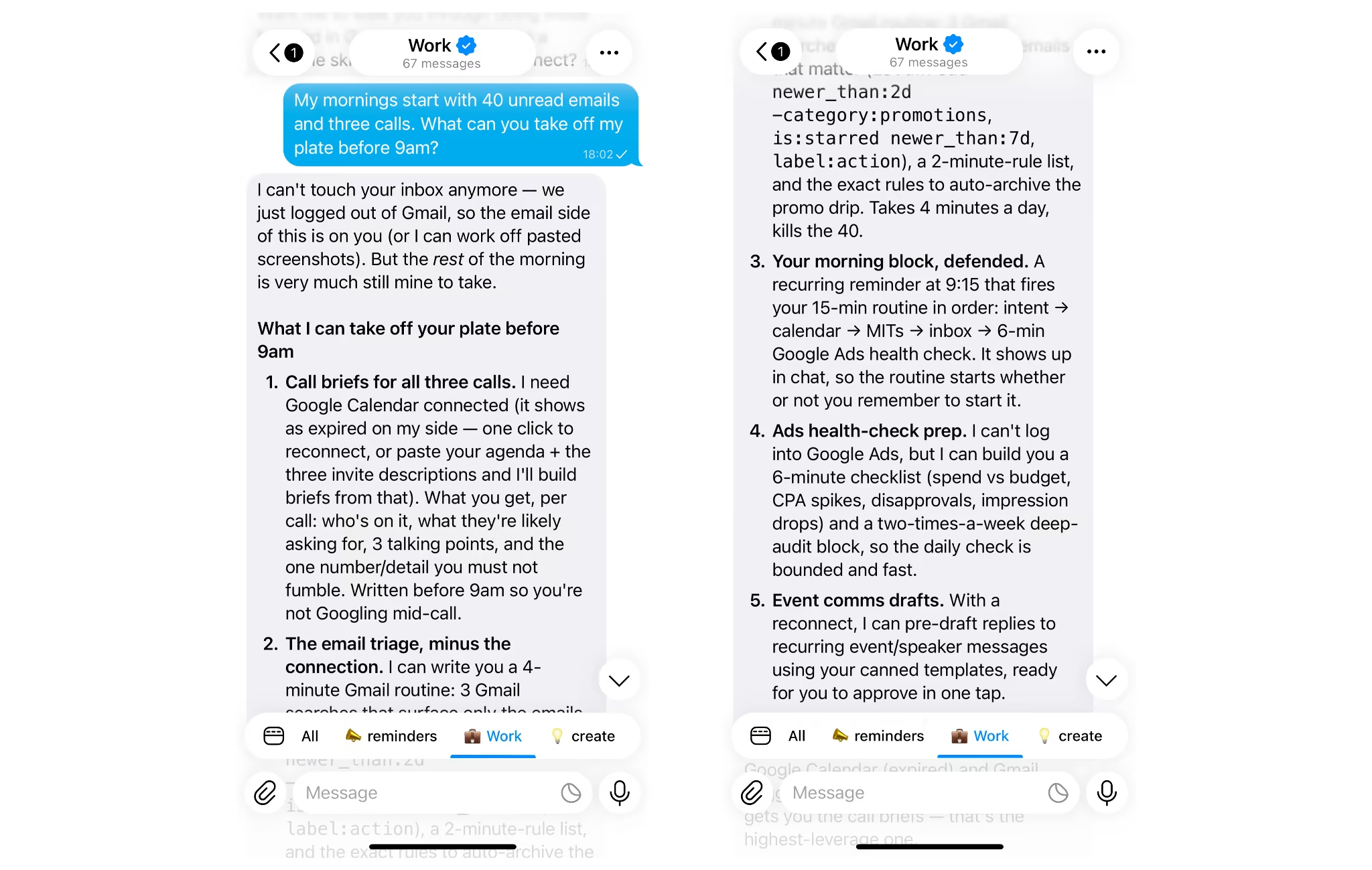
A useful reply comes back with concrete offers, like a daily briefing or an inbox sort, not a list of features.
Switching topics depends on the tool. In most chat assistants, everything earlier in a conversation shapes the next answer, so a new chat can help keep unrelated tasks separate. Assistants with memory may retain useful preferences across chats, but it still helps to name the new topic and provide relevant context.
AI agents with persistent memory don't need the reset. For example, Mira lives in one ongoing chat in your messenger and remembers you across conversations, so you can move from an inbox sort to a trip plan without starting over. Name the new topic in your first line and carry on. When a project needs its own space, ask Mira to open a separate thread for it.
The four parts of a good prompt
A good prompt names a role, the context, the task and the format.
You don't need all four every time, but each one removes a guess the assistant would otherwise make. This is the core of how to ask an AI assistant questions that get specific answers.
| Part | What it tells the assistant | Example |
|---|---|---|
| Role | Whose perspective to take | “You're a strict editor.” |
| Context | The background and who it's for | “This goes to a client who missed two deadlines.” |
| Task | The exact action | “Rewrite this paragraph to be firmer.” |
| Format | The shape of the answer | “Under 80 words, no bullet points.” |
Two extras help when the output keeps drifting:
- Examples: Paste one sample you like and ask for the same style. One example beats a paragraph of adjectives.
- Constraints: Say what to avoid: jargon, exclamation marks, anything over 200 words.
Here's the gap in practice:
| Vague prompt | Specific prompt |
|---|---|
| “Write a follow-up email.” | “Write a polite follow-up to a client who hasn't replied in five days about our proposal. Three sentences.” |
| “Summarize this report.” | “Summarize this report in five bullets for someone with two minutes. Lead with the biggest change.” |
| “Give me post ideas.” | “Give me 10 post ideas for a home coffee channel. Mix how-tos and behind-the-scenes. One line each.” |
| “Help me plan my week.” | “Here are my tasks and deadlines. Order them by urgency and block time for the top three.” |
All four parts in one prompt.
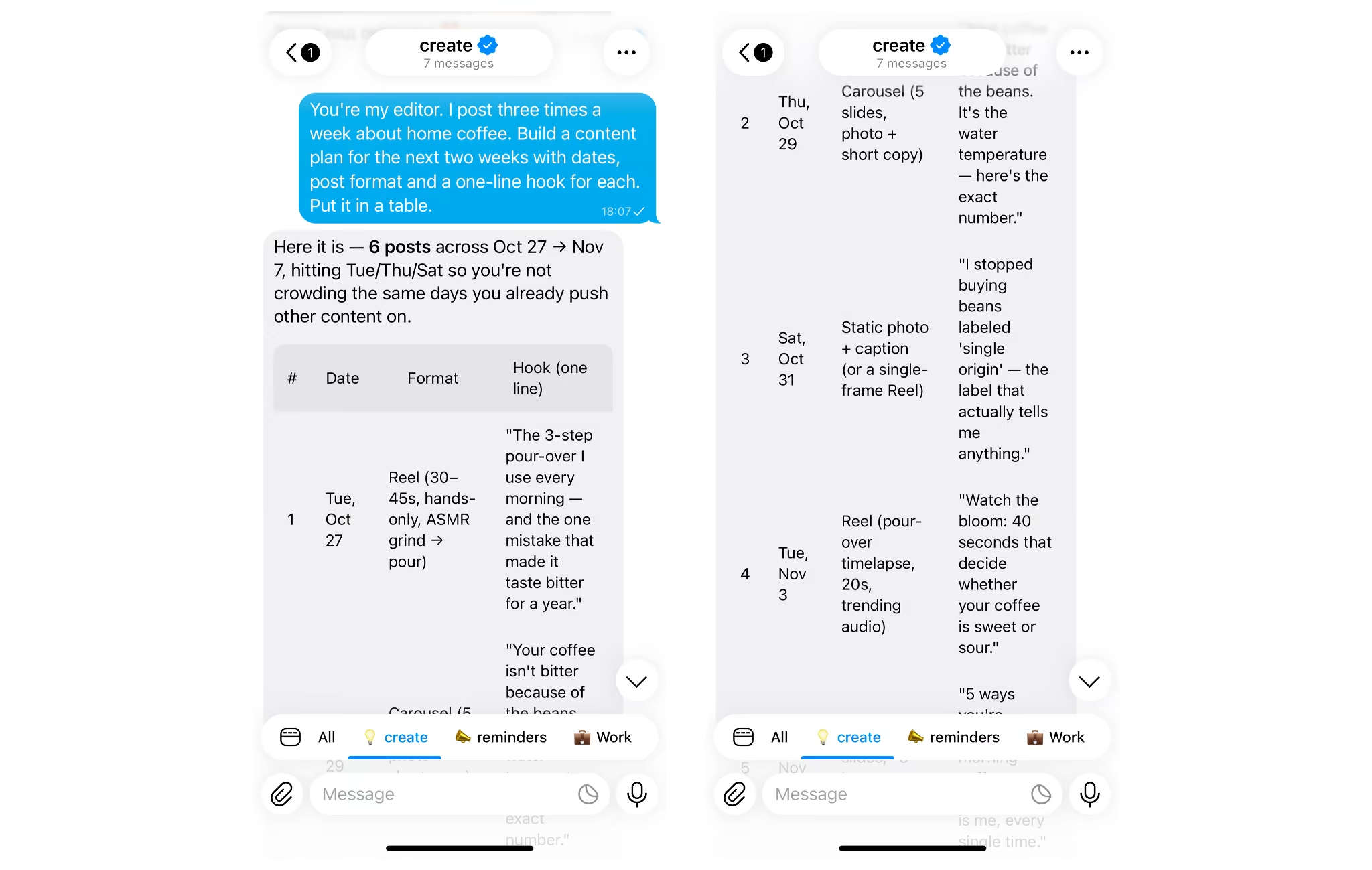
Each part you add is one less thing the assistant has to guess.
How to ask an AI assistant for help with a task, not a topic
When you ask an AI assistant for help, ask for a result, not information about a subject.
“Tell me about budgeting” gets a lecture. “Make me a weekly budget from these numbers…” gets a budget.
Three habits make task requests work:
- Hand over the real material: Paste the email or attach the file. A description makes the assistant work on an imagined version.
- Break big jobs into steps: Ask for the analysis first, check it, then ask for the plan built on it.
- Say what not to do: “Draft, don't send” or “suggest, don't change” keeps you in control.
Two prompts that ask for the task itself:
Ask for the outcome and you get something you can use.
How to talk to an AI assistant like a collaborator
Treat the first answer as a draft, not the final word. The best results come from a short back-and-forth: you react, it adjusts.
Four moves do most of the work:
- Follow up specifically: “Shorter,” “warmer,” “add numbers,” “cut the second paragraph.”
- Let it ask first: Tell it to ask what it needs before it starts. It surfaces gaps you didn't know you'd left.
- Ask for options: Three subject lines in different tones beat one you have to argue with.
- Ask for the reasoning: On anything with numbers, ask it to show the steps so you can check them.
“I need to plan a two-day team offsite. Ask me whatever you need first, then give me two versions of the agenda.”
You can also talk instead of type. In Mira, a voice message works like a typed prompt, which helps when the request is long or you're on the move.
Prompts that get things done, not just answered
Most AI assistants hand back text you then copy somewhere else. An AI agent acts on the request: it checks your calendar, sorts your inbox, sets the reminder and sends the result back to the chat. That's the biggest shift in how to use an AI assistant right now.
The prompt barely changes. You ask for the outcome instead of advice about it.
| Ask for an answer | Ask for the outcome |
|---|---|
| “How should I organize my mornings?” | “Every weekday at 8:30, send me today's meetings and the emails that need a reply.” |
| “How do I track content performance?” | “Every Monday, pull last week's numbers from my sheet. Tell me what went up, what dropped and one thing to check.” |
| “How do I stop missing calls?” | “Remind me 15 minutes before every call on my calendar.” |
| “How do I keep up with code reviews?” | “Ping me when a pull request is waiting on my review.” |
Look at what the right column adds: a time, a source and a format. It's the same four-part structure from earlier, plus “when.”
That “when” matters. Ask once, and the briefing or report arrives on schedule without another prompt. Mira runs these inside your messenger and connects to 1,000+ apps, including Gmail, Google Calendar, Google Sheets, GitHub and Notion. You connect an app by asking: “Connect my Gmail.”
The best prompt is one you only have to send once.
Tell it once: context that carries over
If your assistant has memory, state your preferences once instead of in every prompt. Most prompting advice says to repeat your context each time. Memory removes that step.
Three things worth saying once:
- Your role: So examples and suggestions fit your work.
- Your time zone: So reminders and briefings land at the right hour.
- How you like answers: Length, tone, bullets or prose.
Mira keeps a profile and the facts you share, so later prompts can stay short. Memory is private in one-on-one chats and shared in group chats, so keep personal details out of shared ones.
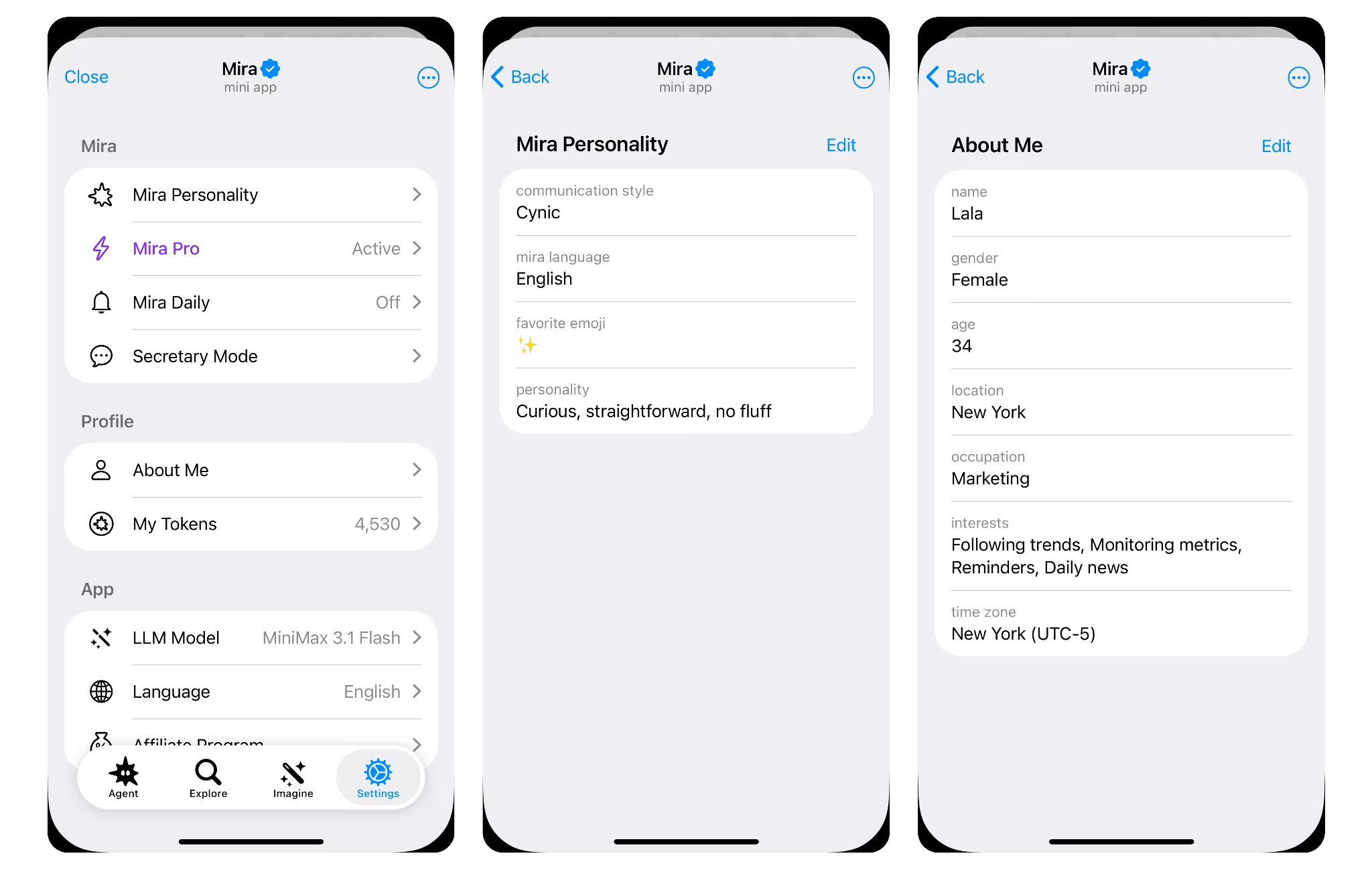
Context you give once is context you never retype.
Common mistakes when you ask an AI assistant questions
Most bad answers trace back to six habits. Fix them and you'll use an AI assistant effectively from the first message.
- The bare question: “Write a sales email” with no product or reader gets filler. Add one line of context.
- Four asks in one message: Each gets a shallow pass. Send them one at a time.
- Leading questions: “Why is X the best option?” gets a case for X. Ask for the strongest arguments on both sides.
- Taking the first draft: It's rarely the best one. Say what's off and ask again.
- Trusting unchecked facts: Assistants can state wrong figures with full confidence. Give it the source and verify anything you'll rely on.
- Pasting secrets: Keep passwords, card numbers and sensitive client data out of the chat.
Fix the input and the output follows.
A simple prompt template to copy
Use this structure for any request and drop the lines you don't need:
Filled in:
- Situation: I run a small online shop and launch a new product on Friday.
- Task: Write three short posts announcing it.
- Format: Under 60 words each, one ending with a question, no hashtags.
- When: Send me the drafts Thursday at 10am.
- Before you start: Ask me what the product does.
Five lines, and the assistant has almost nothing left to guess.
Try your first prompt in Mira
Learning how to ask an AI assistant questions comes down to one pattern: say what you want, why, and what done looks like, then follow up. The rest is practice.
Mira is a good place to practice. It's a personal AI agent that lives in your messenger, so there's no new app to open and nothing to set up. Three things set it apart from a chat-only assistant:
- It acts, not just answers: Mira connects to 1,000+ apps, including Gmail, Google Calendar, Google Sheets, GitHub and Notion, and carries out the task itself. Anything that sends or changes data waits for your approval.
- It remembers you: Your role, time zone and preferred format carry over between conversations, so your prompts can stay short.
- It works on a schedule: Ask once for a morning briefing or a weekly report, and it arrives on time without another prompt.
Start small: “Every weekday at 8:30 am, send me today's meetings and the emails that need a reply.” Message Mira and send it your first task.