Best AI Coding Assistants for Developers in 2026

AI coding tools are now part of the standard developer workflow. By 2026, 76% of developers use or plan to use them in their daily work. McKinsey also identified software engineering as one of the highest-value use cases for generative AI, with significant time savings in code generation, debugging, and documentation.
This guide compares the 10 best AI coding tools in 2026, including features, pricing, pros and cons, and the best use case for each.
Rankings and pros/cons below reflect each vendor's own documentation and pricing pages, plus publicly reported benchmarks (GitHub, Stack Overflow, McKinsey), as of July 2026. Prices and rankings change fast - verify on the vendor's site before you buy.
AI coding assistant vs AI coding agent - what's the difference?
An AI coding assistant is reactive: it suggests completions, answers questions and helps with quick refactors inside your editor as you type.
An AI coding agent is proactive: give it a higher-level task and it plans steps, edits multiple files, runs commands and returns results for your review.
Most tools in 2026 blur the boundary. GitHub Copilot and Tabnine are primarily assistants. Claude Code, Cline and Bolt.new are agents. Cursor and Windsurf do both, depending on the mode.
The distinction matters when choosing: if you want fast completions while typing, an assistant is enough. If you want to delegate a full feature or refactor, you need an agent.
Best AI coding assistants in 2026: Comparison Table
For quick decisions: Cursor for editor-first work, Claude Code for terminal-first agentic tasks, Cline for open-source flexibility, Mira for coding help without opening an editor.
Top 10 AI coding assistants reviewed
1. GitHub Copilot - the most widely adopted AI pair programmer
Best for: teams of all sizes already working inside GitHub and major editors.
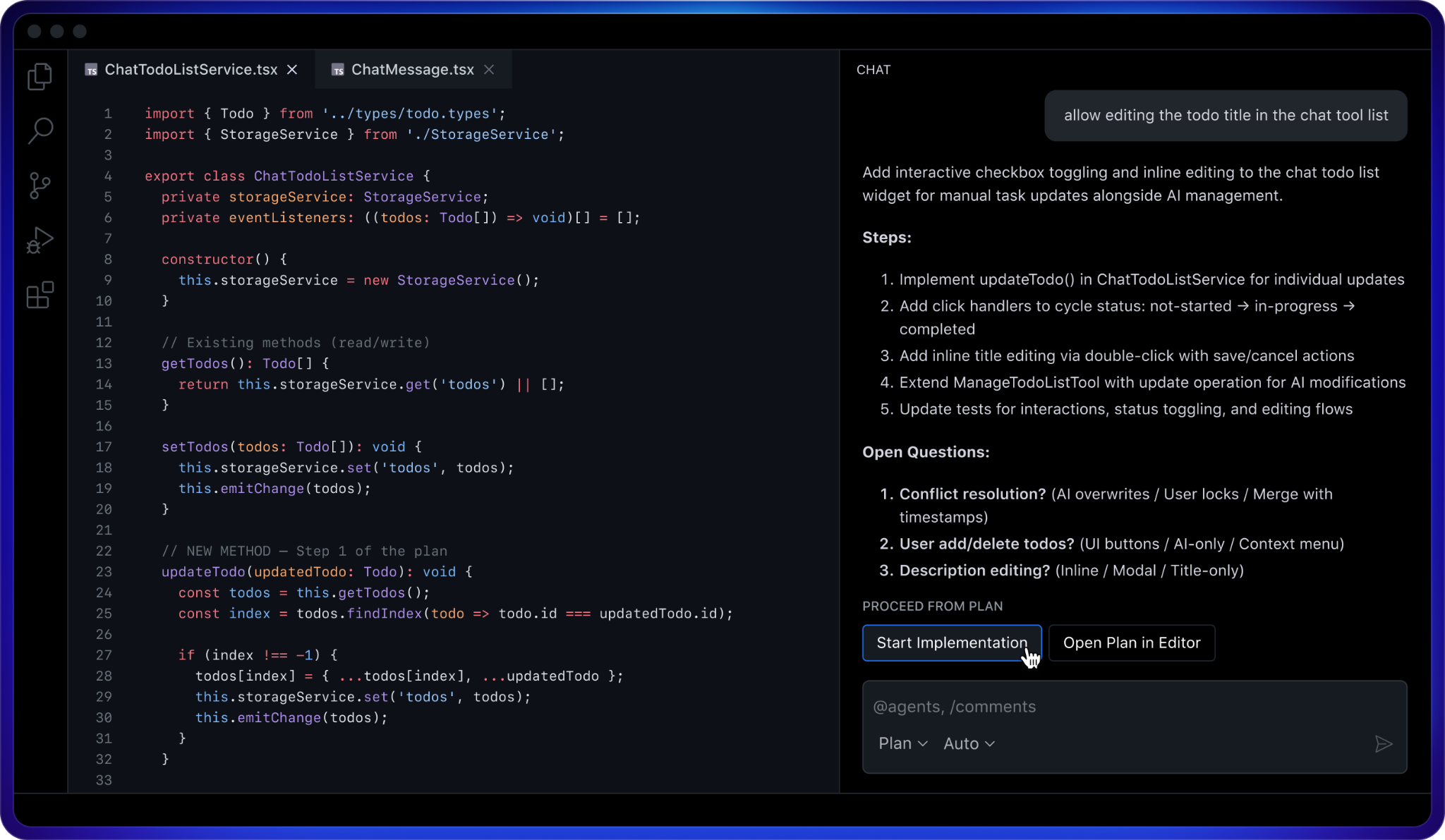
Copilot surfaces open questions — conflict resolution, inline vs modal editing — before it writes anything. This plan-then-implement loop is the part of Agent Mode that changed most in recent releases.
GitHub Copilot remains the most widely adopted AI coding assistant in 2026. Integrated into VS Code, JetBrains and most popular editors, it offers real-time code completions, a chat interface for debugging and refactoring, and Agent Mode for multi-step tasks.
According to GitHub's own research, developers using Copilot complete tasks 55% faster on average, the most cited figure in the space.
- Inline completions: multi-line, context-aware suggestions while typing
- Copilot Chat: explanations, test generation and code review inside the editor
- Agent Mode: creates pull requests and implements features from GitHub issues
- Broad editor support: VS Code, JetBrains, Visual Studio, Neovim and more
Pricing: Free tier (limited completions). Individual $10/mo. Business $19/user/mo. Enterprise $39/user/mo.
🟢 Prompt to copy - code review (works in Copilot Chat, Claude, Mira)
→ Use in Copilot Chat, Claude Code or send to @MiraAgentBot in Telegram
2. Cursor - AI-native editor for codebase-wide editing
Best for: developers who want AI deeply embedded in their editing environment when working on large codebases.
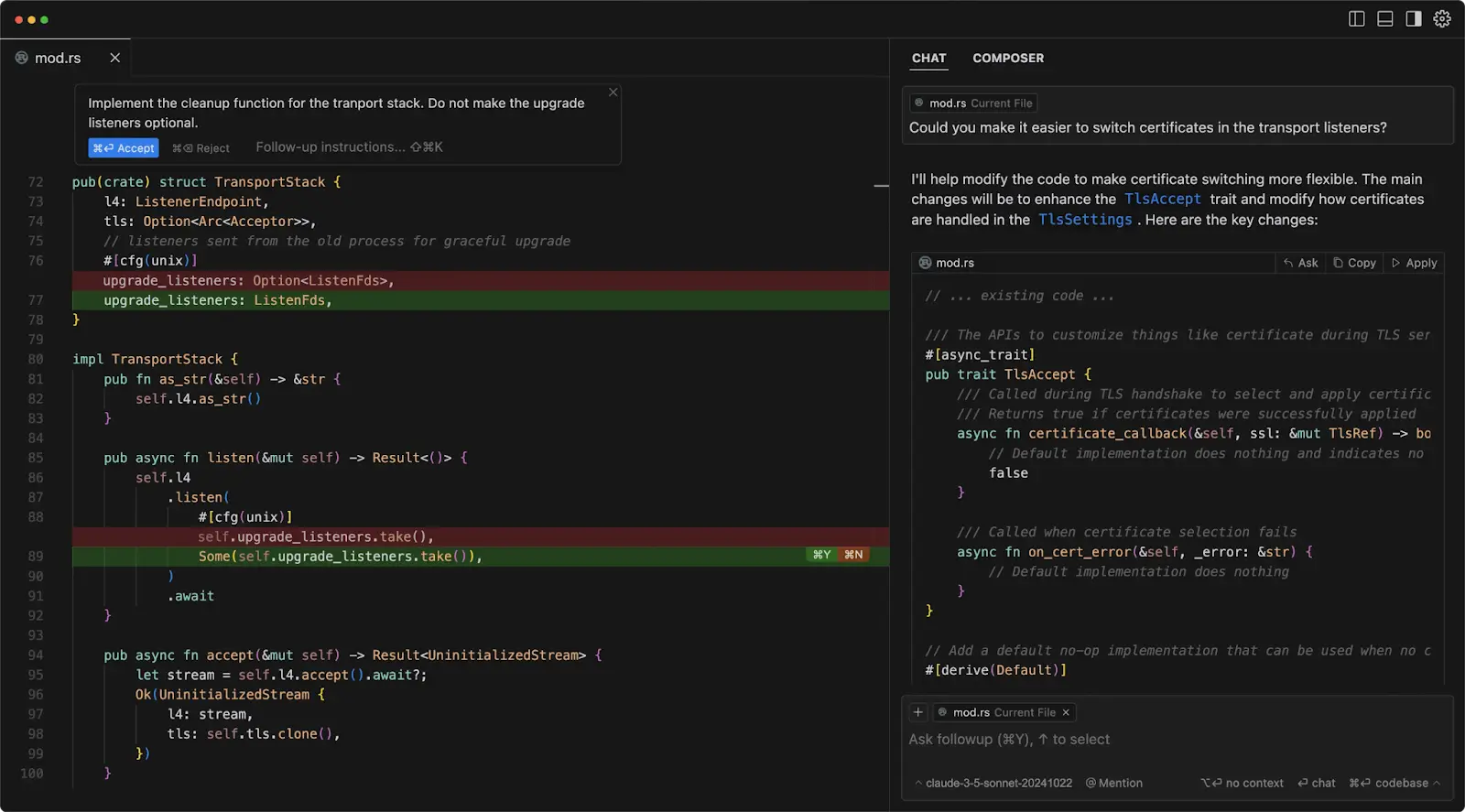
The screenshot shows the accept/reject-per-hunk diff is Cursor's core loop.
Cursor is a VS Code fork rebuilt entirely around AI. Its key advantage is codebase-wide context - it understands your full project structure, not just the open file. Agent Mode takes a natural language instruction and plans, then executes across multiple files.
Used by engineering teams at Vercel, Shopify and Linear, it has become the default AI coding environment for many frontend and full-stack developers in 2026.
- Full codebase context: understands structure and relationships across all files
- Agent Mode: multi-file edits, refactors and feature implementation
- Chat with your codebase: ask questions about any module or function
- VS Code compatibility: reuse existing extensions, no reinstalling
Pricing: Free Hobby plan. Pro $20/mo. Business $40/user/mo.
🟢 Prompt to copy - codebase-wide refactor (Cursor Agent Mode or Claude Code)
→ Works in Cursor Agent Mode, Claude Code or Cline - paste after opening the project
3. Mira - AI coding agent inside Telegram
Best for: developers who need coding help, quick code review or architectural answers without opening an editor.
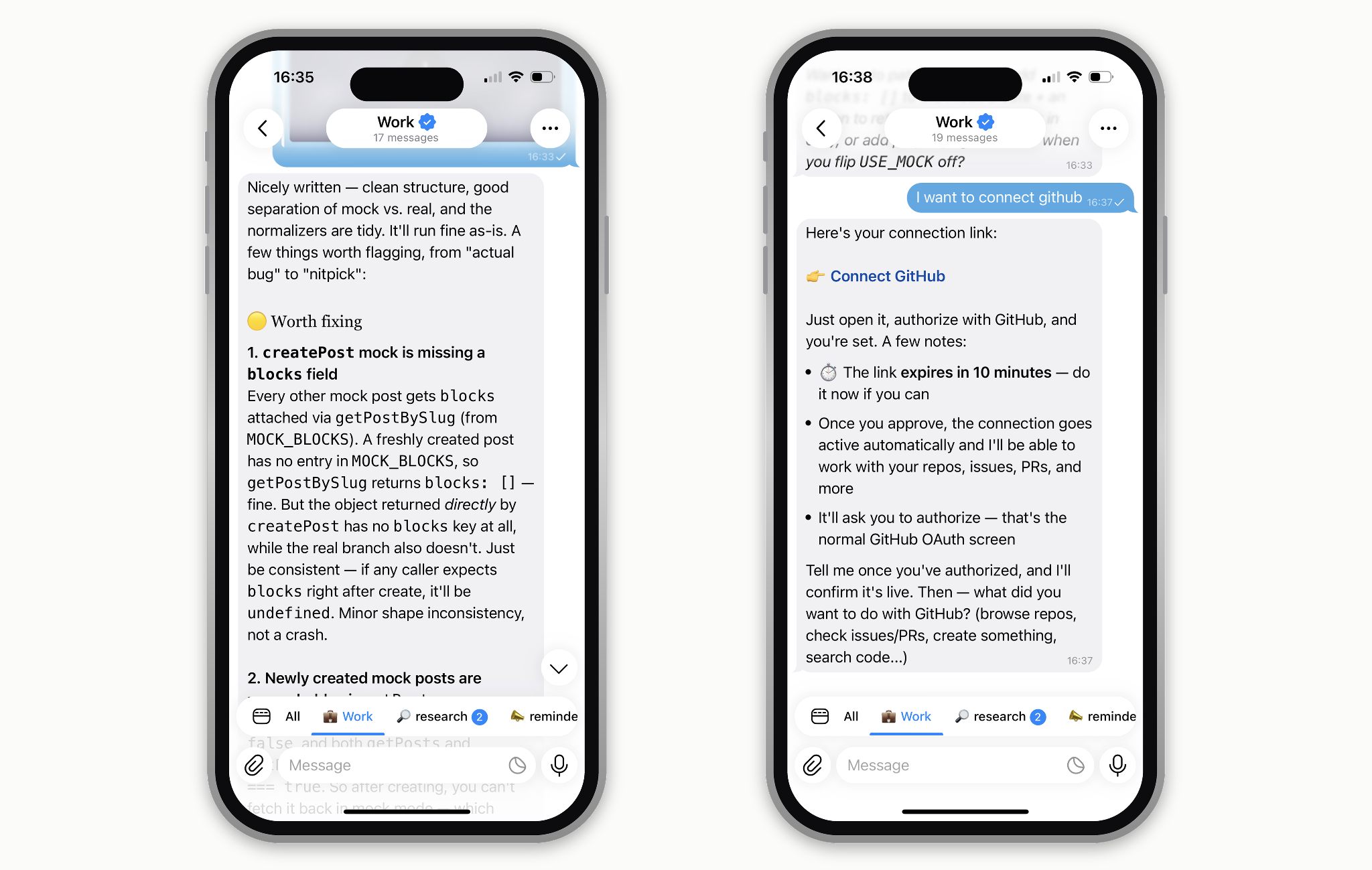
Two things no editor-based tool can do from a phone: a severity-ranked review inside a thread you're already in, and an OAuth connection to your repos with nothing installed.
Mira is an AI agent that works natively inside Telegram, the only tool on this list with no editor, no browser tab, no install. It's model-agnostic: run Claude Opus or Fable for hard reasoning, GPT-4o for speed, and switch per task.
Connect GitHub (plus Linear, Jira, Notion and 500+ other apps) by just asking "Connect my GitHub," and Mira works with your actual repos, not just pasted snippets.
Roughly 1,000,000 people have already "hired" Mira on Telegram, and it ranks among OpenRouter's top 3 Productivity agents.
- Code review between tasks: paste a function into the Telegram chat and get a structured review before your next meeting
- Architecture questions: ask about design tradeoffs, data modelling or debugging without switching away from your current conversation
- Quick generation on mobile: write a regex, a SQL query or a utility function while commuting, paste the result when you're back at your desk
- Works alongside your main tool: Mira doesn't replace Cursor or Claude Code, it fills the gaps when those tools aren't open.
- Summarized standups: add Mira to your team's Telegram group; it tracks decisions across repos and chats and extracts action items.
- Scheduled routines: daily digests of open PRs or issue queues, running on a schedule inside Telegram — no cron, no dashboard.
Pricing: Free tier. Open @MiraAgentBot in Telegram or visit t.me/mira to start.
4. Claude Code - terminal-first AI agent for complex reasoning
Best for: backend developers, CLI-first engineers and anyone who wants an AI agent running alongside their existing editor.
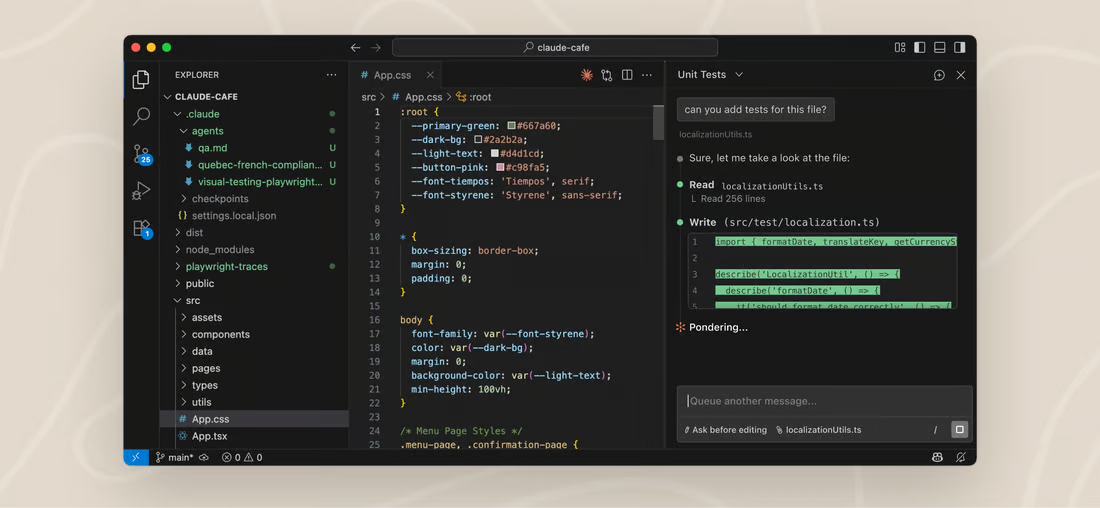
Each action is logged as its own step, with approval available at every one.
Claude Code is an agentic AI coding assistant from Anthropic that runs in your terminal. It reads a full repository, plans implementation steps, edits files, runs commands and creates git commits - all with explicit approval at each step.
Developers consistently describe it as the most capable reasoning agent available in 2026: it strikes the right balance between autonomy and control. Unlike editor-based tools, you can run Claude Code in a separate terminal window while keeping VS Code, JetBrains or Neovim open.
- Terminal-first: works alongside any editor without replacing it
- Large context window: ingests and reasons across an entire repository
- Auto-accept mode: runs unattended on larger refactors while you step away
- CLAUDE.md files: persistent project-level instructions across sessions
Pricing: Free tier (limited). Pro $17–20/mo. Max $100/mo for intensive agentic use.
🟢 Prompt to copy - agentic terminal task (Claude Code)
→ Run in Claude Code terminal after navigating to your project directory
5. Windsurf - AI-native editor built for flow state
Best for: developers who value speed and want a proactive AI that thinks ahead rather than waiting for each prompt.
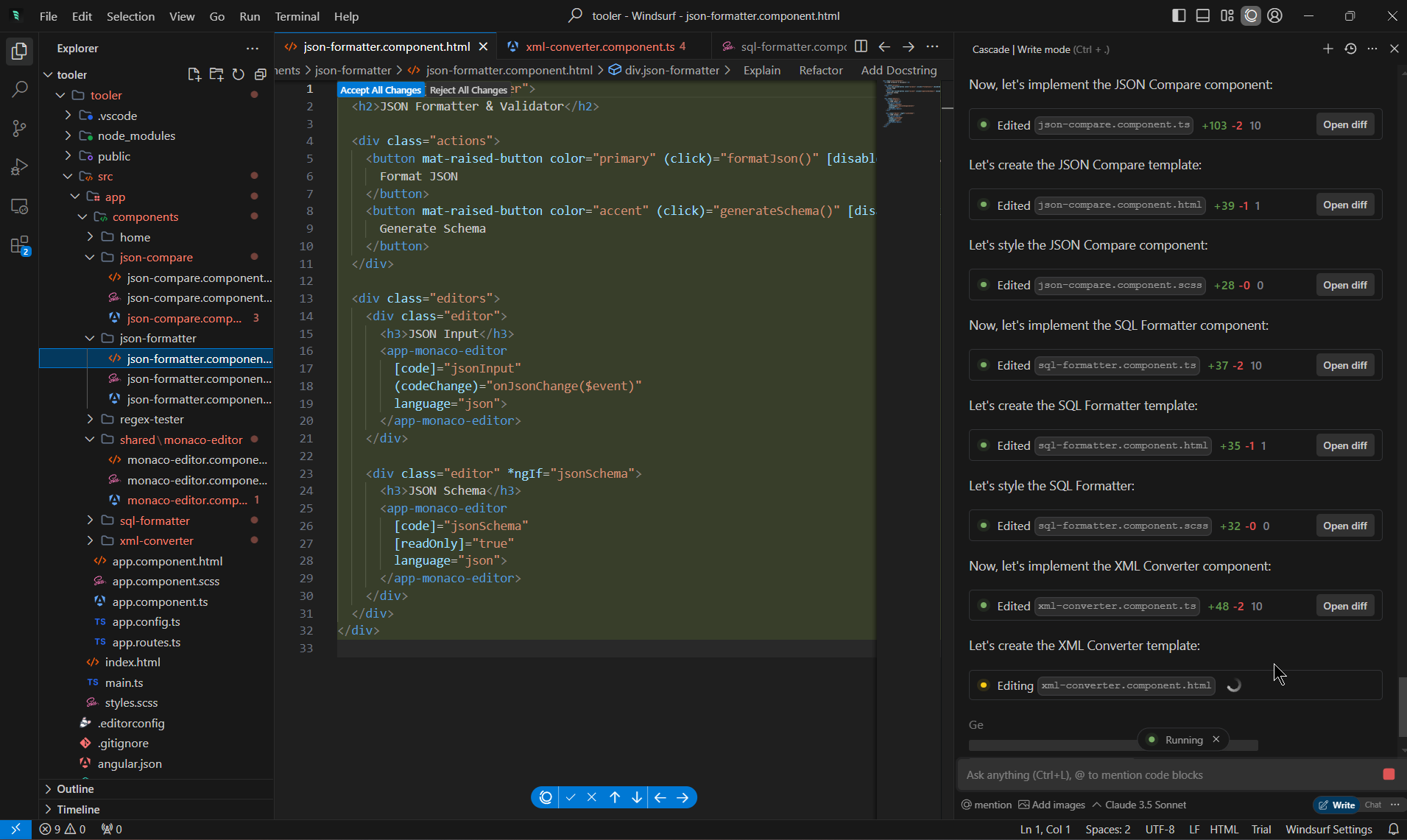
Example of how Cascade narrates its plan while executing rather than stopping for sign-off at each edit.
Windsurf (formerly Codeium) is a VS Code fork whose standout feature is Cascade - an agent that codes, fixes and anticipates your next move by collecting context before starting.
Of all AI coding environments, Windsurf consistently ranks highest for raw typing speed: its multi-line autocomplete and jump prediction make it the fastest tab-to-complete experience available. Its proprietary SWE-1.5 model is trained specifically for coding tasks at Windsurf's price point.
- Cascade agent: collects context, proposes a plan, then executes proactively
- Fast autocomplete: multi-line completion with predictive jump to the next edit
- Windsurf Reviews: AI-assisted code review built into the editor
- Pricing edge: more affordable than Cursor at equivalent feature depth
Pricing: Free tier. Pro $15/mo. Teams $35/user/mo.
6. Tabnine - enterprise AI coding assistant for privacy-first teams
Best for: enterprise teams, financial institutions and regulated organisations where proprietary code cannot leave the building.
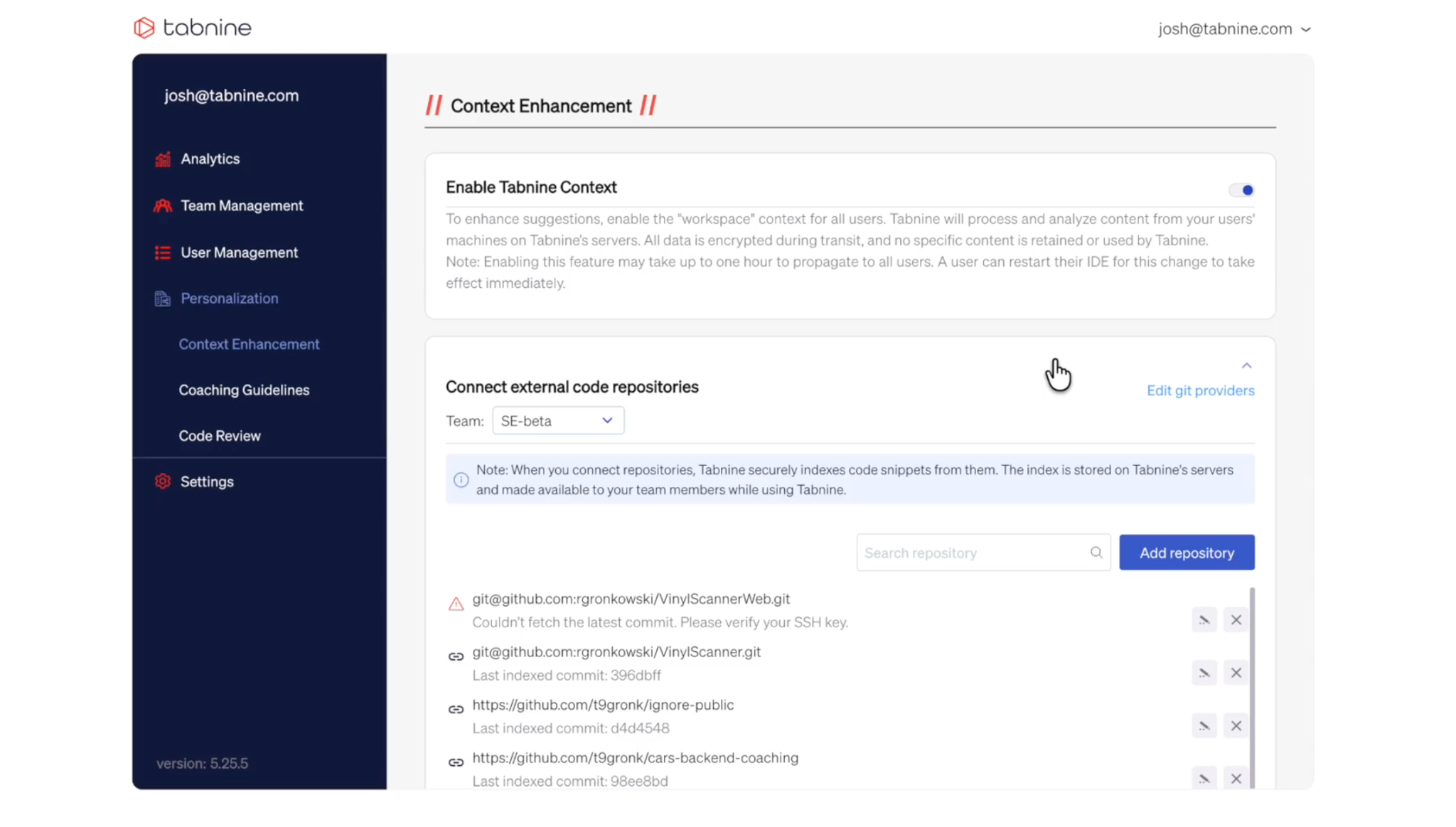
This is the Tabnine admin console, not the editor — governance, team controls and private code indexing are what the enterprise tier actually buys.
Tabnine's defining feature is deployment flexibility. It can run on-premises, in a private VPC or fully air-gapped - your code never touches a third-party server.
Enterprise customers can train Tabnine on their private codebase to generate suggestions aligned with internal standards and architecture patterns. For any team where data residency or compliance requirements apply, Tabnine is the only enterprise-grade self-hosted option on this list.
- Flexible deployment: self-hosted, on-premises or fully air-gapped
- Zero-retention policy: code is never used to train external models
- Private model training: suggestions tuned to your own codebase and conventions
- Broad editor support: VS Code, JetBrains, Visual Studio, Eclipse
Pricing: Free individual tier. Code Assistant $39/user/mo. Agentic Platform $59/user/mo.
7. Cline - open-source AI coding agent with full model flexibility
Best for: developers who want maximum transparency, zero vendor lock-in and full control over which AI model they use.
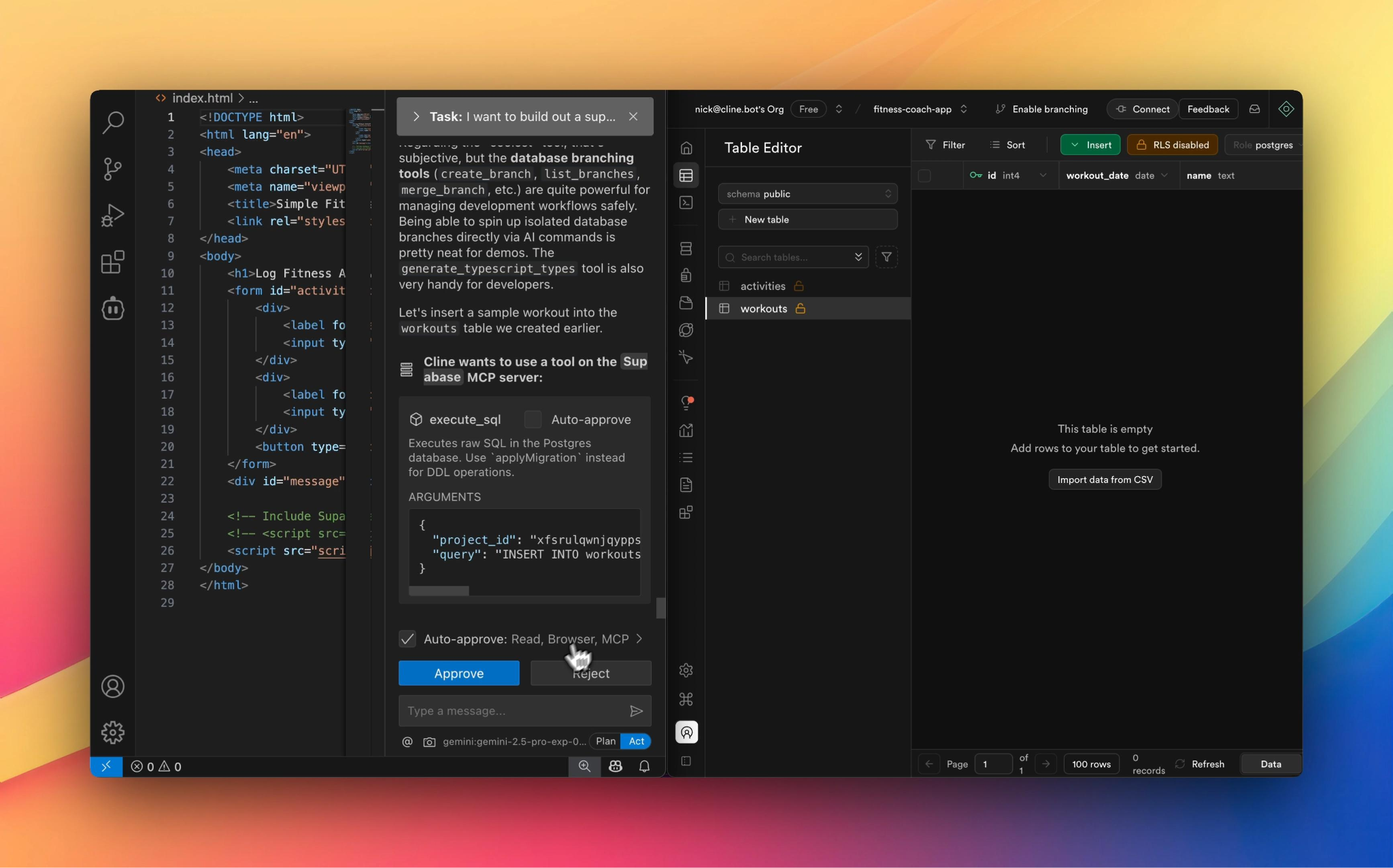
The approve/reject prompt is the per-tool permission model in action.
Cline is a fully open-source VS Code extension. It is model-agnostic: use OpenAI, Anthropic, Google or any provider via BYOK (bring your own key) and pay only for the API tokens you consume - no monthly subscription.
Cline operates as a genuine agent: it reads files, runs terminal commands, edits code and manages multi-step tasks with configurable permission controls at every action. For developers who already have Claude or GPT API access, Cline is effectively a free, highly capable agent.
- Fully open-source: inspect and modify the extension itself
- Model-agnostic: Claude 3.5/4, GPT-5, Gemini or any API-accessible model
- BYOK: you control costs, data and which model runs each task
- Per-tool permissions: allow, deny or require approval for each action type
Pricing: Free (open-source extension). Pay only for the AI model API calls you make.
8. Replit AI - browser-based assistant for prototyping and learning
Best for: developers prototyping ideas quickly, beginners, and teams who need a shared coding environment with zero local setup.
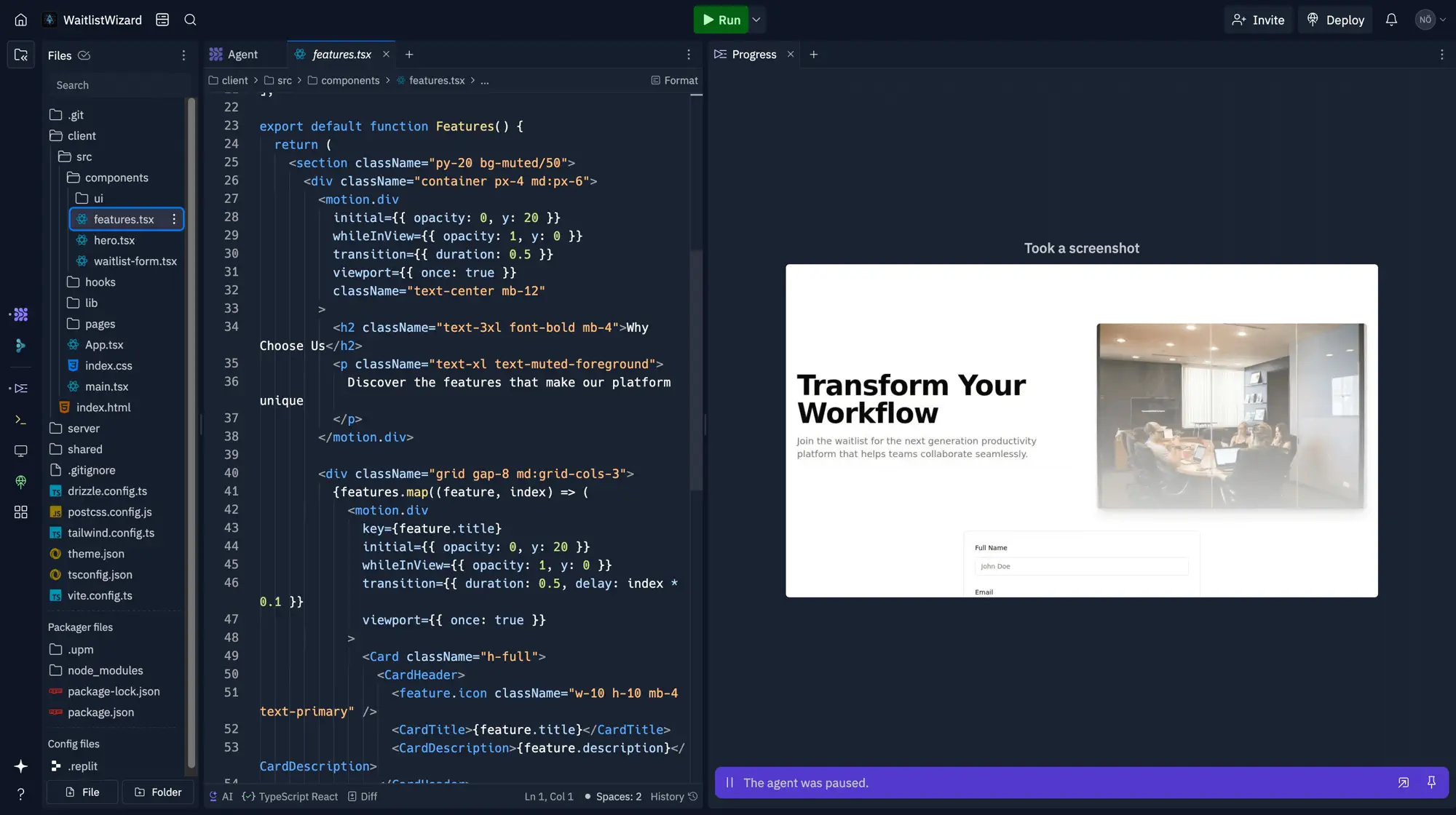
Editor, agent and running app in one browser tab. The tradeoff shows up as slower builds once the project grows.
Replit AI is built into a fully browser-based development environment. There is nothing to install or configure - open a browser and start coding.
The Replit Agent builds applications from natural language prompts, debugs code and generates intelligent suggestions with full project context always available. It is the fastest path from an idea to a working, deployed proof of concept.
- Zero-setup environment: accessible from any device instantly
- Replit Agent: builds full apps from natural language, including backend and database
- One-click deployment: instant hosting with no server configuration
- Real-time collaboration: multiplayer editing built in
Pricing: Free Starter. Core $20–25/mo. Pro $95–100/mo.
9. CodeGPT - budget-friendly AI coding agent with BYOK
Best for: freelancers, students and small teams who want agentic AI capabilities without a large monthly subscription.
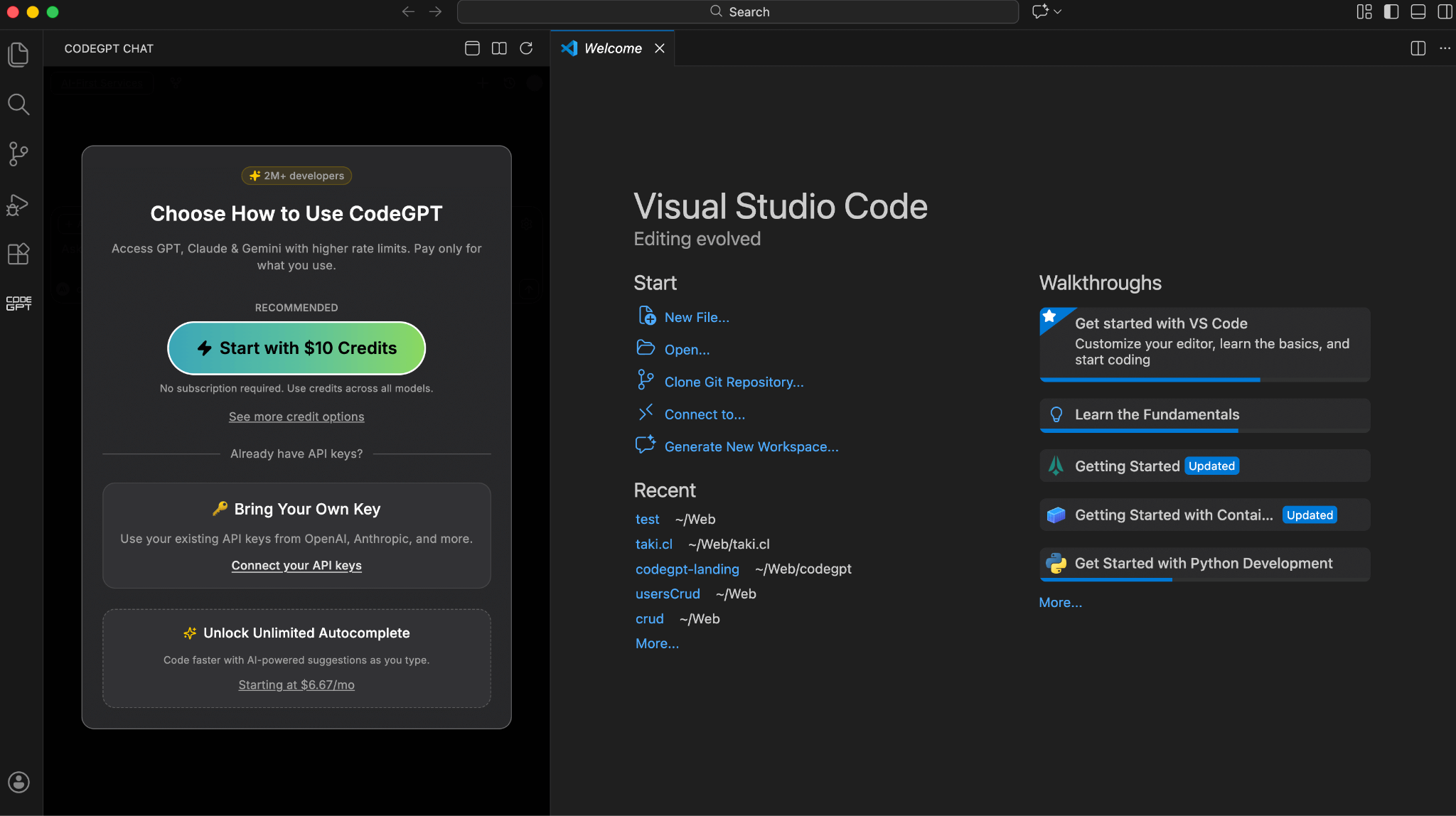
The two options on this screen are the entire pricing model: prepaid credits, or your own API key at provider rates.
CodeGPT plugs into VS Code and JetBrains as a plugin. Its BYOK model lets you connect your own API keys from OpenAI, Anthropic, Google or others and pay only for what you use. Unlike flat-rate tools, this means costs scale down with lighter use.
CodeGPT includes agentic mode with multi-step planning, full repository understanding and AI coding capabilities - at roughly one-quarter the cost of Cursor Pro for developers already paying for API access.
- BYOK: connect your own API keys and use any major model provider
- Agentic mode: planning, multi-step execution and repository context
- No migration: works inside your existing editor
- Cost-effective: unlimited interactions on the BYOK plan for ~$9/mo plus API usage
Pricing: Free tier. BYOK plan ~$9/mo. Team plans available.
10. Bolt.new - AI browser agent for web app prototyping
Best for: frontend developers and designers who want to go from a description to a deployed web application in under ten minutes.
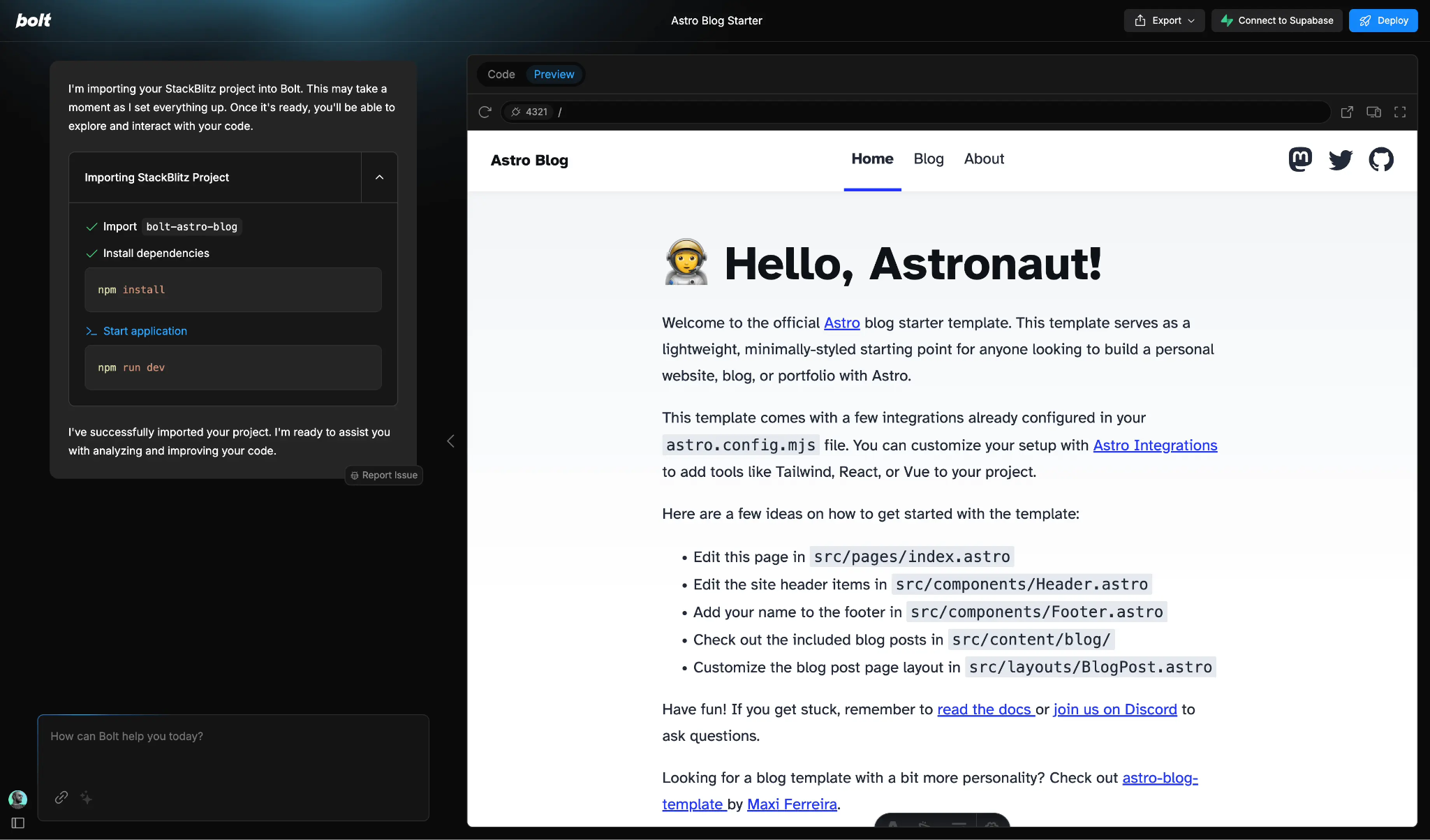
Both npm commands run in-browser via WebContainers — nothing installed locally.
Bolt.new turns a plain English description into a running, deployable full-stack web application entirely in the browser. Built on StackBlitz's WebContainers technology, it provides a complete development environment - package installation, testing and one-click deploy - without touching a local machine. It also supports Figma imports, making it the only tool on this list that bridges design files and working code in a single step.
- Prompt-to-app: describe what you want and receive a running application
- Full-stack support: frontend, backend and database in a single browser tab
- One-click deployment: no server configuration or hosting setup
- Figma import: generate a working app directly from a design file
Pricing: Free tier. Pro $20/mo. Team plans available.
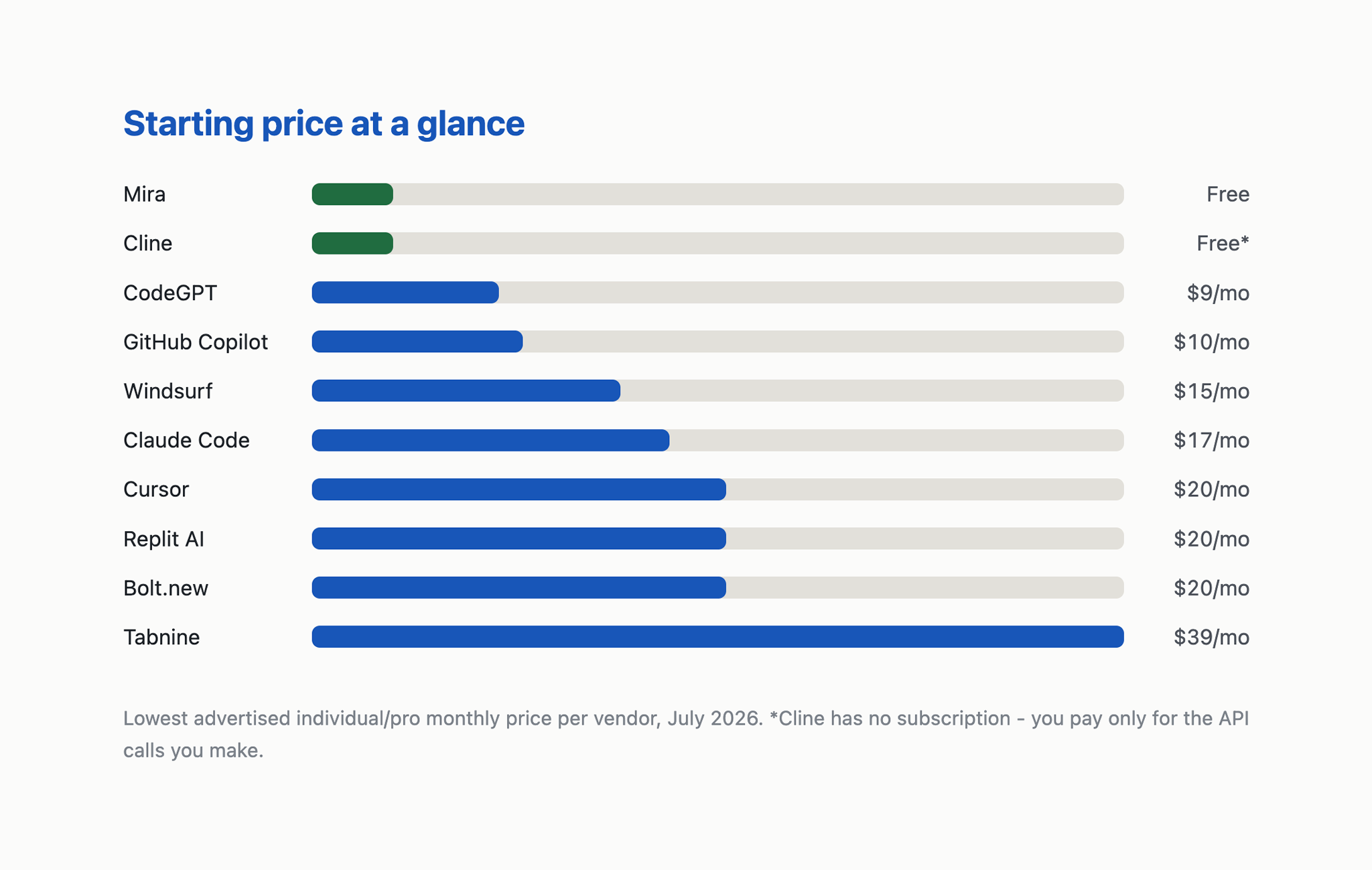
The spread is tighter than it looks — seven of ten land between $9 and $20/mo. The real variance is what you pay on top: Cline's API bill, Claude Code's $100 Max tier, Replit's $95 Pro.
Best free AI coding assistants in 2026
The best free AI coding assistant depends on what you mean by free. Here is what each option actually gives you at no cost.
How to choose the right AI coding assistant
The right tool is the one that removes friction from how you already work - not the one with the most features. Use these five decision points:
- Editor integration vs standalone. If you spend most of your time in VS Code or JetBrains and don't want to change your setup, start with GitHub Copilot (plugin) or Claude Code (terminal alongside your editor). If you're open to switching, Cursor and Windsurf offer the deepest AI-native experience.
- Autocomplete vs agentic delegation. For fast completions while typing, GitHub Copilot and Tabnine excel. For delegating a full feature, refactor or debugging session, use Cursor agent mode, Claude Code or Cline.
- Privacy and deployment requirements. If code cannot leave your infrastructure, Tabnine is the only enterprise-grade self-hosted option. For individual privacy, Cline's BYOK keeps your code within your own API provider agreement.
- Budget constraints. Free: Cline (BYOK), GitHub Copilot (student/OSS), Mira in Telegram. Best value paid: CodeGPT, Windsurf. Enterprise: Tabnine, GitHub Copilot Enterprise.
- No editor required. If you need coding help between tasks, on mobile, or while your editor is closed, Mira is the only tool on this list that works directly inside Telegram without any setup.
🟢 Prompt to copy - find the right AI coding tool for your workflow
→ Works with ChatGPT, Claude, Gemini - or send to @MiraAgentBot in Telegram
Using Mira as an AI coding assistant in Telegram
Every tool on this list assumes you're at a desk with an editor open. Mira covers the scenario they all miss: when the editor is closed, you're on your phone, or you just need a quick answer inside an existing conversation.
As a Telegram AI bot powered by Claude, Mira delivers the same reasoning quality as Claude Code through a chat interface. Search @MiraAgentBot in Telegram - no download, no configuration, free to start.
Three scenarios where Mira fills a gap no editor-based tool can:
- Pre-meeting code review on mobile: paste a function directly into the chat: "review this for edge cases and security issues." Get a structured response before the call starts.
- Architecture question in a team thread: add Mira to a group chat - ask it to evaluate two database schema designs mid-conversation, without anyone opening a separate tool.
- Coding on the go: write a regex pattern, a SQL query or a small utility function while commuting. When you're back at your desk, paste the result directly into your editor.
🟢 Prompt to copy - quick code review via Mira in Telegram
→ Send to @MiraAgentBot in Telegram - works on mobile, no editor required
Try Mira
Open @MiraAgentBot in Telegram or visit t.me/mira - free to start, no installation.
Summary
AI coding assistants in 2026 span a wide spectrum. GitHub Copilot and Cursor lead for editor-first development. Claude Code and Cline win for agentic terminal workflows. Tabnine is the call for enterprise privacy. Mira - available as a Telegram bot - covers the gap every other tool misses: fast, Claude-powered coding help without leaving your messenger.
The best AI coding assistant is the one that removes friction from your real workflow - not the one with the longest feature list.
Try Mira in Telegram - free, no setup required
Open @MiraAgentBot or visit t.me/mira to start a coding conversation without installing anything.