Top Voice AI Tools for Business and Everyday Tasks in 2026
An AI voice assistant turns spoken instructions into action. You talk, it understands what you mean and completes the task: booking meetings, drafting replies, pulling reports, or updating your workflow.
In 2026, however, that label covers three very different types of tools. The right choice depends on one simple question: where does your voice input come from? For some people, an AI voice assistant means Siri answering questions on a phone. For others, it is a system that handles a company’s incoming calls. It can also mean an agent that works inside chats, turning voice messages into finished work.
These tools solve different problems, and the "best" one is whichever fits your input.
What is an AI voice assistant?
An AI voice assistant is software that turns speech into text, understands what you mean, and responds in writing or out loud. That is the basic definition. More capable assistants can also connect to other tools, remember earlier context, and complete tasks on your behalf without making you repeat the same information.
The word “conversational” matters. Older voice systems depended on specific commands and rigid menus. A conversational AI voice assistant understands natural language, maintains context across a discussion, asks follow-up questions, and adapts when a request changes. Large language models made this shift from issuing fixed commands to having an actual back-and-forth possible.
The three types of AI voice assistant
AI voice assistants fall into three groups, and most confusion comes from treating them as one. Here's the split.
- Consumer assistants: Siri, Google Assistant, and Alexa handle everyday queries and device control, including reminders, navigation, smart-home, weather. Free, built into the hardware, general-purpose.
- Business call agents: This is what people mean by an AI phone assistant or an AI call assistant: software that answers, routes, and resolves phone calls for a business, or places outbound ones. Tools like Retell AI, Synthflow, and PolyAI sit here. They're agents for your callers, not personal assistants for you.
- Messenger assistants: Agents that live inside your chats and process the voice you send there, voice notes, not phone calls. Mira is the clearest example: send it a voice message and it transcribes, extracts the tasks, and replies in the same thread.
Where AI voice assistants save the most time in 2026
The biggest savings come from the handoff — the moment your voice becomes a task, an event, or a CRM record without you retyping anything. That's the step that usually leaks time and detail, and it's where every category below earns its keep.
- Hands-free scheduling: Say "book 30 minutes with the team Thursday afternoon" and the assistant handles the invite, the conflicts, and the reminders, no app opened.
- Voice-message processing: A voice note becomes a Notion task or a calendar event with no manual re-entry. This is the messenger assistant's home turf.
- Sales-call support: An AI sales call assistant drafts the call script, then turns the recording into a summary that updates the CRM. The dialing and the objection-handling live with the call-agent tools; the prep and the write-up are where an agent like Mira helps.
- Customer service at scale: An AI voice assistant for customer service handles repetitive tier-one questions around the clock, order status, returns, FAQs, and escalates the hard ones with a summary already attached.
- Multilingual support: A multilingual AI voice assistant answers in the sender's language automatically, with no routing to a specialist. That matters for any team with international customers.
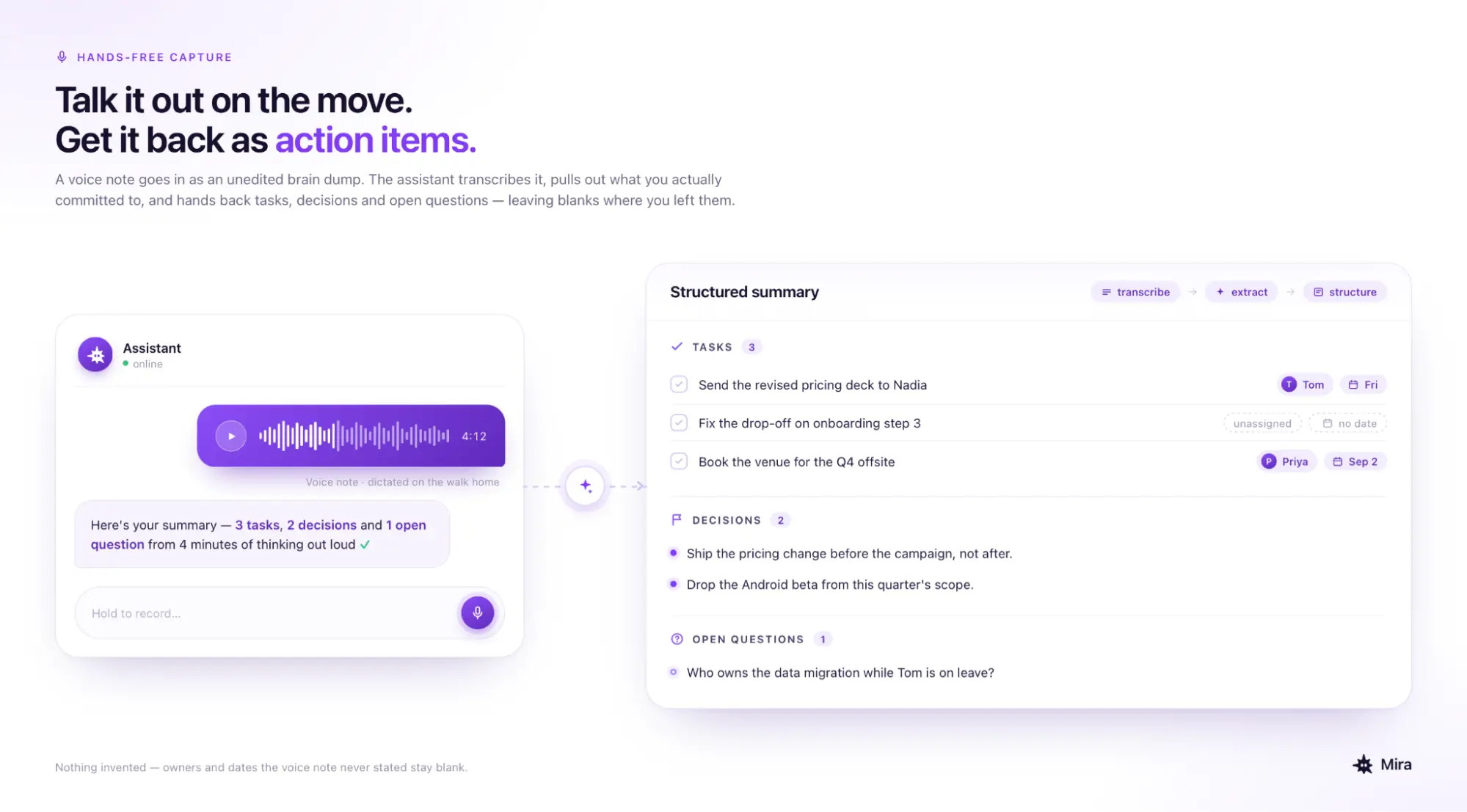
- Hands-free capture: Dictate notes or a brain-dump on the move, and the assistant structures the raw audio into action items and draft follow-ups.
The pattern across all six: the value isn't the transcription, it's what happens right after it.
🟢 Prompt — Voice note to action items
The best AI voice assistants in 2026
AI voice assistants serve different use cases: some handle phone calls, some record and summarize meetings, and others turn voice messages into completed tasks. The table compares the leading tools by input type, core function, and best use case so you can quickly identify which one fits your workflow.
The best AI voice assistant for Android in 2026 is still Google Assistant for device-level tasks. Its native OS access makes it the practical choice for calls, navigation, alarms, and phone settings.
But device control is only one use case. For processing voice messages and managing work through chats, Mira works inside the messaging apps you already use, with nothing extra to install.
Here are the best options, organized by use case.
🟢 Prompt — Meeting summary from transcript
AI voice assistant for business: where the ROI is clearest
For businesses, AI voice assistants deliver the clearest value in three areas: customer calls, hands-free documentation, and multilingual support. In each case, they reduce the work required to turn a conversation into a response, task, or usable record.
Customer service produces the most measurable results. AI call assistants can handle routine requests such as order updates, account questions, and appointment bookings, then transfer more complex cases to a human agent with the relevant context.
Documented deployments show the potential impact:
- Toyota reduced average call-handling time by 20% and call transfers by 13% while processing more than one million calls annually through an AI-enabled contact center.
- DoorDash reduced transfers to live agents by 49%, increased first-contact resolution by 12%, and reported $3 million in annual operational savings from its voice self-service system.
The value extends beyond phone support. For mobile and field-based teams, a voice assistant can capture updates, assign tasks, draft follow-ups, and update business systems without requiring employees to stop and type. More capable tools structure the spoken request, send it to the appropriate application, and confirm when the work is complete.
Multilingual voice assistants can respond in a customer’s preferred language without first routing the conversation to a specialist. This gives international teams a way to support more customers while keeping human agents available for conversations that require judgment, empathy, or local expertise.
These figures are examples from individual deployments, not universal benchmarks. The actual return depends on call volume, task complexity, integration quality, and how often employees need to review or correct the AI.
Businesses should measure average handling time, first-contact resolution, escalation rate, completed tasks, transcription accuracy, and cost per interaction before and after deployment.
🟢 Prompt — Outbound call script
Free AI voice assistant options: what you actually get
Most free AI voice assistants give you a real starting point, but the limits decide whether you can build a workflow on them. The question isn't whether there's a free tier, it's what breaks when you lean on it.
For a best AI call assistant tools shortlist on a zero budget: Google Assistant covers consumer tasks, Otter.ai covers meeting transcription and Mira covers voice note processing in a messenger without any separate app install. The free ai call assistant that fits depends entirely on where your voice input comes from.
🟢 Prompt — Voice note reply draft
How to choose the right AI voice assistant for your workflow
The right AI voice assistant comes down to three questions: where your voice input comes from, what should happen after transcription, and whether it connects to the tools you already use. Answer the first one and the shortlist mostly picks itself.
- From phone calls → a business call agent for inbound support or outbound sales.
- From meetings → Otter.ai or Fireflies, for real-time transcription with speaker labels.
- From voice messages in a messenger → Mira, which processes them in the same thread.
- Need it multilingual → check whether the tool detects the language automatically or makes you set it.
- Budget is zero → Google Assistant, Siri, and Mira's free tier cover most consumer and messenger use without a card.
One thing worth checking separately: CRM integration. Tools that write to HubSpot, Salesforce, or Pipedrive right after a conversation save the manual update — which is exactly where details tend to go missing.
How Mira handles voice in your messenger
Mira turns voice messages into completed work without taking you out of the conversation. It transcribes what was said, identifies tasks and deadlines, and sends the resulting actions to your connected tools. Because the AI agent lives inside your messenger, sending a voice note becomes another way to delegate work.
The distinction is important: Mira processes voice messages, not phone calls. It does not answer calls, screen callers, or dial numbers. Instead, it understands the voice notes you and your team exchange and turns the instructions inside them into useful outputs and actions.
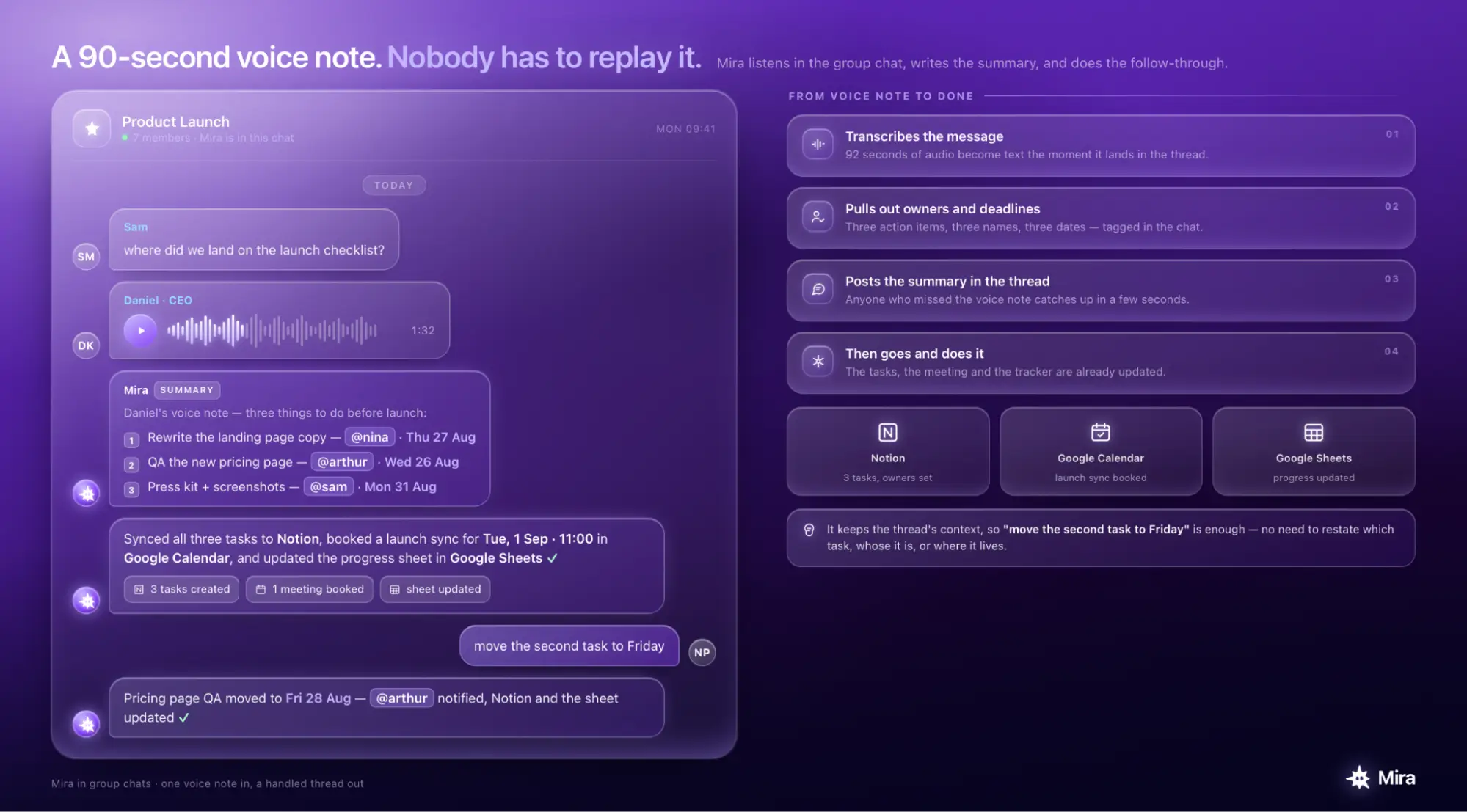
In a group chat, this means nobody has to replay a long voice message to find the important details. If someone sends a 90-second update containing three action items, Mira can transcribe it, identify the owners and deadlines, and post a clear summary in the thread. Anyone who missed the original message can catch up quickly.
Because Mira retains the context of the conversation, a follow-up such as “move the second task to Friday” can be understood without restating the entire request.
The same workflow works for individuals. You can record a stream of ideas during your commute and ask Mira to turn it into a prioritized task list, a structured brief, or a summary of what needs attention next. You can also give it a direct creative command. For example, ask it to generate an image and describe what you want, and it completes the work from that voice instruction.
🟢 Prompt — Turn a brain-dump into a plan
For CRM workflows, Mira can act where the information already lives. It connects with HubSpot, Salesforce, Pipedrive, and more than 1,000 other tools, allowing a spoken deal update to reach the correct record directly. Changes are approval-gated, so Mira asks for confirmation before writing anything to a connected system.
That is what makes Mira more than a voice transcription tool: you send the instruction as a voice message, and it turns the request into finished work.