

AI for HR uses large language models, machine learning, and AI agents to handle work such as screening candidates, answering employee questions, drafting policies, summarizing feedback, and forecasting attrition. These tools can take over much of the routine work, while HR teams remain responsible for decisions that affect someone’s pay, role, or employment.
By December 2025, 39% of organizations had adopted AI in HR, yet the vast majority of HR leaders said they still had not seen significant business value from it.
Adoption is no longer the main challenge. Results are. This guide covers where AI delivers value in HR, where it falls short, reviews the best AI tools for HR in 2026, and where Mira, a personal AI agent, fits in.
Automate routine HR work

What “AI for HR” actually means
AI for HR refers to software that helps teams create content, answer employee questions, analyze workforce data, and automate multi-step processes.
The term covers several types of technology, each with different capabilities, limitations, and levels of risk.
Generative and conversational AI are generally easier to control because a human can review the output before it affects an employee.
Predictive ML carries greater risk because scoring or ranking people can produce biased outcomes, even when that was not the intention.
AI agents are the newest category. Because they can take actions across multiple tools, teams need to define what requires approval and what happens when the agent makes a mistake before switching one on.
12 ways HR teams use AI right now
These are the applications with real deployments behind them, ordered roughly by how many teams have them running. Each one has a failure mode worth knowing before you start.
1. Recruiting and sourcing
AI recruiting tools draft job descriptions, write boolean search strings, screen resumes against criteria and rank candidates by fit. This is the most mature use case in HR by a wide margin.
Unilever cut time-to-hire by roughly 75% using machine learning screening, and SHRM reports companies using AI in recruiting have reduced cost-per-hire by 30%.
Failure mode: the model learns from your past hiring decisions, including the biased ones. If your historical data says successful engineers came from four schools, the ranking will quietly reproduce that. This is also the use case regulators are watching most closely.
AI prompts to use today:
2. Interview logistics
AI can handle the administrative work around interviews, including scheduling, rescheduling, reminders, transcription, and structured scorecards. It can coordinate availability across multiple calendars, send follow-ups, and turn interview notes into a consistent format for the hiring team.
Failure mode: almost none. This is the safest high-value automation in HR because nobody's employment prospects hinge on when the calendar invite went out.
AI prompts to use today:
3. Onboarding
An AI agent provides IT accounts, triggers benefits enrollment, builds a 30-60-90 plan from the role, and schedules the first week's meetings. It adapts the sequence to the hire's level, location and team rather than sending everyone the same PDF.
Failure mode: access provisioning that runs without a check can grant permissions nobody intended. Put an approval gate on anything touching systems.
AI prompts to use today:
4. Offboarding
Access revocation, exit survey distribution, asset return tracking, final-pay checklists. Offboarding is more automatable than onboarding because the steps are near-identical every time.
Failure mode: revoking access on a schedule rather than a confirmed last day. Tie the trigger to an HRIS field, not a date someone typed.
AI prompts to use today:
5. Employee support and the HR service desk
An AI HR chatbot answers policy, leave, payroll and benefits questions from your own documentation, 24/7, and escalates what it can't handle. Tier-1 HR tickets are repetitive enough that deflection rates of 40–60% are realistic.
Failure mode: hallucinated policy answers. Insist on retrieval-based answering that cites the source document, and make the citation visible to the employee. A confident wrong answer about parental leave is worse than no answer.
AI prompts to use today:
6. Policy and document work
Handbook rewrites, plain-language summaries of dense policies, acknowledgement forms, template letters. This is where generative AI tools are unambiguously good. AI takes a 40-page handbook and produces the two-paragraph version employees will actually read.
Failure mode: compliance drift. AI doesn't know your jurisdiction's employment law and will produce plausible language that's wrong for your state. Legal reviews anything that becomes official.
AI prompts to use today:
7. Performance management
Synthesizing feedback from multiple sources, drafting review text from a manager's notes, preparing calibration summaries, flagging vague or non-specific feedback.
Failure mode: managers submitting AI-drafted reviews they didn't actually think about. The tool should make managers faster at articulating a judgment they've formed, not substitute for forming one.
AI prompts to use today:
8. Learning and development
Personalized learning paths, skills gap mapping, course content generation, adaptive curricula. This is the second-most-adopted use case at 43% of AI-using organizations.
Failure mode: generating volume nobody completes. Recommending twelve courses to someone who finished none last quarter isn't personalization.
AI prompts to use today:
9. People analytics
Attrition prediction, engagement sentiment analysis, compensation benchmarking, open-text survey summarization. Summarizing 3,000 free-text survey responses into themes is genuinely hard for humans and easy for a model.
Failure mode: treating an attrition score as a fact about a person. Use it to prompt a conversation, never as an input to a decision about them.
AI prompts to use today:
10. Workforce planning and scheduling
Demand forecasting, shift optimization, headcount modeling. In shift-based industries this produces the most direct cost saving of anything on this list.
Failure mode: optimizing purely for cost produces schedules that burn people out and raise turnover. Constrain the model with fairness rules, not just labor targets.
AI prompts to use today:
11. Internal mobility and succession
Matching employees to open internal roles by skill, suggesting career paths, pairing mentors. This one is underused relative to its value, most companies have better candidates inside than in their applicant pool.
Failure mode: incomplete skills data. The model can only match on what's recorded, and most HRIS skill fields are years stale.
AI prompts to use today:
12. HR communication and meeting follow-through
Summarizing hiring panel discussions, extracting decisions and action items from threads, tracking who committed to what, chasing follow-ups.
HR teams reportedly spend up to 60% of their time on coordination — handoffs, status chasing, reconciling data between systems, rather than on the work itself.
Failure mode: a summary that loses the dissent. If three interviewers disagreed, the summary needs to say so, not average it out.
AI prompts to use today:
Notice how many of these are coordination rather than judgment. That's the pattern: AI is currently much better at moving work between people than at deciding anything about them.
What to automate and what to keep human
The dividing line is consequence: automate HR tasks that move work along, keep humans on anything that changes a person's pay, status or employment.
This isn't only an ethics position. It's increasingly what the law requires, which is the next section.
Best AI tools for HR in 2026
There's no single best AI tool for HR, because the software splits into six categories that solve different problems.
The useful first question is whether you need AI inside your system of record or on top of it.
Pricing below is what vendors publish or what buyers commonly report. Most enterprise HR software is quoted, not listed. Verify before budgeting.
All-in-one HRIS with AI built in
These are your system of record first and AI tools second, which is the right order of priorities but means the AI is rarely the best available.
- Workday: The enterprise default, with Illuminate embedding AI across payroll, talent and analytics. Expensive, long implementation, custom pricing.
- Rippling: Strongest at unifying HR, IT and finance data, which makes its automation more useful than most because it can act across all three.
- BambooHR: Built for SMBs and genuinely easy to run. Advanced features are limited and add-ons accumulate.
- Gusto: Around $40/month plus per-user pricing, best for small teams that want payroll and HR in one place. Gets expensive at scale.
- UKG: Roughly $27–37 per employee/month, strong on workforce management. Complex to implement.
- SAP SuccessFactors and Paycor: Comprehensive and scalable, both with real learning curves and custom enterprise pricing.
AI Recruiting tools and ATS
This is where AI is most mature and most regulated. Every tool on the list needs the bias-audit conversation from the compliance section.
- Greenhouse: Best for structured hiring and interview consistency, which also happens to be the best defense against bias claims. Demo-gated pricing.
- Lever: Combines CRM and ATS well for teams that source proactively. Overkill under about 50 hires a year.
- iCIMS: Enterprise-scale hiring, starting around $1,700/month. Complex interface.
- JazzHR: Around $75/month plus $9 per job — the most accessible option for small teams, limited to recruiting.
- Eightfold AI and Phenom: AI-native talent intelligence for matching, internal mobility and scheduling at scale.
- Paradox (Olivia): Conversational hiring for high-volume hourly roles, where scheduling is the actual bottleneck.
Performance, engagement and analytics
- Lattice: About $11 per seat/month, well-designed review and goal cycles. Not an HRIS replacement.
- 15Five: Around $16 per user/month, focused on continuous feedback rather than annual reviews.
- Visier and ChartHop: People analytics across disconnected systems — the category to look at if your data lives in six places.
- Leena AI and Moveworks: Agentic HR service desks that resolve employee requests end-to-end rather than routing them.
General-purpose AI assistants HR uses daily
This is the category most HR teams actually spend time in, and it's usually the cheapest line on the list. ChatGPT, Claude, Copilot and Gemini all handle drafting, summarizing and analysis well, and differ mainly in which suite they're already embedded in.
How Mira can streamline your HR operations
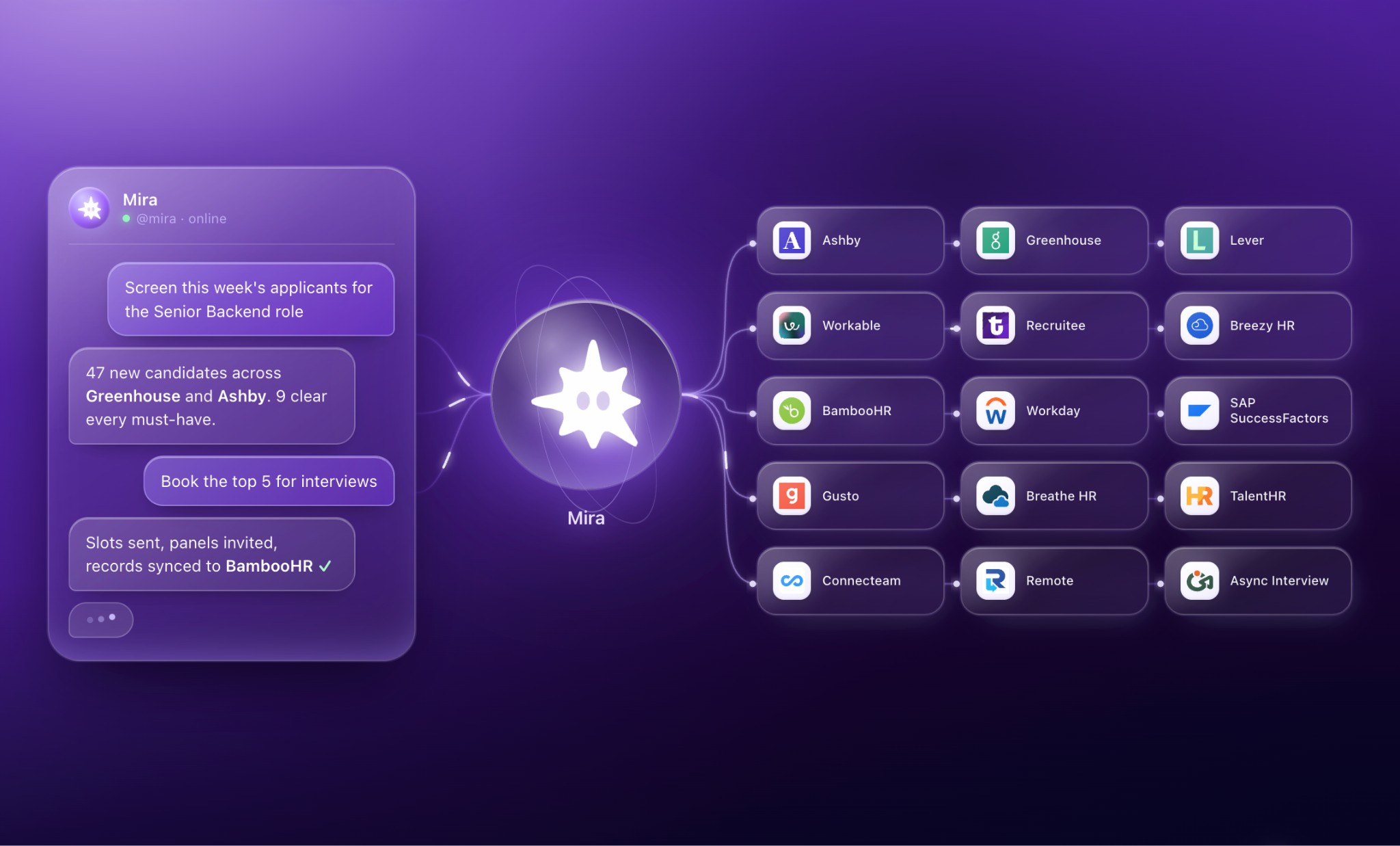
Mira is an AI agent that lives in your messenger and executes tasks rather than just answering questions.
It connects to your ATS, your HRIS and the rest of your stack, so the work in the use cases above (drafting, chasing, summarizing, updating records) happens in the chat you're already in.
- Recruiting pipeline: Connect Greenhouse, Ashby, Lever, Workable, Breezy HR or Recruitee and ask for the state of a role, move a candidate to the next stage, or draft and send the rejection without opening the ATS.
- Employee records and payroll: With BambooHR, Gusto, TalentHR, Workday or SAP SuccessFactors connected, it answers leave and benefits questions from the system of record and pulls the numbers for a headcount or turnover report.
- Drafting: Job descriptions, policy rewrites, interview scorecards, review drafts, every prompt in this article runs in the same chat, with your company context already in memory.
- Email and scheduling: Gmail and Google Calendar for candidate updates, offer follow-ups and interview invites – sent, not handed back to you to send.
- Hiring panel threads: Add Mira to a group chat and it tracks who said what about a candidate, extracts the decision, and chases the interviewer who hasn't submitted feedback.
- Analysis: Point it at survey exports or pipeline data in Google Sheets and it returns themes, patterns and a summary you can send on.
- Recurring work: Weekly pipeline summaries, probation review prompts and document deadlines run on a schedule, without building a workflow.
Mira connects to 1,000+ apps in total, including Notion, Slack, Jira and Google Drive alongside the HR tools above, and it holds memory across conversations so you're not re-explaining your org, your policies or your hiring process every time.
How to roll out AI in HR without joining the failing majority
Pick one high-volume, low-risk workflow and measure it before you touch it. Nearly every failed HR AI project skipped one of those two steps.
- Pick one workflow, not a strategy. Interview scheduling, policy Q&A or survey summarization are good first choices – high volume, low consequence, easy to measure. Resume screening is a bad first choice despite being the obvious one, because it carries the most legal weight.
- Baseline the metric first. Record the current numbers for two to four weeks before the pilot. Without it you'll be arguing about whether it worked instead of knowing.
- Write the AI usage policy before the pilot. It takes an afternoon and it's much harder to introduce after people have already formed habits with the tool.
- Redesign the workflow around the model. If the AI drafts the review, the manager's step changes from writing to editing and judging. Say that explicitly, or they'll do both and it'll take longer than before.
- Train for the four adoption personas. Skeptics need to see a use case work, reluctant users need a low-risk task, explorers need permission to experiment, and champions need something to lead. One training session for all four groups reaches one of them.
- Measure and re-audit quarterly. Check both the efficiency metric and the fairness metric. Models drift, and the second number is the one that turns into a legal problem if nobody's watching it.
What to measure
Track the guardrail metric from day one. It's the one that matters when something goes wrong, and it's useless if you start collecting it afterwards.